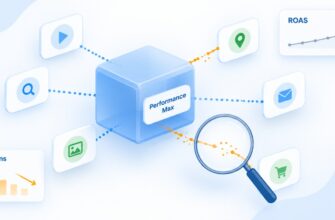
Performance Max is a tool powered by machine learning and artificial intelligence. The more “freedom” you give it, the more actively it will search for paths to conversions.
These paths intersect with those where customers already find you independently—brand search helps them. At first glance, this creates a paradoxical situation: you pay Google for traffic that could have come organically or through a separate search campaign.
But is this a problem? If so, how can you solve it without harming campaigns that are already generating sales? Let’s examine this in more detail.
How exactly does PMax “absorb” brand traffic?
Traffic cannibalization in Performance Max occurs when Google’s algorithm decides that showing a PMax ad for a query containing your brand name will be more effective than passing the query to a search campaign or organic search. Technically, this is not an error but a feature of how the system works.
Performance Max comprehensively analyzes user intent. It sees the words in the search query and the entire user journey: visited websites, items added to cart, content viewed on YouTube. When a user enters “buy [Your brand],” PMax interprets this as a high-intent query with a likely conversion—and eagerly takes it.
Previously, Google officially stated that search campaigns would receive priority in this case. In practice, this did not always work. In 2024, the policy was revised: now keywords with exact match have the highest priority, while search themes in PMax are equated to phrase and broad match.
For example, if a search campaign contains a keyword that exactly matches the user’s query—the search campaign wins. In all other cases, everything depends on the ad rank.
Important: PMax attributes brand search conversions to itself through data-driven attribution. This means that if a customer was already ready to purchase, the system may record the sale as its own “achievement,” and you will see impressive numbers in your dashboard that do not actually reflect the real value of the campaign.
Is “cannibalization” of traffic really a problem for business?
Not everything is as straightforward as it seems at first glance. There are types of business where the majority of sales come from brand queries. Loyal audience, complex product, specific niche. People come for a specific brand, which is perfectly normal.
But if 80% of sales come from brand products, while any other traffic does not convert or does so with minimal probability, a problem arises—the audience may run out. Scaling will become impossible. Generating additional demand is not just an opportunity, but a necessity.
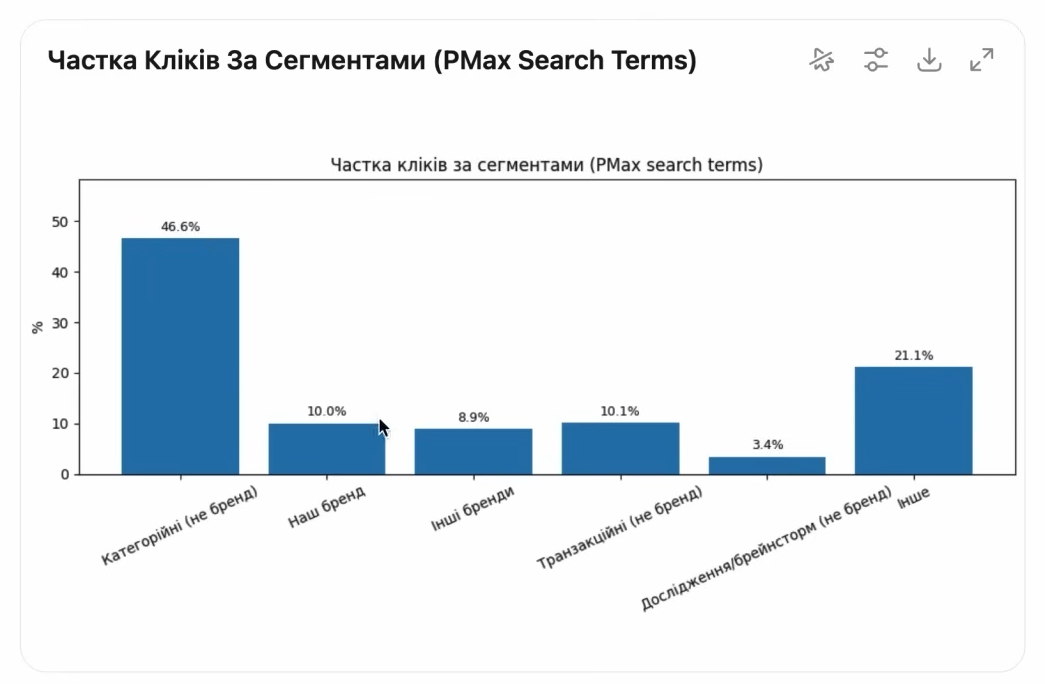
Here is an example from a real account. Analysis of search queries over a period showed the following distribution:
- category non-brand queries—46–50% of clicks;
- our brand—about 10% of clicks;
- other brands (competitors)—about 10%;
- transactional non-brand (“buy,” “price,” “order”)—10%;
- research and brainstorming queries—3–4%;
- others—21%.
The share of conversions is different: almost half are category queries, 20% are brand queries, 7.9% are transactional, 18.7% are others. In this case, 20% of brand conversions is not a disaster, but a normal indicator determined by how a person makes a purchase decision.
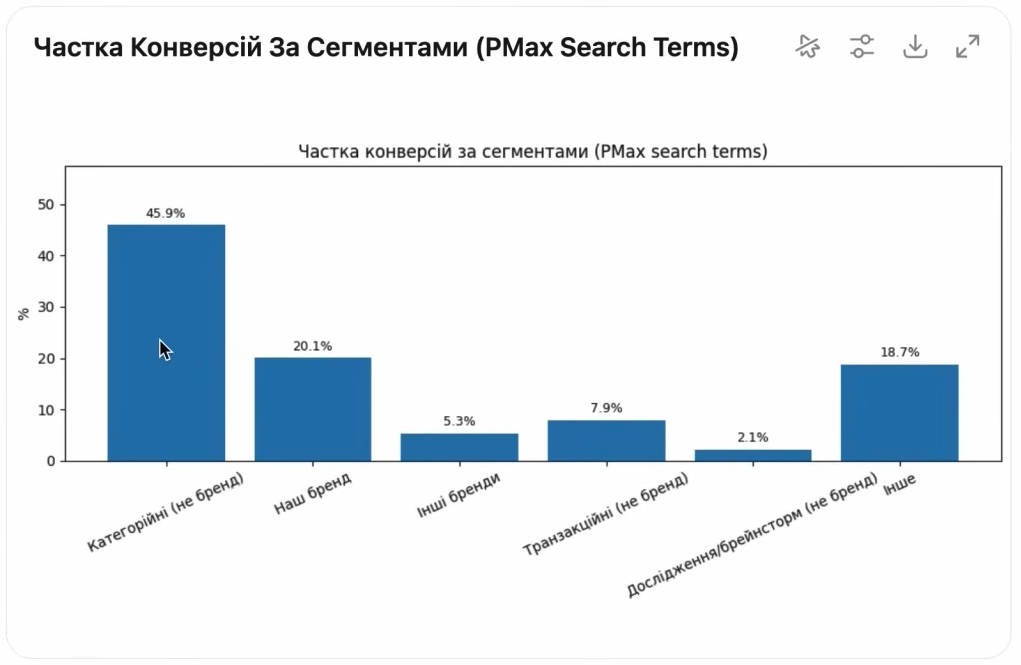
Attention! If your brand brings 35–40% of conversions—it’s time to think. This may indicate that PMax is unable to attract new audiences, and you are paying for traffic that already belongs to you. If the share is lower—cannibalization is within normal limits, and there is no need to rush to reduce it.
How to check how much brand traffic comes from Performance Max?
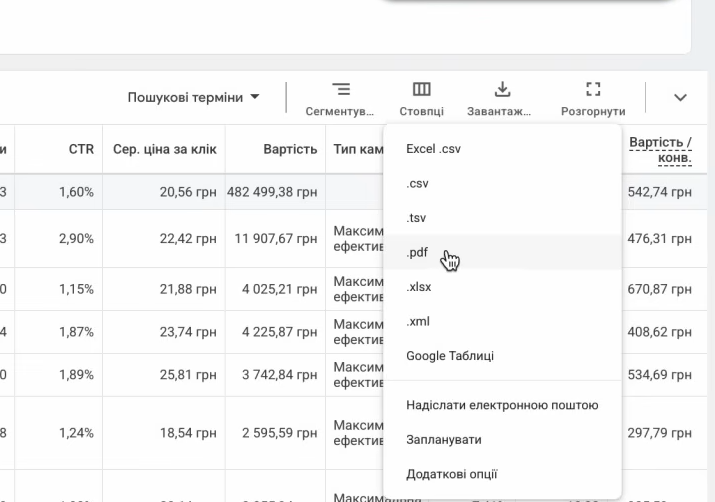
The logic is simple: you don’t make decisions blindly, but rely on data from your dashboard. To do this:
- Go to the Google Ads panel, select the “Campaigns” section—and filter by type “Maximum performance.”
- Select the desired campaigns. Go to the Search Terms Insights tab—a tool that Google specifically implemented for PMax, since you won’t find regular search queries there.
- Select the analysis period. I would recommend taking at least 30 days—on shorter intervals, the statistics will be unrepresentative.
- Download the data in XLSX or CSV format. If the account is large—the file will be substantial, and manually processing it will be difficult.
- Upload to ChatGPT (or an alternative AI service) and request basic segmentation. The query might sound something like this: “I have a file with search queries from Google Ads. Group them by categories: brand queries (my brand—name), competitor brands—list, category non-brand, transactional (buy, price, order), informational (how, what is, reviews), etc. Create charts showing distribution by number of clicks, spend, and conversions.”
Honestly, the analysis takes literally 5–10 minutes. And the conclusions from it are invaluable. You will see where there are scaling points, imbalances, or underutilized resources.
Suppose it turns out that informational queries (“how to use the product,” “how to service the purchased item”) bring 3–4% of clicks and 2% of conversions, but have an attractive cost per conversion. This is a signal that it is worth launching a separate campaign or setting up targeting for these queries.
What is the difference between “negative keywords” and brand exclusion?
This is where the confusion begins. Many think that simply adding a word to a blacklist is enough to exclude the brand.
The exclusion list is a separate mechanism. You create brands and add them to the campaign. Google pulls them from its database, so recently appeared brands may not appear immediately—indexing takes time.
Negative keywords are a classic mechanism. You manually specify word forms, possible spelling variations (Cyrillic, Latin, with errors, without spaces, etc.), and Google uses exact matching.
Important! The brand list works at the entity recognition level, while negative keywords work at the exact text matching level. For greater reliability, it is better to use both tools together.
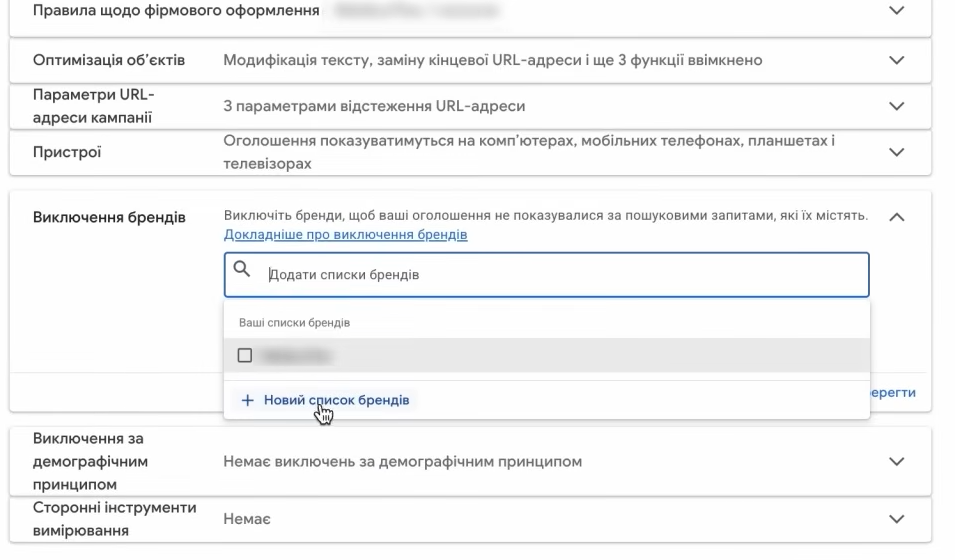
How to set up a brand exclusion list?
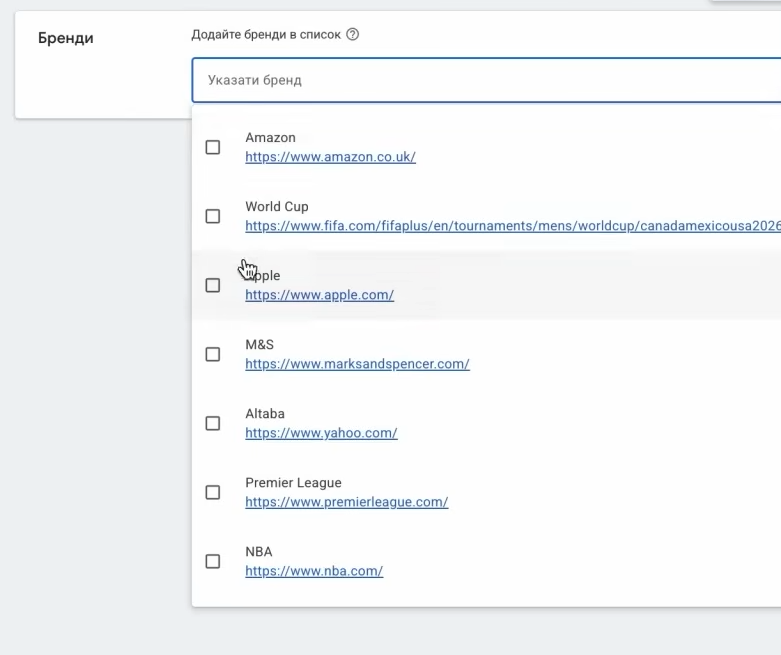
The entire process will take literally a minute. Go to the desired campaign—in the settings menu, find the “Brand exclusion” block. Click “Add new list,” give it a name (for example, “Competitors 2026”), and start entering brands.
Google will suggest options—when entering “Apple,” the system will offer the official version to add. If the brand is not in the database—you need to wait for the system to add it. This can take from several days to weeks. Don’t panic if you don’t find it right away.
The finished list can be reused—this is convenient when you have several PMax campaigns and need to quickly set up exclusions.
How to exclude brand queries from PMax using negative keywords?
The second method—negative keywords. You can add them in several ways:
- At the campaign level—go to the specific campaign, open the “Keywords” menu, go to the “Negative keywords” section. Add a list or connect an existing one.
- At the account level—account-level negative keywords apply to all campaigns. This is useful if you have many campaigns and want to exclude the brand globally.
- Through support—previously this was the only way to add negative keywords. Now this feature is available directly, but if something doesn’t work—support is always ready to help.
Now the most important part—how to compile the list. It is important to specify not just the brand name in one variant. These are all possible ways of writing it.
Suppose your brand is “Siryi Kit” (Grey Cat). What needs to be added:
- siryi kit, siryogo kota, siryomu kotu, sirym kotom—in all cases;
- siry kit, siryi kit, sirykit—Latin alphabet variations;
- siriyskyi kit, sirij kot—typical errors and phrases;
- sometimes people write with apostrophes, hyphens, or lowercase letters—add those too.
If the brand is written in Latin—consider variations with and without space, with typographical errors, with “y” instead of “i,” replacing “o” with “0,” and so on. Yes, this is tedious, but this is exactly what brings results.
Important! In some accounts, we noticed that even after adding negative keywords and the Brand Exclusion list, PMax continued to show for the brand. If you have the same situation, submit a request to Google Ads support. As a rule, they quickly help resolve such errors.
Intersection of brand queries between campaigns: how to set priorities?
The question of search campaign priority over PMax is one of the most relevant in 2024–2026. Google’s algorithm determines which campaign wins the auction based on four levels:
- If the keyword in the search campaign exactly matches the user’s query, it automatically wins.
- If there is no exact match—the system compares phrase/broad match keywords with Search Themes in PMax. Here they are equal.
- The relevance of the query context is considered.
- Under equal conditions, the campaign with the higher ad rank wins (combination of bid, quality, and expected CTR).
What does this mean in practice? If you want to guaranteed win the auction for your brand—add brand keywords with exact match to a separate campaign. And simultaneously exclude them from PMax. Then brand traffic will go where it is cheaper to obtain.
This is how practically all large online stores operate: a separate brand campaign with low bids (since there is little competition) + Brand Exclusion in all PMax campaigns. The savings on CPC can be colossal—sometimes 5-10 times.
Can brand traffic be completely excluded from PMax?
I recommend approaching this question carefully. Don’t disable the brand immediately in all campaigns—this can lead to a drop in sales without any visible reason.
The best way is to conduct a controlled experiment. Create two identical shopping campaigns (Standard Shopping) for the same product. In the first—exclude the brand in all possible variations, in the second—leave everything as is. Slightly adjust bids so that the campaigns are in equal conditions. Run them for 2-3 weeks. See what the statistics show.
Why Google Shopping and not PMax? Because in Performance Max the experiment will be “impure”: you won’t be able to control which specific placements and channels received the traffic.
An alternative option—use the experiments feature in Google Ads. Create a copy of the PMax campaign, completely exclude the brand from the copy, and see how conversion, ROAS, CPC, and CTR change. Google will automatically split traffic evenly between the two versions.
Tip! There is no such thing as a “one-click” purchase cycle. Often the decision is made after 6-20 touchpoints with the brand. A linear test model may show nothing—especially if you have a long sales cycle (B2B, complex products, expensive purchases). Plan at least a month for the test.
Attribution of conversions in Performance Max: what to pay attention to?
Another tricky topic. PMax often attributes brand search conversions to itself—and you see a beautiful ROAS in reports. But this is not always the campaign’s real contribution.
What to do? Look at attribution not by last interaction, but at associated conversions. In Google Ads, this can be seen in the “Attribution” section. If PMax brings mostly “last-click” conversions by brand, but few associated ones—this is a signal that the campaign is intercepting ready buyers rather than attracting new ones.
It is useful to simultaneously analyze data from Google Analytics 4. Create a segment of users who came through PMax and track their journey. If most of them previously came from organic search or direct traffic—you are dealing with cannibalization, not real attraction of new customers.
Figures for Ukraine: a click on a brand in Google Ads can cost from 2-5 UAH for little-known brands and up to 15-30 UAH for popular ones where there is competitive advertising. If PMax “takes” this traffic—you pay this money twice, since you could have gotten the click cheaper through a separate search ad.
When should you NOT exclude brand traffic from PMax?
Not everyone knows, but sometimes brand traffic in Performance Max performs an important function—it feeds the machine learning system. The algorithm uses conversion data from all channels to form look-alike audiences and find new segments.
Disabling the brand means depriving the system of part of the signals. If you have:
- a small number of conversions overall (less than 30 per month);
- the campaign preparation period has not yet passed (1-1.5 months);
- the brand brings less than 20% of conversions in the structure.
In all these cases, I would not rush to exclude. It is better to focus on the quality of audience signals, creatives in the ad group resources, and feed optimization in Merchant Center.
If you have your own brands in 10-20 product categories, and people searching for these categories periodically visit your site from Google—this is perfectly normal. Excluding such traffic can completely fail category campaigns that depend on multiple user interactions with the brand.
AI Max and new control opportunities in 2026
It is worth separately mentioning AI Max—an update for search campaigns that Google has been actively implementing since 2025. This is not an analog of Performance Max, but rather an “overlay” on search campaigns that uses more AI for expanding keyword matching and dynamic headline generation.
In the context of brand traffic, AI Max can also become a source of problems—it can expand queries in non-standard ways. Therefore, if you enable AI Max in a search campaign, be sure to check the search query report in a week or two. This will allow you to timely detect whether the campaign is starting to encroach on other brands or “eat” your own organic traffic.
Overall, 2026 has provided advertisers with more control tools: negative keywords at the PMax level, brand exclusion, experiments, more detailed reporting on placements. Use them. PMax in its current form is no longer a “black box,” but a manageable tool from which you can squeeze the maximum if you spend more time on setup.
Excluding brand traffic is not a dogma, but a tool. Sometimes it saves the budget, sometimes—it collapses conversions. It all depends on your business structure and purchase cycle. Conduct analysis, test, and don’t be afraid to experiment—this is a case where practice gives far more answers than theory.