Google Search Advertising
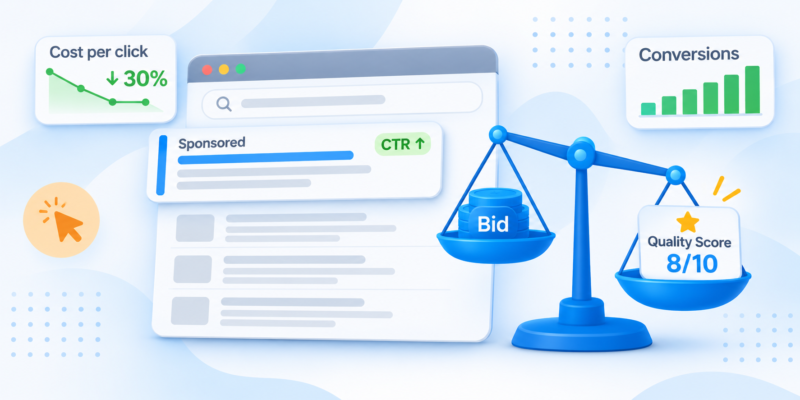
A person types “construction debris removal price” — and a second later sees several offers with prices and phone numbers. There’s no need to convince them of the service’s benefits: they came with a task and are ready to pay. Google search advertising works with existing demand, which is why inquiries often appear on the day of launch, not six months later, like in SEO.
Below, we will break down the rules of the auction, what the cost per click depends on, how to set up a campaign step by step, and what changed with the arrival of AI Max.
What is search advertising and where is it shown?

Search advertising consists of text ads that Google shows in response to a specific search query. They look almost like regular results: a headline, a link, a couple of lines of description, just marked as “Sponsored” (or “Ad”). They are placed above and below the organic search results. The top block fits up to four ads—and they collect the bulk of the clicks.
The launch is done through Google Ads (the service’s old name is Google AdWords), and in the Russian-language interface, it is labeled as “Google Реклама”. Three names, one dashboard.
The main difference from banners and videos is user intent. Compare: “which laptop to choose for studying” and “buy Lenovo IdeaPad 5 Kyiv”. The first person is researching the topic, the second is choosing a store. Search engine advertising allows you to show your ad specifically to the latter—and you pay for the visit, while impressions are free.
Impressions are also possible on Google’s search partners—on third-party resources with a built-in search bar. Clicks from them are cheaper, but their quality is inconsistent: you should look at the statistics of this network in a separate segment.
Advantages of Google search advertising
Speed is the primary reason this format is valued. Ad moderation usually takes up to one business day, after which the website is immediately shown above organic results. SEO for the same queries would require months of work.
Let’s say a clinic opened a new branch in Pozniaky on Monday. By Tuesday, search advertising is already generating appointments from local residents. For launching a new location, a seasonal service, or a sale, this is often the deciding factor.
Other strengths:
- Hot audience. The ad is seen by a person who entered the query themselves and is looking for a contractor or a store right now.
- Flexible budget. You can start with 300–500 UAH per day and stop the ads with a single button, without contracts or minimum placement periods.
- Precise targeting. You can set the city, district, or a 3 km radius around an address, call center business hours, and device type.
- Transparent statistics. For each keyword, you can see the number of clicks, inquiries, and the cost of a single conversion—down to the hryvnia.
- Equal footing with major players. A small store can outcompete a marketplace through a relevant ad and a good landing page, rather than the size of its wallet.
- Fast hypothesis testing. A new service, a different price, a changed offer—in a week or two, it will be clear if there is demand.
By the way, Google search advertising complements organic promotion well. While a page is climbing the search rankings, paid ads cover the same queries, and conversion data suggests which keywords are worth investing in for SEO.
Attention! Fast results have a downside: if the account balance runs out, the traffic stops that very minute. There is no cumulative effect here, unlike with SEO.
How does the auction work in search campaigns?
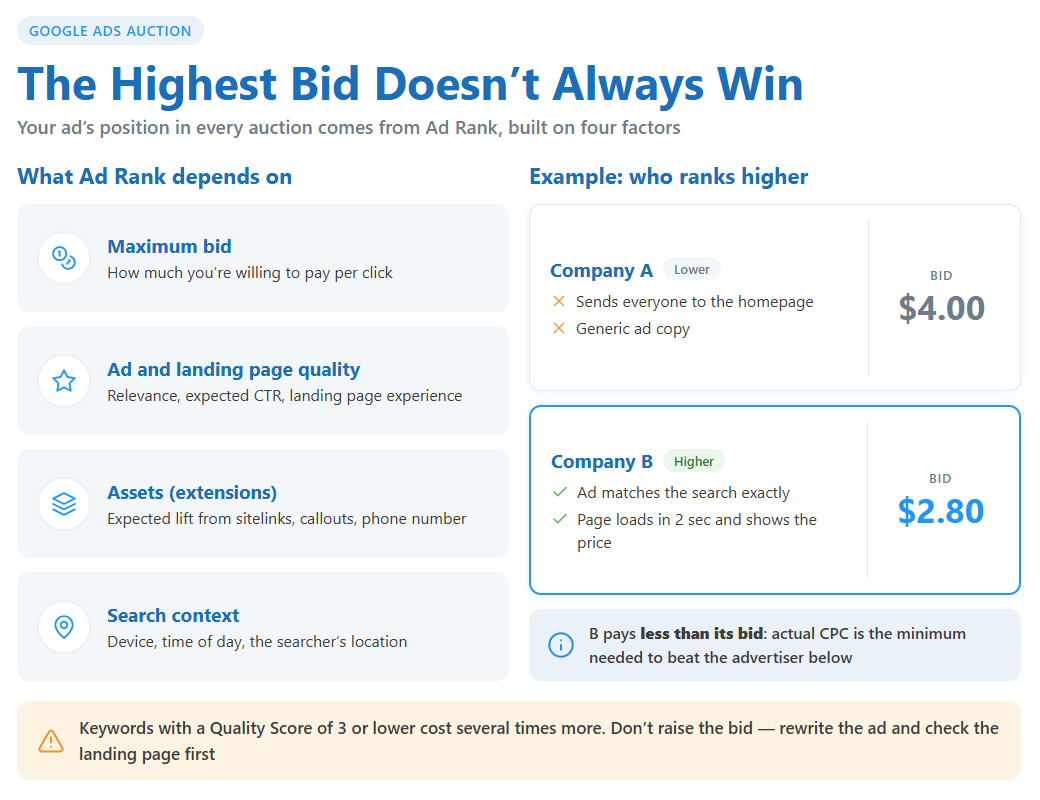
Every time someone enters a query, the search engine conducts an auction in a fraction of a second among advertisers with suitable keywords. The winner isn’t the most generous one. The system assigns a rank to each participant, which depends on four factors:
- the maximum bid amount;
- how good the ad and the landing page are;
- the expected impact from assets (extensions);
- the context of the search—device, time of day, and the person’s location.
Why is the Quality Score important?
This is a score from 1 to 10 assigned to a keyword. It includes three components: expected CTR, ad relevance to the query, and landing page experience. The number itself isn’t used in the auction; it serves as a diagnostic tool. But it immediately points out the weak spot: “below average” for CTR means a boring headline, and for the landing page—slow loading or a mismatch with the query.
Attention! Keywords with a score of 3 and below cost significantly more than neighboring ones. Do not increase the bid for them—first, rewrite the ad and check the page.
Who is search advertising for?
The format shines where demand is already formed and people search for a solution using words. It works well for:
- urgent services—tow trucks, locksmiths, at-home washing machine repair;
- medicine and beauty—dental implants, MRI, laser hair removal;
- B2B with narrow demand—cherry picker rental, wholesale supply of packaging film;
- local business—car service in Obolon, a notary near the subway;
- online stores (as a supplement to shopping campaigns).
However, for a new product without demand, search advertising will yield little: if no one is looking for the device, there is no one to show ads to. The second weak zone is cheap goods. With a margin of 60 UAH per order and a click for 9 UAH, the unit economics won’t work out even with a good conversion rate.
How does a Search campaign differ from Performance Max?
This question comes up in almost every consultation. Both campaigns are shown in search, but the management logic is different.
| Parameter | Search campaign | Performance Max |
|---|---|---|
| Where ads are shown | Google Search and search partners | Search, YouTube, Display Network, Discover, Gmail, and Maps |
| Targeting | Keywords and match types | Audience signals and search themes, decided by the algorithm |
| Control | High: queries, bids, ad copy | Limited |
| Creatives | Text | Images, videos, text, product feed |
| Minimum required at launch | Can launch without conversions | Accumulated conversions are needed |
Lawyers, clinics, construction crews—everyone who relies on leads—are better off starting with Search: every query is visible, and junk traffic is easily filtered out. A coffee machine store with a feed already uploaded to Merchant Center can launch Performance Max for its inventory, while a Google Ads Search campaign will cover branded and category queries like “coffee machine for office” or “De’Longhi espresso maker price”.
What to prepare before launching a search advertising campaign?
Half of wasted budgets are the result of skipped preparation. Setting up search advertising starts not in the dashboard, but with three things.
- Conversion tracking. GA4 and Google Ads must track form submissions, calls, purchases, and messenger messages. Otherwise, automated bidding strategies operate blindly, and you’ll never know which keyword brought the order.
- Landing page. For the query “air conditioner installation Odesa”, a person should land on the installation section, where prices and timelines are specified, not on the homepage. Check the mobile version: more than half of the clicks will come from smartphones.
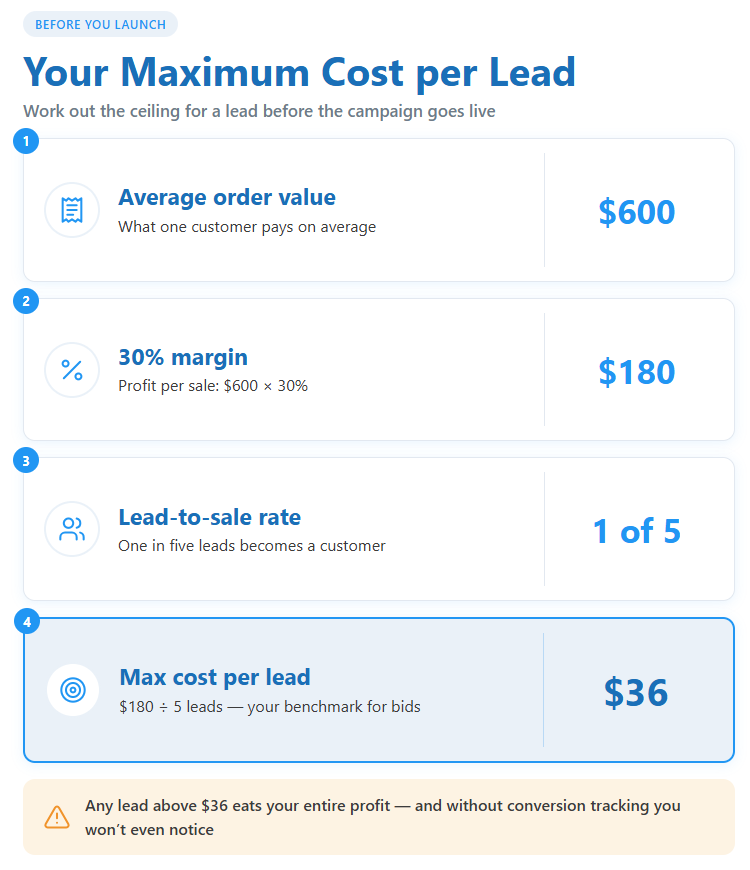
- Allowable cost per lead (CPL). It’s calculated quickly. Let’s say the average order value is 6,000 UAH, and the margin is 30%, which is 1,800 UAH. Out of five inquiries, one person buys. This means a lead more expensive than 360 UAH eats up all the profit. This number will later become a benchmark for bids.
How to set up Google search advertising?
Campaign objective and type
A campaign is created via “Create” → “Campaign”. The objective can be one of three: “Sales”, “Leads”, or “Website traffic”, and the type—”Search”. System prompts and default strategies depend on the objective, so choosing “Website traffic” to save money is a bad idea: there will be many clicks, but no leads.
Networks, location, and language targeting
First of all, uncheck the “Display Network” box, otherwise, money will flow into banners on third-party websites. It’s acceptable to leave search partners as they are—you can evaluate them in 2–3 weeks.
Under geography, open advanced location options and select “Presence” instead of “Presence or interest”. Otherwise, a pizza delivery ad in Lviv will be seen by a person in Warsaw who read news about Lviv. For Ukraine, select Ukrainian, Russian, and English: the system targets based on the browser language, not the query language.
Daily budget and bidding strategies
It sets the average amount spent per day. It sometimes happens that Google spends twice as much in a day, but over a month, it still cannot exceed the daily limit multiplied by 30.4. At 500 UAH per day, this is a maximum of 15,200 UAH.
The choice of strategy is determined by how much data has been accumulated:
- “Maximize clicks” with a max CPC bid limit—when there are no conversions yet;
- “Maximize conversions”—from 20–30 conversions per month;
- “Target CPA” (Cost Per Action)—when the cost per lead stops fluctuating;
- “Target ROAS” (Return On Ad Spend)—for stores that pass the purchase amount to the system;
- “Target impression share”—to maintain positions for brand queries.
Keyword research
The main assistant here is the Keyword Planner, located in the “Tools and settings” → “Planning” section. Enter a couple of base phrases or a website address—the service will provide search volume, competition level, and bid ranges for top of page placement.
Divide the collected list by intent. “Plastic windows price”, “order Rehau windows Dnipro”, “turnkey window installation” are commercial queries; we take them. “How to adjust a window for winter” is informational; it will generate almost no leads.
By the way, don’t chase quantity. 30–50 exact phrases at the start work better than 800 collected “just in case”.
Match types and negative keywords
Match types determine how much a search query can differ from a keyword:
- broad match (no operators)—ads may show on searches that relate to your keyword, including synonyms;
- phrase match (“refrigerator repair”)—searches that include the meaning of your keyword;
- exact match ([refrigerator repair])—searches that have the same meaning as your keyword.
Broad match provides reach, but without conversions and automated strategies, it burns money quickly. At the start with a small budget, phrase and exact matches are safer.
Negative keywords filter out irrelevant impressions. A baseline set for almost any niche includes: “free”, “DIY”, “download”, “vacancies”, “job”, “essay”, “forum”, “used”. After that, the list is replenished from the search terms report—check it weekly, and at first, even more often.
Account structure and ad groups
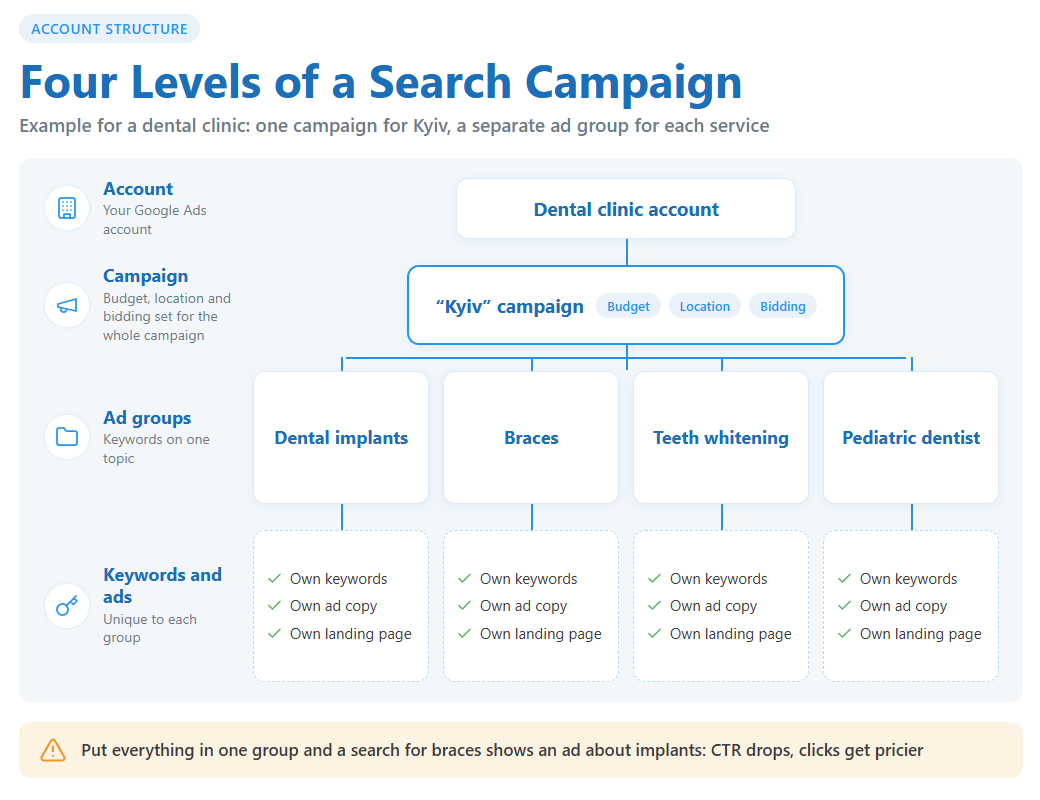
The structure consists of four levels: account → campaign → ad group → keywords and ads. The budget, geo-targeting, and strategy are set for the entire campaign, while keywords on a single topic are grouped into an ad group.
Let’s take a dental clinic. One campaign for Kyiv, with groups for “implants”, “braces”, “whitening”, “pediatric dentist” inside. Each has its own ad copy and its own landing page. If you dump everything into one group, an ad for implants will show up for a query about braces. The CTR will drop, and the cost per click will increase.
Responsive search ads
The primary format in Search. You provide up to 15 headlines (up to 30 characters each) and up to 4 descriptions (up to 90 characters), and the system combines them for a specific query, showing up to three headlines and two descriptions.
What to write in the headlines:
- the keyword phrase—in two or three variations;
- the price or its starting point: “Debris removal from 1,200 UAH”;
- timelines and terms: “We’ll arrive in 2 hours”, “Working without days off”;
- arguments against competitors: “Movers included in the price”;
- a call to action: “Calculate the price online”.
Pinning headline positions is rarely worth it—every pin narrows down the number of combinations. Keep an eye on the ad strength indicator: you need a “Good” or “Excellent” rating.
Assets (extensions)
Additional elements make the ad larger and more noticeable. The minimum set: four sitelink assets to website sections, callouts (“2-year warranty”, “Installment payments”), and a phone number. Local businesses need a location asset from their Business Profile; stores need prices and promotions. Assets are free: you only pay for the click, just like with the headline.
Set it up yourself or order search advertising services?
To be honest, launching a simple campaign using this guide is entirely possible in one evening. The DIY route is justified when there is one service, one city, a budget of up to 10,000–15,000 UAH per month, and you have a couple of hours a week for reporting.
Search advertising services from a specialist or an agency pay off in other conditions: hundreds of product categories, multiple regions, a high cost per click, and end-to-end analytics with a CRM. In those cases, a single mistake in the structure costs more than the contractor’s monthly fee.
If you decide to delegate the Google search ads setup, clarify with the contractor before signing the contract:
- whose account the dashboard is registered to (it must belong to you);
- what metrics the report is based on—leads and their cost, or clicks and impressions;
- how often the search queries are cleaned up;
- who is responsible for setting up conversions and auditing landing pages;
- what you are paying for—a one-time setup or ongoing monthly management with ad testing.
If the contractor hasn’t researched the niche yet but is already promising “first place in search” or an exact number of leads, that’s a red flag. An ad’s position is determined anew in every auction, so it is impossible to guarantee it.
What has changed in search campaigns with the introduction of AI Max?
Over the past year, search has shifted heavily towards automation. AI Max is not a new campaign type, but a set of features enabled within a regular Search campaign. There are three main ones:
- search query matching—expands reach through broad match and targeting without keywords;
- text optimization—AI generates ad copy variations based on your ads and landing page content;
- final URL expansion—the visitor is sent to the page most relevant to their query.
Starting in September 2026, campaigns using Dynamic Search Ads (DSA), automatically created assets, and broad match at the campaign level are automatically upgraded to AI Max by Google—new Dynamic Search Ads can no longer be created. Ignoring this tool is no longer an option.
However, control remains. Brand exclusions and restrictions, locations of interest at the ad group level, and URL exclusions are available. Exclude the blog, vacancies, and the “About Us” page—otherwise, the algorithm might eventually drive a paid click to a three-year-old article. A separate AI Max match type and a “Source” column have appeared in the search terms report, showing which queries the system selected.
Attention! When a campaign hits its budget limit, AI Max will be of no use. If your money only lasts until noon—first, clean up your keywords and bids.