Launching PMax is the moment when only “Target ROAS” can open the floodgates of traffic and completely shut them off. But what value should you set at the first launch? There can be many correct answers.
Let’s go step by step: how Google Ads calculates bids for ROAS, why inflated values kill a campaign before it has time to “learn,” and what formula to use for starting.
What is Target ROAS in Google Ads?
Return on Ad Spend shows how much profit each hryvnia spent on promotion generates. The metric is calculated using the formula:
ROAS = (Revenue from advertising / Advertising costs) × 100%.
And Target ROAS is a bidding strategy that is part of Smart Bidding. You specify profitability, and the system selects bids at auction to maintain the chosen value.
Important: Target ROAS is not a guarantee that you will achieve the specified profitability. It is a benchmark that determines the “ceiling” of the cost per click.
How does Google Ads AI apply Target ROAS for bid assignment?
Here, hidden logic kicks in, which is why an advertiser may not understand why a campaign isn’t spending money. The formula looks like this:
Maximum cost per click = Average check × Conversion rate ÷ tROAS
Simple example. Check — 100 UAH, conversion — 2%. Revenue — 2 UAH. If tROAS is 800%, cost per click is 25 kopecks. Now imagine that in your niche, the cost per click on an ad is 6 UAH. Guess how much traffic you’ll get with a limit of 25 kopecks? Answer: zero.
What is the break-even point (break-even ROAS) and when is it needed?
This is the point where a campaign breaks even. If profitability is higher than the specified figure, you’re in profit. Lower — you’re at a loss. The formula is simple: one divided by margin. If it’s 25% (including packaging, logistics, and order processing costs), break-even = 1 / 0.25 = 400%.
Attention! Break-even is a metric for analysis, not a number to enter in the “Target ROAS” field. These are completely different things.
For the Ukrainian market, this point is significantly higher than the profitability at which competitors operate in auctions. Set a formal break-even point — the campaign will get stuck with zero traffic.
Why can’t you set a high ROAS at the start of a Google AI campaign?
So you read in a blog: “Margin 30% — ROAS 333%.” Or: “I want to sell for 500 UAH, margin 20% — I set ROAS 2500%.” And you go to the interface. A week, two, three pass. And PMax can’t spend even one hryvnia.
This happens because of the formula mentioned earlier. With inflated Target ROAS, CPC drops to values that simply don’t pass. The system physically cannot buy an impression, and training drags on for an indefinite period.
This logic is confirmed by Google’s official position. If you’re setting up PMax for the first time and have fewer than 50 conversions per month, start with a reduced ROAS. If it’s profitable to launch advertising with ROAS 1000%, leave it at 500%. After 30 conversions, increase it.
How many conversions are needed for Target ROAS to work?
Smart Bidding doesn’t like empty accounts. To get acceptable results, sufficient information volume is necessary. tCPA works more effectively for accounts with 15-30 conversions in the last 30 days. For Target ROAS — roughly the same story, plus stable conversion value is important.
If your account has 5-10 transactions per month, using Target ROAS is almost guaranteed stagnation. Use the “Maximum value” setting without restrictions or start with “Conversions” / “Target CPA” to accumulate enough information.
Conversion benchmarks:
- less than 15 per month — we don’t use tROAS at all;
- 15-30 — you can try, but with a reduced target;
- More than 30 — we work fully with the strategy;
- 50+ — you can gradually approach desired metrics.
How to correctly calculate ROAS for Performance Max?
Let’s move to practice. I recommend calculating “Max Feasible ROAS” — this is the potential profitability where CPC remains competitive.
Formula:
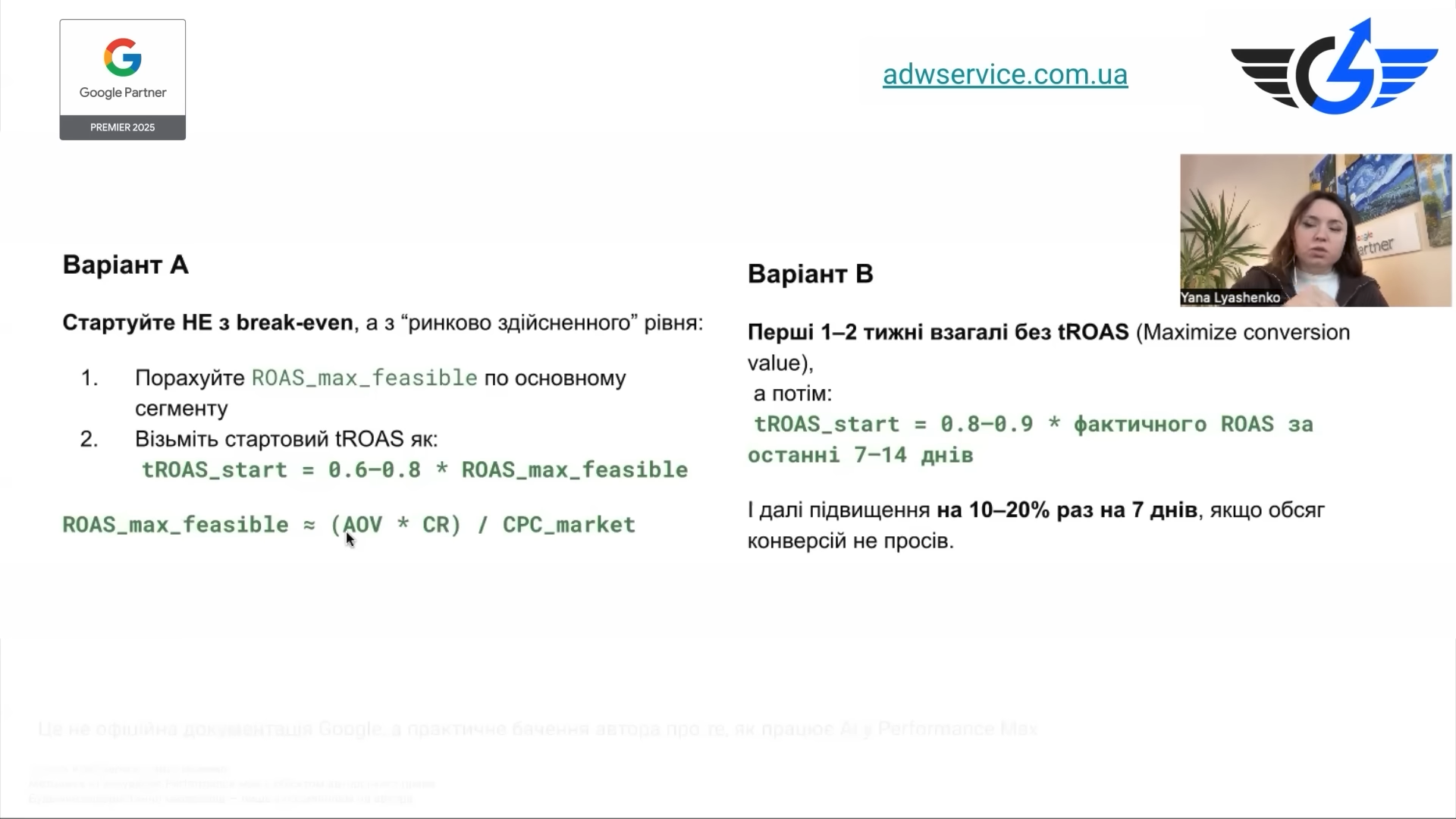
Maximum possible ROAS = (Average check × Conversion rate ÷ Market CPC) × 0.6-0.8
Check — real metric for the products you plan to sell. Conversion rate — ratio of purchases to clicks. 1% means 1 purchase per 100 clicks, 2% — 1 out of 50.
CPC — market cost per click. You’ll see it in the “Keyword Planner.” Enter main queries on the topic and look at the range. For some it will be 6, 16, 40 UAH — it’s all individual.
Alternative option: launch without specifying tROAS
If you don’t want to do calculations, start with the “Maximum value” strategy without restrictions for 1-2 weeks. The campaign will fill with information, and AI will study the audience and feed.
Then look at the obtained ROAS and multiply by 0.6-0.8. This is the starting target. Why reduced? When setting a limit, the campaign always loses volume. Give it room to grow, don’t strangle it.
Advice. This option doesn’t work if the actual ROAS is very high — around 1500% and above. In this case, the “×0.6-0.8” formula will still give an inflated value at the initial stage, and the campaign will get stuck again.
Another approach — use averaged market values. For Ukraine, ROAS within 500-600% works well for most niches in digital commerce. This isn’t a benchmark, but if there’s no time for calculations, you can start with this value and adjust along the way.
How does artificial intelligence learn with low ROAS?
Low tROAS is a command to “enter the wide auction and collect data.” The algorithm gets increased CPC, participates in an increased number of auctions, generates clicks, accumulates statistics on each query, audience, and creative.
PMax uses machine learning fueled by conversion value, micro-conversions, Merchant Center data, product feed, and audience actions. The more signals — the more accurately you can predict who should be shown ads. And to collect signals, traffic is needed. And for traffic, adequate ROAS is needed.
By the way, an important detail: the coefficient that the system uses in the CPC formula isn’t constant. It’s calculated for individual auctions. Today for a query it’s 5%, tomorrow — 3%, the day after — 0.7%. With the same ROAS, the actual cost of the target action can fluctuate.
How to gradually increase Target ROAS after launch?
Universal rule: increase tROAS by 10-20% at a time, no more than once every 10-14 days. This gives the system time to adapt without a sharp drop in performance. Raised from 400% to 480% — waited, looked at dynamics. If volume holds — continue. If it dropped 20% — go back.
What to look at when increasing:
- number of conversions;
- conversion rate;
- cost per conversion;
- impression share in auctions;
- “Average ROAS” column.
Target profitability should not exceed the same value from previous periods. To find this information, in the “Columns” dropdown menu select “Modify columns” and add “Cost” from the list. Then multiply the ratio number to cost by 100.
Why do budget constraints undermine tROAS?
Another point people forget. If the budget is limited (you allocate 200 UAH per day, but the system wants to spend 800), Target ROAS will work incorrectly. The system has no room to maneuver: it can’t gather enough information for optimization or test different bid combinations.
Make sure the campaign doesn’t exhaust the budget per day — at least in the first month. Otherwise, you risk encountering a double constraint: from above — tROAS, from below — budget. The algorithm is literally squeezed between two walls and can’t learn anything.
How are margin, ROI, and ROMI related to ROAS?
These metrics are often confused. ROAS — revenue divided by costs. ROI — return on invested capital (including product cost) and assessment of overall payback. ROMI — return on marketing investment.
ROAS of 300% with 50% margin is profitable. With 20% — you’re at a loss. Break-even ROAS is needed as a benchmark format: it’s tied to margin and allows you to assess the real financial result.
What to do if ROAS is 100% or less?
Sometimes people ask: can you start with 100% or without ROAS at all? You can — and often it’s the best solution. “Maximum conversion value” without restrictions provides the greatest freedom. This is especially useful for new accounts.
Starting a campaign with ROAS 100% (i.e., advertising generates exactly as much revenue as it spends) is worth it when you’re consciously paying for AI training. For 1-2 weeks after launch, this approach is acceptable. Then you must transition to Max Feasible or increase to more profitable values.
Honestly, I prefer the “no ROAS for 1-2 weeks + transition to calculated ROAS” option over starting with 100%. In this mode, AI works on value, not some artificial target. And you get clean data after the first cycle to work from.
How long does PMax train with reduced ROAS?
Typically, training takes about two weeks, but with Performance Max it’s longer. In practice — from 2 to 6 weeks. This depends on the number of conversions, budget, creative quality, and availability of target audience signals.
With reduced starting ROAS, training goes faster. With increased traffic, the amount of information collected by the algorithm also increases. Understanding forms faster of which search topics, audiences, and ad groups bring the desired result.
Starting benchmarks:
- with Max Feasible and standard budget — 2-3 weeks until first stable results appear;
- without restrictions with maximum value orientation — 1-2 weeks of data collection, then transition;
- with inflated values — from 4-6 weeks and often without result.
Common mistakes when choosing initial ROAS
Top mistakes I see regularly:
- The metric is set “by guess.” Just a number that “sounds good” won’t give good results.
- Copying others’ settings. Someone has profitability of 1200%? Great. But you have different initial conditions. A number from someone else’s case is meaningless without context.
- Break-even as starting target. If you set break-even, you won’t get any traffic.
- Early ROAS increase. Launched at 400%, after 4 days see profitability of 600% and think: “Aha, can increase!” No. Training isn’t finished, statistics aren’t representative.
- Ignoring micro-conversions and signals. AI learns not only on purchases. The more micro-conversions connected, the faster the algorithm reaches the needed value.
- Starting without importing offline conversions. If your sales partially happen via phone, feedback form, or CRM — without importing them, AI Max sees only part of the picture. Set up offline conversions or at least rules for their evaluation.
How does ROAS affect cost per click?
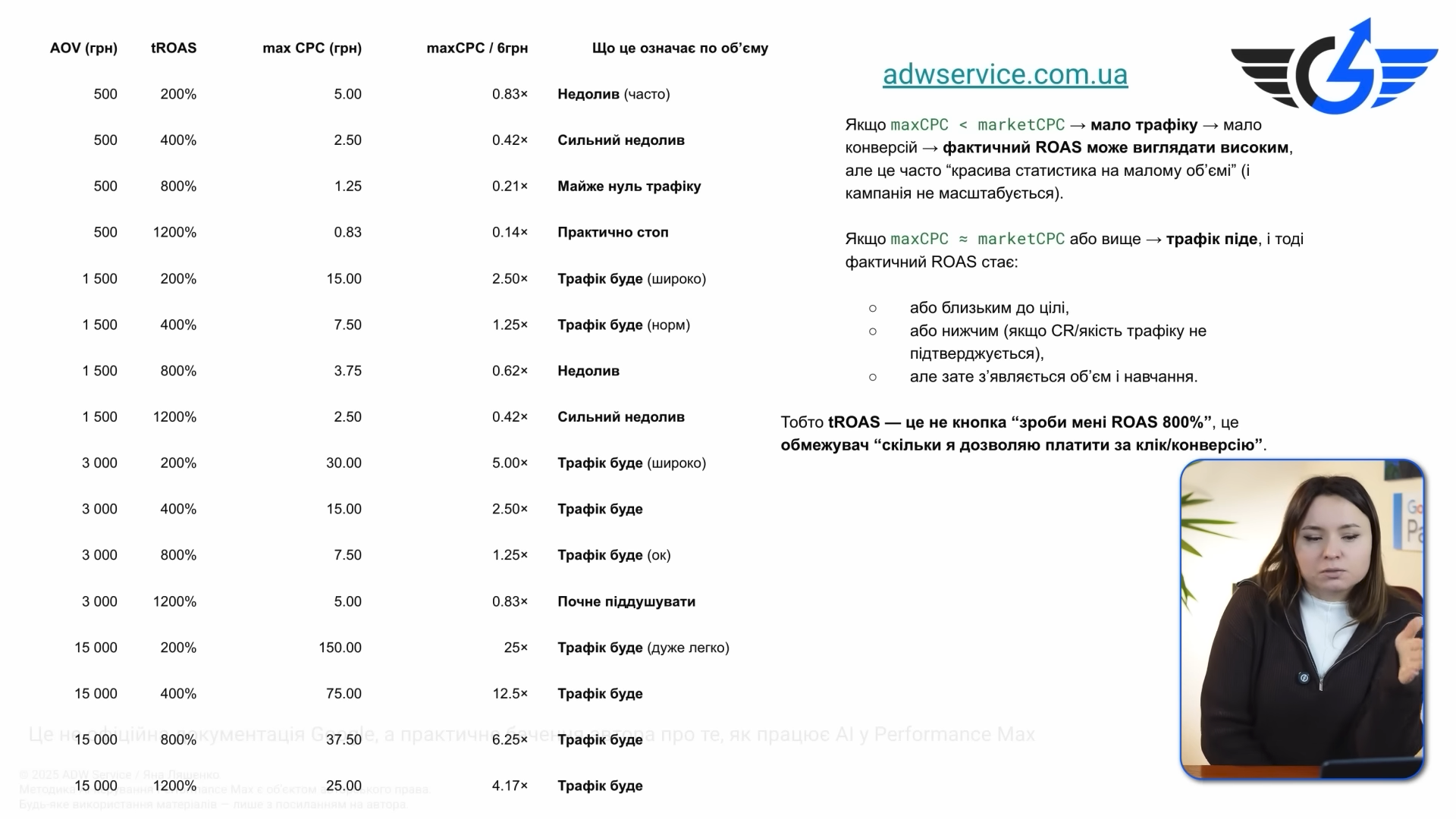
For clarity — how CPC changes depending on check and ROAS (with a 2% rate):
Average check | ROAS value | ||||
|---|---|---|---|---|---|
200 % | 400 % | 800 % | 1200 % | 2000 % | |
500 | 5 | 2.50 | 1.25 | 0.83 | 0.50 |
1 500 | 15 | 7.50 | 3.75 | 2.50 | 1.50 |
3 000 | 30 | 15 | 7.50 | 5 | 3 |
15 000 | 150 | 75 | 37.50 | 25 | 15 |
Look at these numbers and compare them with market CPC. If the “Planner” indicates average cost per click of 6 UAH, and with your set ROAS the maximum comes out to 1.25 UAH — the campaign has failed. Find such a combination of Target ROAS and average check where CPC is at least at market level or higher.
What starting ROAS to set for different business types?
For dropshipping with 3-6% margin, realistic ROAS is 1500–3000%. But in dropshipping, PMax works with difficulty: cost per click in popular niches doesn’t allow reaching a competitive bid. Here, it’s better to pay attention to Smart Shopping or work with lower margin but larger volume.
For regular e-Commerce with 25-40% margin, optimal start is 350-600%. Margin helps build in a reserve for training and experiments.
For premium products with check of 10,000+ UAH and high margin, ROAS can be 800-1200%, but only with well-configured signals.
As for leadgen in PMax, the situation is more complicated. With leadgen, campaigns can produce a lot of spam, especially in early stages. This is because, again, you can’t influence targeting, choose keywords, etc. Here, it makes sense to focus on Target CPA rather than ROAS, and use separate rules for separating leads by quality.
What to do if ROAS doesn’t bring traffic?
Launched advertising with calculated ROAS, a week passed — nothing. What to check?
First — feed and Merchant Center. If there are red warnings there or some positions aren’t approved, campaigns have nothing to show. Clean the feed, add quality photos, check information matching between the site and Merchant.
Now creatives and asset groups. In PMax, creatives and audiences aren’t just “additions,” but success factors. Low-quality photos, missing video, and bad headlines reduce ad quality and make bids less competitive.
Third — audience signals. If the asset group is launched without signals, AI takes longer to find customers. Upload Customer Match (lists of existing buyers), specify your segments by search queries.
And finally, simply reduce ROAS. Seriously. If everything else is optimized but there’s no traffic — the current ROAS isn’t helping you participate in auctions. Reduce it by 30-50% and wait. After the campaign gains momentum, return to earlier values.
Useful data sources for calculations
For those who want to calculate honestly, here’s what you’ll need:
- Google Keyword Planner — here we look at predicted cost per click for main queries. Consider the range, not the average value — yours will be different depending on bid size and ad quality.
- “Auction Insights” report in existing campaigns — shows who you’re competing with and what your traffic share is. If it’s low and position is weak — ROAS is likely inflated.
- “Conversion to cost ratio” (multiply by 100) — your actual ROAS for a specific time period. Used as a base for calculating target metric after the first cycle.
- Google Analytics 4 — where we get site conversion data, average check, user behavior. Without correctly configured e-Commerce tracking, all calculations are guesses.
- Your own profit and loss report — to know exact margin by categories. Because ROAS of 400% for one category is profit, for another — loss.