A familiar situation: your budget is being spent, you’re getting clicks, but there are almost no sales through Google Shopping — or each order is unreasonably expensive. If you recognize your campaigns or are planning to scale them, now is the time to conduct a Google Shopping audit.
This is not just a matter of checking boxes in the settings. We analyze the entire chain: from the technical characteristics of the product feed to the actual return on every hryvnia invested.
For example, sometimes the problem lies in incorrect feed attributes (e.g., missing GTIN or incorrect product category), and sometimes it lies in the fact that bids are distributed equally between top-performing and unprofitable items. A comprehensive analysis helps identify the bottleneck specific to your situation.
When should you order a Google Shopping ad audit?
A Google Shopping ad audit is not just an emergency measure when everything goes wrong. We are often approached by companies that want to reach a new level in terms of sales, but are stuck at an invisible barrier.
Here are some situations where Google Shopping ad audit services will be most beneficial:
- Results are stagnating or deteriorating. CPA is rising, ROAS is falling — even though you haven’t changed anything in your settings. This often happens when competitors increase their activity or Google’s algorithms change their priorities. An audit will show you exactly what has “broken” and how to fix it.
- Scaling does not work. You increase your budget by 30–50%, but the number of orders remains the same — the money simply “disappears.” This is a sign that the campaign has reached its ceiling in its current structure. We find segments where additional investments will actually generate growth: for example, specific categories of high-margin products or regions with low competition.
- Change of team or contractor. A new agency or in-house specialist inherits the legacy of their predecessor. In this case, an audit provides an objective starting point: you record the current state of affairs, identify accumulated problems, and develop a clear action plan.
- Launching new lines or entering new markets. Before investing significant budgets in expanding your product range or geographic reach, make sure that the basic structure of your campaigns is working smoothly. Otherwise, mistakes will simply multiply along with the scale.
Tip: Schedule an express audit 2–3 weeks before peak season—Black Friday, New Year’s sales, or other important dates. This will save you from unpleasant surprises such as Merchant Center being blocked at a time when every hour of downtime costs tens of thousands of hryvnia.
What are the benefits of a Google Shopping account audit?
When you work with campaigns every day, your view becomes blurred. An in-house specialist or agency may not notice problems that have been accumulating for months. A Google Shopping advertising account audit provides a fresh perspective and allows you to see what escapes your usual attention.
Here are the specific results you get:
- Budget savings and increased return on investment. We identify “leaks” — irrelevant search queries that drain your budget, or products with high costs and zero conversions. For example, a recent audit revealed that 23% of the budget was spent on queries containing the word “free.” After adding negative keywords, the budget was reallocated to best-selling items, and ROAS increased by 40% in the first month.
- Expanding your target audience reach. Minor technical errors in Merchant Center—incorrect price formatting, missing shipping attributes, outdated images—can lead to product listings being rejected or downgraded. Correcting these “minor details” can restore dozens, and sometimes hundreds, of listings that were previously not visible to buyers.
- Clear logic instead of a “black box.” After the audit, you will no longer have to guess why your campaign is performing the way it is. We explain how Google’s algorithms allocate your budget, why some products get more impressions while others get almost none, and how to influence this. All this is based on your real data, not abstract theory.
- A ready-made scaling plan. We don’t stop at diagnostics. You get a step-by-step roadmap: what types of campaigns to add (for example, Performance Max for certain categories), how to segment products by margin, what bids to adjust, and how to increase your market share in your niche.
What does the Google Ads campaign audit service include?
Our task is not just to compile a list of errors, but to provide you with a ready-made action plan with priorities. Upon completion of the Google product campaign audit, you will receive a detailed report and a step-by-step roadmap for making corrections. Next, we will take a closer look at the main stages of the work.
Диагностика Google Merchant Center
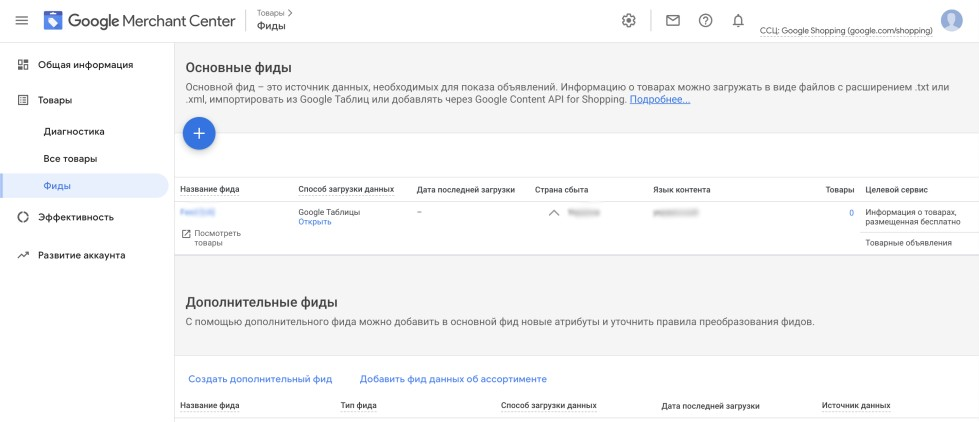
We begin every audit with Merchant Center, as this is where the foundation for product advertising is laid. If there are issues at this level, further campaign optimization becomes pointless: you will be improving something that is fundamentally flawed. That is why we thoroughly check the data source and ensure that Google correctly “sees” your product range.
At this stage, we analyze:
- Status of product items. We provide a comprehensive report on rejected and restricted products. In practice, it often turns out that 10–20% of the product range is blocked due to seemingly minor issues: unsuitable image formats, missing mandatory attributes, or descriptions that do not meet Google’s requirements. All this time, the business is simply not visible for a significant part of its catalog.
- Synchronization of data between the website and the feed. We check how quickly prices and stock levels are updated. Imagine: the product already costs 1,400 UAH on the website, but the advertisement still shows the old price of 1,200 UAH. The user clicks, sees a different amount, and leaves. You paid for the click, but all you got was a disappointed visitor. We identify such delays and help eliminate them.
- Completeness of attribute filling. We pay special attention to GTIN (barcodes), MPN (manufacturer part numbers), and categories. Products without this data receive lower priority in search results and sometimes do not participate in auctions for competitive queries at all.
Important! Advertisers often underestimate the impact of image quality. Watermarks, advertising text over photos, frames, or collages can all lead to pessimization or rejection of the product. We check each image for compliance with Google’s requirements and provide specific recommendations for improvement.
Analysis of campaign structure and segmentation
One of the most common mistakes is to upload your entire product range into a single campaign and hope that the algorithms will figure it out themselves. In practice, this takes away your control: the budget is distributed randomly, rather than where it will bring the maximum return.
That’s why, as part of our Google Shopping ad campaign audits, we take a detailed look at the segmentation logic and assess how rationally funds are being spent across product groups. Here’s what we look at first:
- Division by margin. Products with a 50% markup and products with a 10% markup should not compete for the same budget. Let’s say you have an online electronics store: smartphones bring in $800 in profit per sale, and cases for them bring in $40. If they are in the same campaign, the algorithm may get “carried away” with cheap clicks on accessories, and expensive items will not be shown. We check whether it makes sense to separate high-margin products into separate campaigns with more aggressive ROAS targets.
- Categorical logic. Products with different decision-making cycles require different approaches. People spend weeks choosing a laptop, comparing specifications, but buy a charger for it in five minutes. If these items are mixed together, cheap impulse purchases often eat into the budget, leaving no resources for promoting expensive flagship products.
- Seasonality. Winter jackets in June or garden furniture in January are obvious examples. But there are also less obvious cases: for example, school supplies, which continue to drain the budget in October, even though peak demand is long gone. We analyze whether off-season items are “stealing” resources from the current assortment.
A typical scenario we see during audits: a budget of 2,000–3,000 UAH per day is spread thinly across thousands of products. As a result, no single item receives enough data for optimization, and bestsellers get lost among the outsiders. In such cases, we propose a new, more divided structure — with separate campaigns for priority categories — so that sales leaders finally get the budget they deserve.
Cleaning search queries and working with negative keywords
Google’s algorithms are becoming increasingly sophisticated, but they are not perfect. Without regular monitoring, a significant portion of your budget may be spent on clicks from people who will never buy anything. That’s why, when auditing Google Shopping ads, we carefully study search query reports — that’s where the “holes” through which money leaks are hidden.
Our work with semantics includes:
- Identifying irrelevant queries. You sell new household appliances, but your ads are shown for queries such as “refrigerator repair,” “used washing machine,” or “vacuum cleaner parts.” Such clicks will not lead to sales, but your budget will be depleted. We find such patterns and create lists of negative keywords to block them.
- Cutting off information traffic. Requests containing words such as “instructions,” “how to do it yourself,” “photos,” “reviews,” and “comparison” often mean that the person is only researching the topic and is not ready to buy. For an online store, such traffic is a waste of money. We analyze what percentage of the budget is spent on such queries and help minimize it.
- Analysis of competitors’ brand queries. Sometimes Google displays your products under other brands’ names. If a user is specifically searching for a particular competitor, the likelihood of conversion is minimal—they will simply scroll past your ad. We assess whether it is worth spending your budget on such traffic or whether it is better to exclude it.
Performance Max is a special case. In these campaigns, direct control over search queries is limited, but there are still opportunities. We create negative keyword lists at the account level, and in complex cases, we help compose a request to Google support to add exceptions. This allows us to significantly reduce the cost of attracting orders, even in automated campaigns.
Commodity feed quality assessment
Google algorithms “read” your feed as instructions: what to show, to whom, and for which queries. If these instructions are sloppy—with vague headlines, empty fields, or irrelevant descriptions—your ads will either be shown less often than they could be, or they will reach the wrong audience.
That’s why when auditing Google Shopping campaigns, we pay special attention to titles — they’re the first thing that both the algorithm and the buyer see:
- Structure and formula. Check whether the title complies with the recommended format: Product type + Brand + Model + Key features. For example, instead of “Nike sneakers,” it should be “Nike Air Max 90 men’s sneakers, black, size 42.” This title covers more search queries and gives the user the information they need right away.
- Word order and mobile display. On smartphones, headlines are often truncated after 50–70 characters. If the most important information—the product type or brand—is at the end, the user simply won’t see it. We analyze whether the priorities in each headline are set correctly.
- Relevance to key queries. We compare the wording in the feed with how real buyers search for your products. Sometimes the headline says “sports shoes for running,” but 80% of the audience types in “running shoes.” This mismatch reduces impressions and clickability.
An important detail for the Ukrainian market! We always check the availability and quality of Ukrainian-language feeds. Many advertisers lose a significant share of traffic simply because their products are only available in Russian, while part of the audience searches in Ukrainian. If localization is missing or has been done using machine translation with errors, we point this out and provide recommendations for improvement.
Review of bidding and budget strategies
At this stage, we move on to a detailed analysis of the figures. Has the right automatic strategy been chosen? Does the campaign have enough “fuel” to run? We check:
- Realistic target ROAS. If you set a target return on ad spend of 800% when the actual figures are around 250%, the algorithm will simply stop showing ads — it will not be able to find auctions that match unrealistic expectations. We analyze historical data and help you find the right balance: the goal should be ambitious but achievable so that the campaign gets enough traffic while remaining profitable.
- Is there a lack of funds? We identify campaigns with the status “Budget limited” — this means that the system could bring in more conversions, but it lacks funds. Sometimes adding 500–700 UAH to the daily limit of a successful campaign results in a 20–30% increase in orders. The money is right there for the taking — you just need to grab it.
- Strategy alignment with data volume. The Target Profitability strategy requires a minimum of 15–20 conversions per month to function correctly. If a campaign only has 5–7 orders, the algorithm does not have enough data to learn and starts to “guess.” In such cases, we recommend temporarily switching to “Maximum clicks” or manual bid management until enough statistics have been accumulated.
Commodity audit
Overall campaign statistics represent the average temperature across the hospital. Good average indicators often hide individual products that drag the entire account down. Therefore, a Google Shopping audit must include an analysis of performance at the level of each product ID.
We segment the entire range into efficiency groups and look for two categories of problematic items:
- Money-losing products. These are items that actively drain the budget — sometimes exceeding their own margin by 2–3 times — but do not generate orders. For example, a product with a margin of $200 spent $600 and generated zero sales. For such items, we suggest a specific tactic: lower bids, move them to a separate campaign with strict control, check the competitiveness of prices on the website, or temporarily stop impressions.
- Zombie products. Products that are in stock and correctly uploaded to the feed, but for some reason are not being displayed at all. There are various reasons for this: too low a bid, high internal competition with other items in the catalog, weak title. We develop a “resuscitation” strategy — for example, we move such products to a separate campaign with minimum bids in order to collect cheap traffic and obtain initial data on demand.
Cost of auditing an advertising campaign on Google Shopping
We understand that a local online store with a hundred items and a large marketplace with tens of thousands of products are two different things. Therefore, the price of a Google Shopping audit depends on the amount of data in the account and the depth of immersion.

To begin with, we always recommend a basic check—it quickly identifies key problem areas and shows where money is being lost right now. If the basic check is not enough (for example, you have a complex campaign structure, multiple language versions of your website, or a wide sales geography), we move on to the extended format.
For your convenience, we have divided our services into three packages:
- Basic audit ($270). Comprehensive analysis of all key criteria: Merchant Center technical settings, feed quality, bidding strategies, campaign structure. You receive a detailed report with specific growth points and correction priorities.
- Advanced. Everything included in the basic package plus a detailed video analysis. Our specialist records a video that clearly shows each error found directly in your account interface: what is wrong, why it is a problem, and how to fix it. This format is especially convenient if the audit is needed to transfer work to a new contractor or to train a team.
- Expert. Maximum immersion. In addition to the report and video, you receive an hour-long personal consultation with a leading specialist. During this consultation, you can ask any questions, discuss non-standard situations, and work together to develop an advertising strategy for the coming months.
The final cost of advanced packages is influenced by the number of active campaigns and product items, the number of language versions of the feed, the breadth of targeting geography, and the volume of historical data for analysis. Write to us — we will evaluate your account and give you an exact price within one business day.