Search advertising is one of the most predictable channels for e-commerce and services. But there’s a nuance: click costs quickly eat up your promotional budget if you don’t understand what needs to be done and, more importantly, how to influence it.
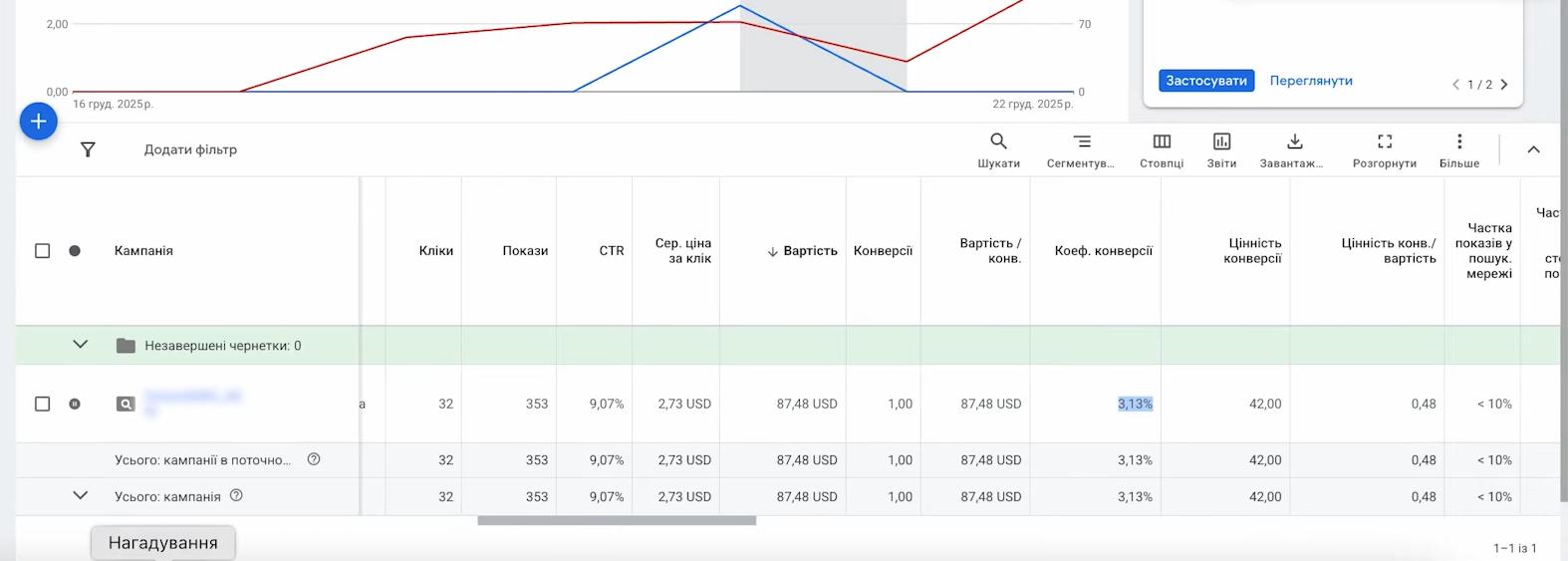
Picture this: a campaign has been running for 6 days, covering the USA, nearly $87 spent — and just one single purchase. Conversion rate is decent, 3.13%. But ROI is one. Sound familiar?
Let’s discuss how to lower the cost per click, why “raising the bid” has no effect, and what actually keeps CPA at a high level.
What is CPC and how is it formed in Google Ads search?
Cost per click is the amount you pay for a user clicking on your ad. In search advertising, this amount is not fixed; it’s formed through an auction principle. Every time a query is entered into the search bar, the system decides in fractions of a second whose ad to show first, second, third — and at what price to the advertiser.
It’s important to distinguish between two metrics:
- Maximum CPC — the bid you set manually (or that is determined by an automated strategy). The conditional “ceiling” of funds that Google can charge at a time.
- Actual CPC — the real amount charged for a click. Usually lower than the maximum, since the auction takes the minimum amount needed to outbid the nearest competitor.
Attention! A price below $0.01 (or 1 kopeck) is technically impossible in Google Ads. Even in the cheapest niches, there is a lower limit.
Simple example. If the maximum CPC is 5 UAH, and weak competitors with a bid of 1.80 UAH are nearby in the auction, the system will charge you about 1.90 UAH. The rest stays in your wallet.
What factors affect the cost per click in search advertising?
This is where it gets interesting. The bid is just one factor. The actual CPC is influenced by a whole range of variables:
- Competition in the niche. The more advertisers competing for a query, the higher the starting bid.
- Quality Score of the keyword — a rating from 1 to 10.
- Relevance to the search query.
- Expected CTR — the probability that users will click on the ad.
- Quality of the landing page: loading speed, user experience.
- Geography, device type, time of day.
- Campaign type and bidding strategy.
- Ad extensions and formats (adaptive texts, RSA).
Suppose you sell laboratory microscopes. There are 4-5 serious competitors in the niche. Your QS = 4, a competitor’s = 9. If you set a higher bid than theirs, Google might still show theirs first, while charging you more for a worse position. Simply because the algorithm prefers quality advertising.
How do CPC and conversion rate affect the cost per conversion?
Here’s what you need to understand: lowering CPC in isolation from conversion rate is a dead end. CPA is formed by these two metrics combined.
The formula is simple: CPA = (CPC × number of clicks per conversion).
Let me show you with an example. Suppose the average bid is $2.73. Let’s see how CPA changes at different conversion rates:
- 1% — requires 100 clicks per purchase, CPA = $273;
- 3.13% — requires ~32 clicks, CPA = $87;
- 6% — requires ~16 clicks, CPA = $43.68.
See the difference? Conversion doubled — CPA dropped without any changes. Now imagine the reverse situation: same bid, but conversion dropped from 3% to 1%. The budget goes nowhere.
The conclusion is obvious, but often ignored: the task is not to “lower the bid,” but to properly manage the ratio of CPC to conversion rate. It’s more profitable to pay more per click if traffic converts at 9-10%, than to save on cheap but useless traffic.
What is Quality Score and why is it the key to cheap clicks?
Quality Score is a rating from 1 to 10 assigned by Google to each keyword. It consists of three components: expected CTR, relevance, and landing page quality. Each component is assigned a status of “Below average,” “Average,” or “Above average.”
The ad rating in the auction is calculated by multiplying Quality Score by the bid. The higher your QS, the less you pay.
Numbers from practice. Increasing the quality score by one point on average lowers CPC by about 17%. And the difference between QS = 4 and QS = 10 can give a discount of up to 50%.
This isn’t a marketing fairy tale, it’s math. Google is interested in showing relevant ads, so it rewards those who make them quality.
How to improve this metric? Work with these three components separately. In Google Ads, you can add columns with the status for each of them:
- “Below average” next to expected CTR — the ad is boring, rewrite the headlines and add specific data (prices, promotions, benefits).
- Problem with relevance — the keyword doesn’t match the ad text. Move it to a separate group or change the creative.
- Landing page difficulties — check loading speed, relevance, and mobile version. Sometimes the quality score on the landing page is the best indicator of how Google evaluates it.
Important! Quality Score is based on exact match queries from the last 90 days. If a keyword has fewer than 10,000 impressions, the rating may be understated simply due to lack of data.
Why should you break ad groups into thematic clusters?
Account structure is the foundation. If a group contains keywords like “buy sneakers,” “Nike running sneakers,” “children’s canvas shoes,” and “women’s platform sneakers,” no single ad will be relevant for all of them.
The correct logic is:
- Campaigns — breakdown by main product or service categories;
- Groups — narrow thematic clusters within a campaign;
- In each — relevant keywords and ads where these words are clearly reflected in the headlines.
Example for an online shoe store. Campaign “Running Sneakers” → two groups: “Men’s Running Sneakers” and “Women’s Running Sneakers.” In each — 5-10 close keywords and RSA where the first headline contains the exact query phrase. Under this scheme, CTR rises on its own, and CPA can drop by 20-25%.
Life hack. If one keyword brings most conversions, move it to a separate group (SKAG approach). Then you can write ads targeted specifically at it and achieve maximum QS.
How to properly work with keywords?
What queries you track affects both CTR and conversion rate. The classic funnel looks something like this:
- Informational query (“what is a microscope”);
- General commercial (“buy microscope”);
- Refined commercial query (“buy laboratory microscope”);
- Transactional with brand or model specified (“buy Levenhuk MED 40 microscope”).
The lower in the funnel — the higher the conversion, but competition is usually higher there too. Strategy depends on budget and goals.
Which match type to choose?
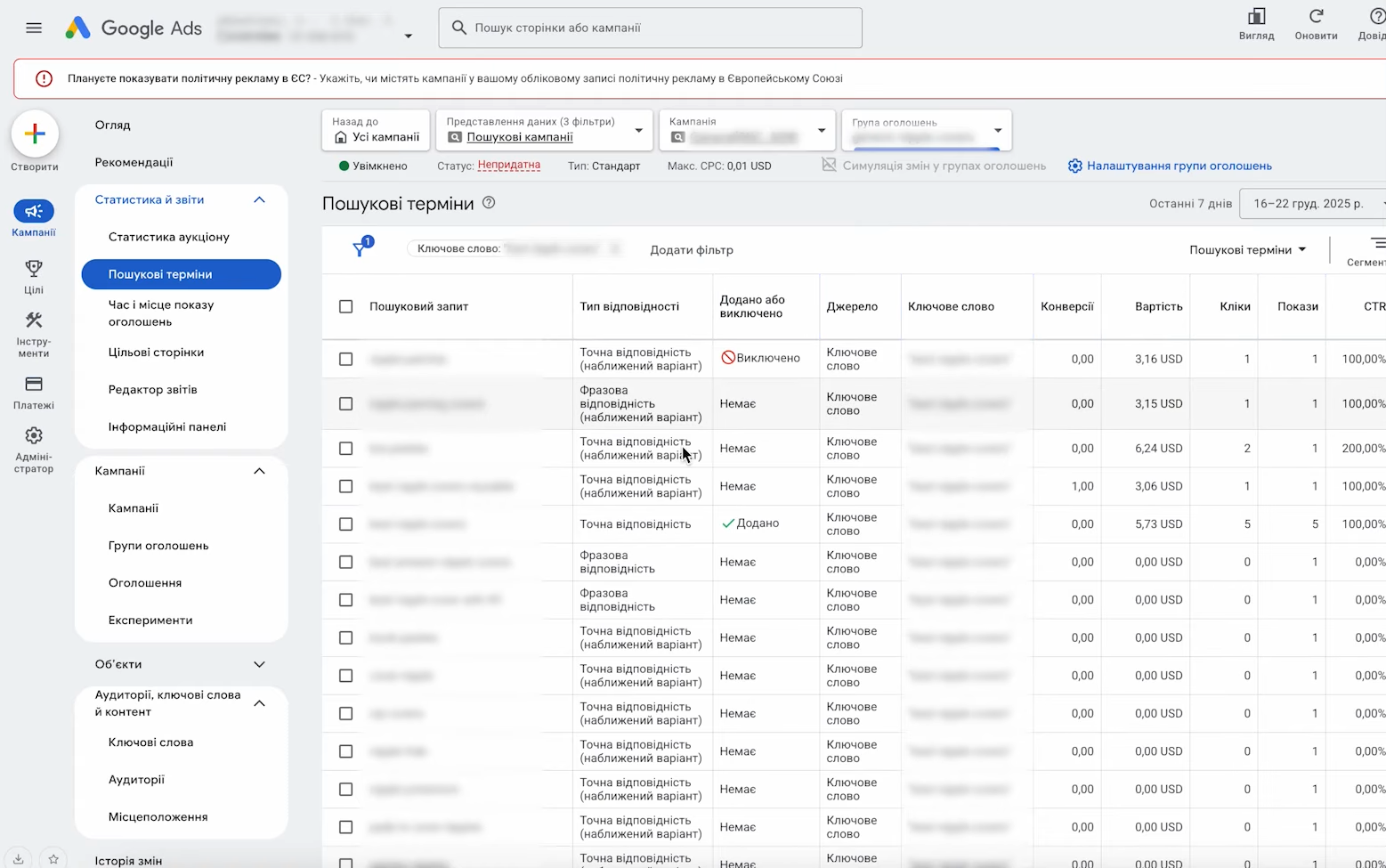
In Google Ads today there are three match types:
- Exact — your ad is shown for queries closest in meaning. Maximum relevance and best control, but limited reach.
- Phrase — queries containing your keyword in the same word sequence. Balance between reach and quality.
- Broad — Google itself decides which variations to show ads for. Maximum reach, minimum control. Without reliable negative keywords — the budget goes nowhere.
At the start of a campaign, it’s better to use exact and phrase. Gather statistics, determine which queries actually bring profit — then you can add broad, but definitely with a configured negative keyword list.
How to use negative keywords to filter out irrelevant queries?
Negative keywords are your filter against “junk” traffic. Once a week or two, go into the “Search queries” report and see which actual queries you were shown for.
Suppose you sell “best nipple covers.” You review search queries — and see that some impressions are for phrases without “best” that don’t relate to your niche at all. That’s money wasted. Add them to negative keywords — and traffic becomes more targeted.
What is usually considered negative:
- “Free,” “DIY,” “manual,” “essay” — if you sell, not teach;
- Competitor names (though sometimes the opposite — you specifically target them);
- Incompatible product categories (“children’s,” “used,” “wholesale” — depending on your business);
- Regions where delivery is not available.
Advice! Sometimes it’s better to over-optimize than under-optimize. Especially if your goal is to get clean data for subsequent transition to conditional automatic “Maximize conversions.” The algorithm learns on what you give it. Give it dirty traffic — it will convert dirty.
How to increase ad relevance and CTR?
Relevance is the cheapest way to influence CPC. Often business owners write one “universal” creative for the whole campaign — and wonder why numbers drop.
Several rules that actually work:
- The first headline should contain exact keyword insertion. If the keyword group is “buy iPhone 15 Pro,” then the headline “iPhone 15 Pro buy in Kyiv” already beats competitors with the headline “Apple tech store.”
- Use all 15 headlines and 4 descriptions in adaptive texts (RSA). Google alternates different combinations and chooses the most effective.
- Specify concrete details: prices, delivery times, warranty, promotions. “Delivery in 24 hours” sounds better than just “fast.”
- Call to action: “Order,” “Check price,” “Get discount.”
- Test different versions. A/B tests help find headlines that increase CTR by 20-30%.
The higher the CTR, the better the expected CTR. And then — the familiar story of cheaper clicks.
Which extensions should you connect?
Extensions are additional blocks under the ad message: links to site categories, phone, addresses, prices, reviews. They increase clickability with almost no effort.
The minimum set that should be in every search campaign:
- Sitelinks — 4-6 pieces to main site sections;
- Callouts — brief phrases about benefits: “Free shipping,” “2-year warranty”;
- Structured snippets — lists of models, services, brands;
- Additional phone number if you take calls.
Observations based on real campaigns. Connecting a full set of extensions gives on average +15-20% to CTR and corresponding CPC reduction of 10-15%.
How to optimize the landing page to lower CPC?
Landing page quality is the third component of QS. And honestly, it’s the hardest to work with, as it often requires developer, designer, and content manager services. But the investment pays off.
What Google checks on the landing page:
- Content of the query and ad text. If the text says “20% discount on running sneakers,” but the page shows a catalog of all shoes without discounts, relevance drops.
- Loading speed. PageSpeed Insights is your friend. Anything loading longer than 3 seconds repels users and lowers QS.
- Responsiveness for mobile devices. Most clicks now come from mobile devices.
- Clear UX. The user should understand within 3 seconds where they are and what to do next.
- Honesty. No hidden fees, pop-ups blocking content, or misleading headlines.
Simple checklist for a landing page under advertising: H1 contains keyword → first screen shows product/service → bright call-to-action button → phone and messengers in visible place → short form → social proof (reviews, cases, guarantees).
Bid adjustments: when to raise and when to lower?
Adjustments are a way to extract more benefit from traffic that already brings money, and filter out what doesn’t. You can adjust by: devices, geography, time of day, demographics, audiences.
How this is done in practice:
- After 2-4 weeks of operation, review statistics by segments;
- You see that conversions come better from desktop — raise the bid for desktop by +20-30%;
- You notice mobile visits are expensive and useless — reduce them by 30% or disable altogether;
- Analyze time of day: no one buys at night — adjust the schedule accordingly or disable it;
- Look at regions: situation worsens in Kyiv, but not in remote areas — differentiate bids.
Don’t make adjustments based on 50 visits. You need a sample of at least 200-500 per segment, otherwise you’re making decisions based on random noise.
Bidding strategies: manual vs automatic
The question that worries everyone: manual bids or automatic? The answer — depends on the stage and volume of data.
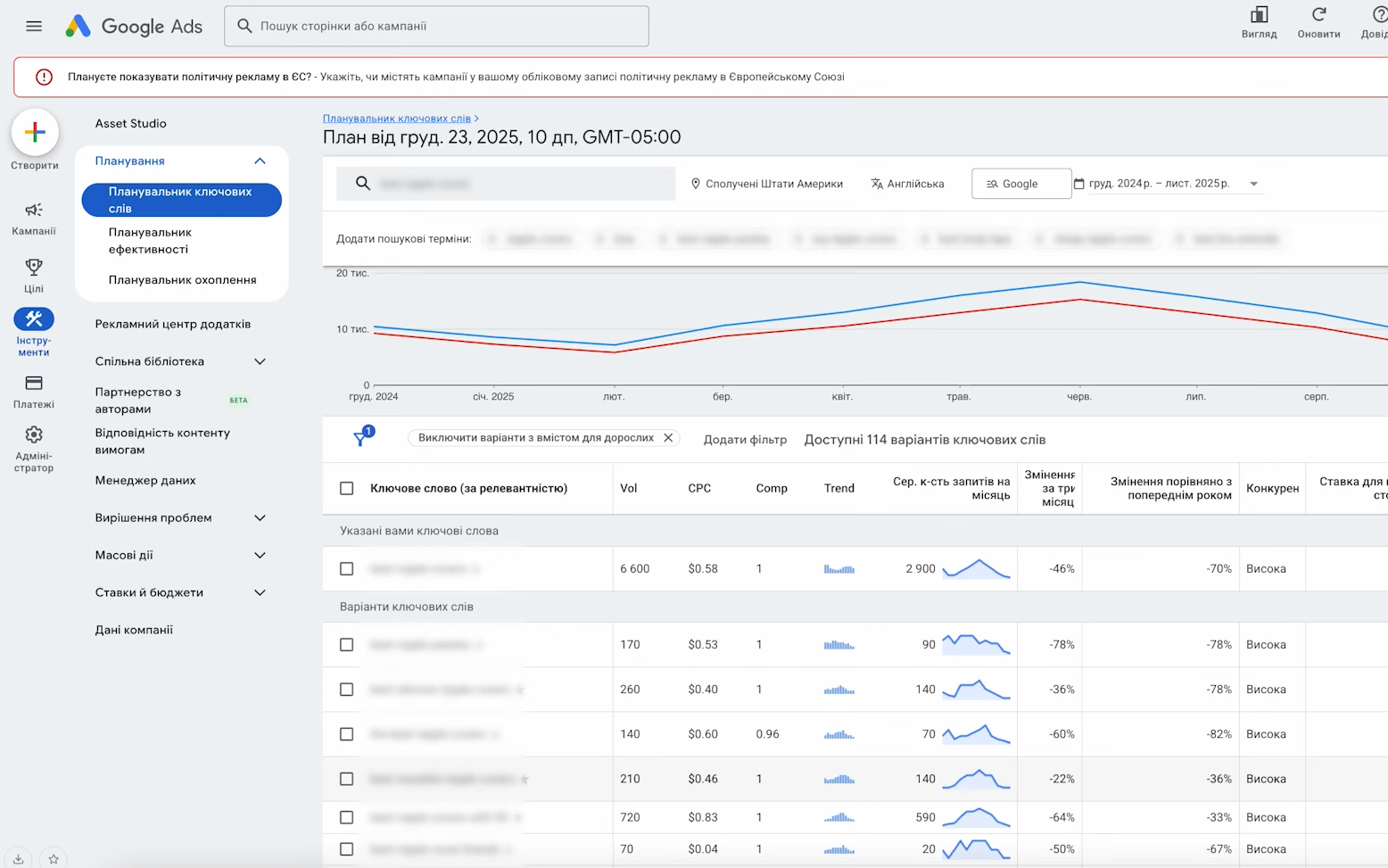
Manual bids are good if you’re just starting and want to figure things out. You see how specific words behave, what things really cost, what your QS is, where you lose. It’s laboratory work — slow but instructive. The Keyword Planner tool will show the price range in the niche, and you’ll understand what to aim for.
Automatic strategies “Maximize conversions,” “Target CPA,” “Maximize conversion value” work effectively when the algorithm has data. Usually this is 30-50 orders per month. If fewer, the system will fluctuate and make wrong decisions.
The logical sequence for a new campaign is:
- 2-4 weeks on manual bids, with deduction and cleaning of results;
- Gather more than 30 conversions, see a stable picture;
- Switch to “Maximize conversions” — the system optimizes for volume;
- When the situation stabilizes — switch to “Target CPA” with a specific number.
How to analyze competitors at auction?
In Google Ads there’s the “Auction insights” report — an underestimated tool. It shows which domains you face in search results, what their impression share is, and how often they outrank you.
What’s interesting to see there:
- Who your real competitors are, not who you consider them to be;
- Which keywords they’re more active on, and where you beat them;
- Whether to increase the budget, or you’re already at the edge of budget depletion.
If you see that your “impression share” exceeds 80% — there’s nowhere to scale, you can raise the bid for better positions. If below 50% — there’s room for growth through budget.
What to do if CPC is high but positions aren’t being lost at auction?
This is the hardest question. Simply lowering bids is dangerous: you’ll drop out of the auction. A more subtle approach is needed here.
Step-by-step algorithm:
- Check QS for main words. If it’s 5-6 — there’s room for improvement, work on ad quality and landing page.
- Look in the Planner at what competitors pay on average. Sometimes you’re overpaying out of habit.
- Lower bids gradually, no more than 10-15% at a time. Wait 5-7 days, look at the result.
- Simultaneously increase relevance: rewrite texts, add extensions, test landing pages.
- See if there are low-competition keywords you can add instead of expensive ones. Often a three-four word query costs 3-5 times less than a two-word one, and converts better.
- Use the ad schedule: disable hours and days when there are no clicks.
Raising QS by one point is roughly the same as lowering the bid by 17%, only without losing positions. If choosing one lever for long-term CPC reduction — it’s working on quality.
How to evaluate the effectiveness of changes?
Lowering CPC is not an end in itself. You’re interested in the end result: ROI, CPA, CPL. So you need to track not just spending. Here’s what matters:
- CTR — rising or falling after changes;
- Conversion rate — has it improved after landing page optimization;
- CPA (Cost Per Acquisition) — actual cost of acquiring a customer;
- CPL (Cost Per Lead) — for those collecting leads, not selling immediately;
- ROI / ROAS — return on advertising investment.
Analytics frequency: daily — superficial budget monitoring, weekly — detailed analysis by groups and keywords, monthly — strategic decisions about account structure.
Connect Google Analytics — you’ll see behavioral statistics on the site, time on page, depth of view. This will suggest which landing page elements to refine.
Typical mistakes that make CPC skyrocket
In conclusion — a brief list of the most common mistakes:
- One group with 50 different keywords “because it’s more convenient.”
- Broad match without negative keywords. Money burns within the first hours.
- One static creative for all words instead of adaptive with variations.
- A 2015 landing page that takes 7 seconds to load on mobile.
- Switching to automatic strategies with insufficient data (less than 30 per month).
- Daily manual intervention in automatic strategy — the algorithm doesn’t have time to learn.
- Don’t ignore the “Search queries” report — there’s always something to clean.
- Same bids for desktop computers and mobile devices.
- Contextual advertising without analytics connection — you’re working blind.