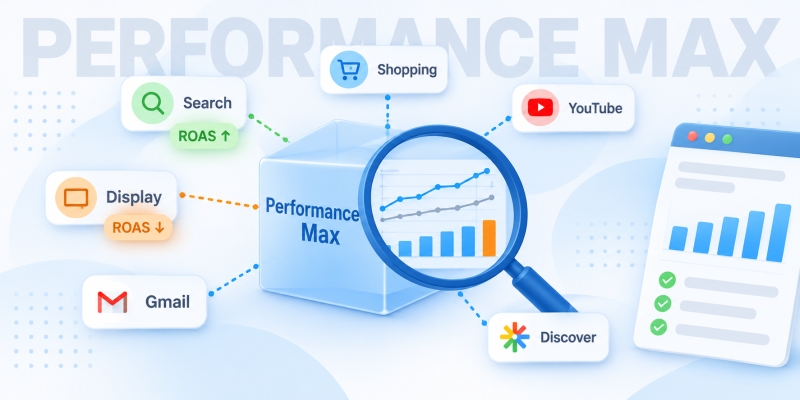
Performance Max is the most closed-off campaign type in Google Ads. Google shows ads on Search, Shopping, YouTube, Discover, Gmail, and Display Network sites, but in return, it provides very few control levers and even less transparent statistics. Because of this, a manual review turns into hours of work with a dozen exported files. A neural network seriously saves time here: You give it the spreadsheets, it finds patterns, calculates shares, and formulates hypotheses. An audit using a neural network doesn’t replace a specialist, but it does the most tedious part for them—sifting through data.
Let’s break down how to conduct a Performance Max audit using ChatGPT, exactly what to export from the account, how to prepare the files, what prompts to use, and where the neural network makes mistakes most often.
What can ChatGPT do in a PMax audit, and what can’t it do?
Let’s start with the limitations. Otherwise, it’s easy to overestimate the tool and mistake the confident tone of its answers for being right.
ChatGPT handles tasks well where it needs to process an array of similar rows and spot a structure:
- grouping 3,000 search phrases by meaning and highlighting non-target clusters;
- counting n-grams—repeating words and phrases—and linking costs and conversions to them;
- comparing ROAS and conversion value by channels, groups, and categories;
- finding anomalies: a channel taking up 40% of the budget with zero sales, or a group with a CTR three times lower than the rest;
- turning a dry spreadsheet into a list of priority actions.
But here is what the neural network cannot do—at least in a standard chat without connected integrations:
- log into your ad account and check the settings (anything not in the export doesn’t exist to the model);
- know the specifics of your business—profit margins, seasonality, or which items are worth selling at a loss just to acquire repeat purchases;
- verify if conversion tracking on the website is working correctly (but it can suggest which signs point to a breakdown);
- account for Google Ads interface updates released after the model’s training date.
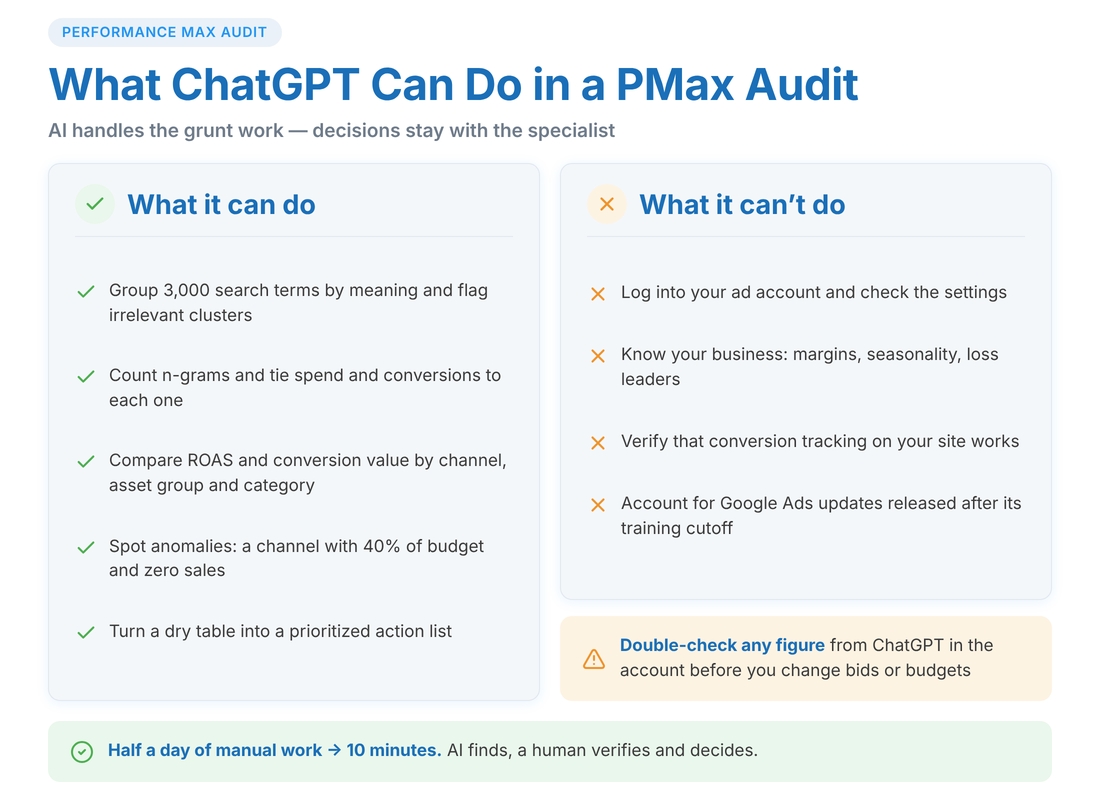
The main advantage of a PMax audit in ChatGPT is speed. What takes a specialist half a day (sorting phrases into buckets, consolidating channels, recalculating shares), the model does in 10 minutes. The freed-up time is better spent on interpretation and decision-making.
ChatGPT answers confidently, even when it’s wrong. Any number from its response that you plan to use to change bids, budgets, or exclude a channel must be double-checked in your account or the source spreadsheet. It takes a minute, but sometimes saves tens of thousands of hryvnias.
Can you trust ChatGPT to audit your ad account?
This is a question asked by almost everyone trying Performance Max campaign analysis using ChatGPT for the first time. The answer can be split into two parts: security and the quality of conclusions.
Security and data anonymization
Google Ads exports do not contain personal data—only advertising statistics. But they do contain commercial information: your brand, product range, prices, and sales volumes. If you work with a client under an NDA or simply don’t want to hand your account data over to third-party servers, anonymize it before uploading:
- replace your brand name with a placeholder (“Brand A”) and run a find-and-replace on search queries—otherwise, branded traffic analysis will lose its meaning;
- remove URL columns if they contain real domains and products;
- amounts can be converted into standard units or multiplied by a coefficient—the proportions will be preserved for analysis;
- disable the use of your chats for training in ChatGPT’s settings (the “Improve the model for everyone” option or similar, depending on the interface version).
Example. You run a cosmetics online store with a turnover of 800,000 UAH per month. Queries like “buy serum [store brand]” will turn into “buy serum brand_x” after find-and-replace—they will still be clearly branded to the neural network, and competitors won’t learn anything valuable even if there is a leak.
Quality of conclusions
The neural network doesn’t know your business. It sees that Display yielded a 0.8 ROAS and will suggest restricting it. But perhaps Display brings in new buyers who later return via branded search, meaning its real value is higher. Therefore, ChatGPT’s role in an audit is that of an intern analyst who calculates quickly and suggests hypotheses. The final decision remains yours.
The rule is simple: AI finds, a human verifies and decides.
What PMax reports should you export for campaign analysis in ChatGPT?
Without the right exports, any Google Performance Max audit using AI will fail—the model will start hallucinating. Gather this set for the same time period (usually 30–90 days, depending on traffic volume).
Channel performance report
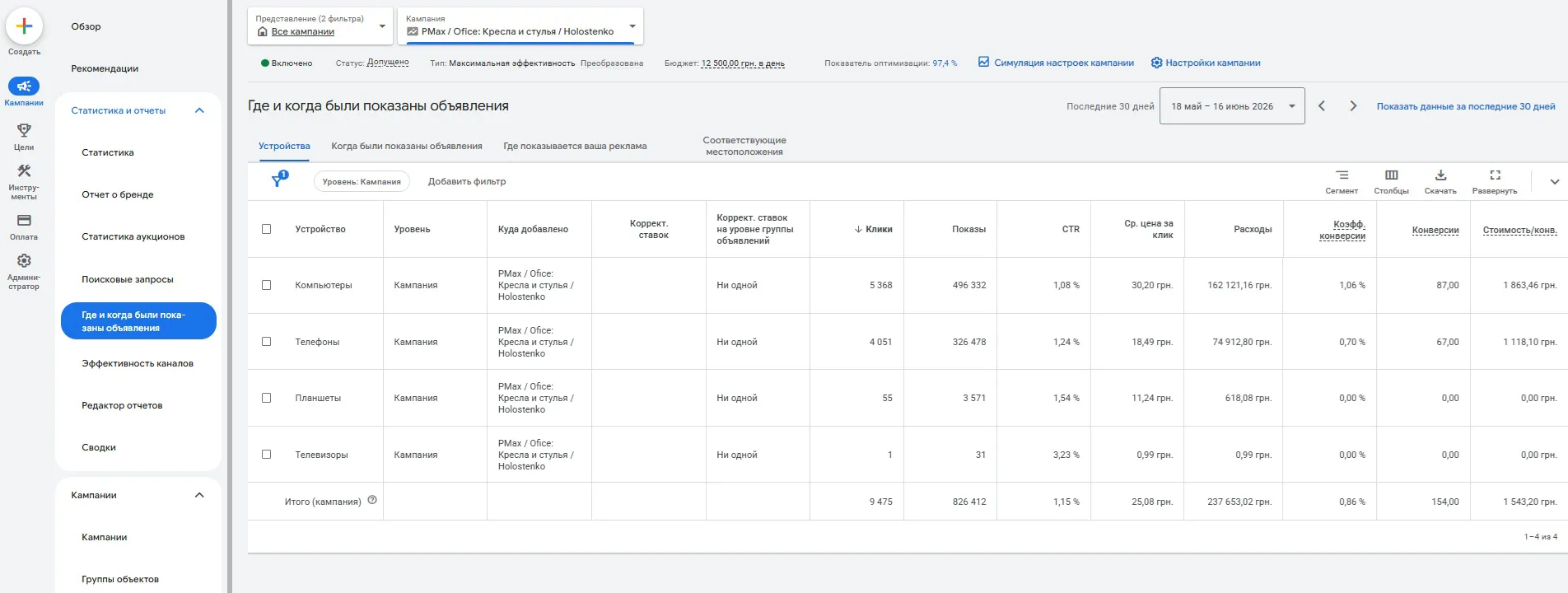
This is the most important export. Google relatively recently opened up PMax performance breakdowns by channel. Find it in the reports section. Export the cost, clicks, impressions, conversions, conversion value, CTR, and CPC for each.
This is exactly where you most often discover that 35–50% of the budget goes to Video and Display with zero sales, while Search and Shopping deliver all the results.
Search terms statistics
The “Search terms” report has become fully fledged—with real phrases, not just categories. Export data for the longest possible period: 90–120 days provide a statistically reliable picture. The columns are the same as for channels, plus the search term itself.
Running Search campaigns in parallel? Export their keyword report too. This will allow you to find overlaps and cannibalization.
Asset group report
In the assets section, pull the statistics for each group with the same set of metrics. Also, include the performance rating of each asset (“Low”, “Good”, “Best”). Ratings in a CSV export aren’t always formatted correctly, so sometimes it’s easier to copy the table straight from the interface and paste it into the chat as text.
Product report (for e-commerce)
The product report from the feed: ID, title, status, and standard metrics. If there are 2,000 items in the feed, the export will be large—that’s normal; ChatGPT can digest tens of thousands of rows using its built-in data analysis.
Placement report
This shows the websites and apps where ads were shown, along with impressions for each. Google doesn’t show costs and conversions there—but even a list of placements with impression counts lets you clean out mobile games, kids’ apps, and other junk.
Additional exports
- Demographics (age, gender) and device statistics—from the “Insights” section.
- Geography report (regions and cities).
- Change history—so the neural network can link performance drops to specific edits.
- Screenshots or text descriptions of settings: bid strategy, target ROAS/CPA, budget, whether final URL expansion is on, what audience signals and search themes are set, and whether the brand is excluded.
Save all files in CSV format. Excel files with merged cells and formatting are harder for it to read.
How to conduct a Performance Max audit using ChatGPT: a detailed checklist
Now for the sequence. The order isn’t random: if it turns out in the first step that conversions are tracking incorrectly, the rest of the analysis loses its meaning.
Checking the foundation: conversions and learning phase
Upload the overall daily statistics and describe your settings. Have the model check:
- whether there are sudden spikes in conversions while ad spend remains stable (a sign of duplication or a broken tag);
- whether the estimated conversion rate aligns with the industry norm (1–3% for an online store, 3–10% for B2B leads; if the numbers are exponentially higher, you’re likely tracking something extra, like views of the “Contact Us” page);
- how many conversions are accumulated per month (if fewer than 30, the algorithm won’t exit the learning phase, and any further review will be an analysis of an undertrained system);
- whether the budget or target ROAS changed by more than 20–30% (every such edit restarts the learning phase).
Where the money goes: channel analysis
Take the channel report. The prompt could be: “Calculate the shares of cost and conversion value for each channel. Highlight those where the first share exceeds the second by more than 1.5 times. For each problematic channel, suggest what can be done within PMax’s limitations.”
The neural network will generate a table and likely point to Video or Display. Next comes your interpretation. If the goal is brand awareness for a new label, spending on YouTube is justified. If the goal is sales with a 400%+ ROAS, a video with a 50% return needs to be restricted: by excluding the brand, removing video assets (Google will then generate its own video, which is even worse—it’s better to upload at least a basic video and monitor its share), or adjusting the target return on investment.
Branded traffic and cannibalization
Performance Max loves branded queries—they are cheap and convert excellently, so the algorithm eagerly snaps them up. On paper, everything looks great, but in reality, the ads intercept people who were already looking for you.
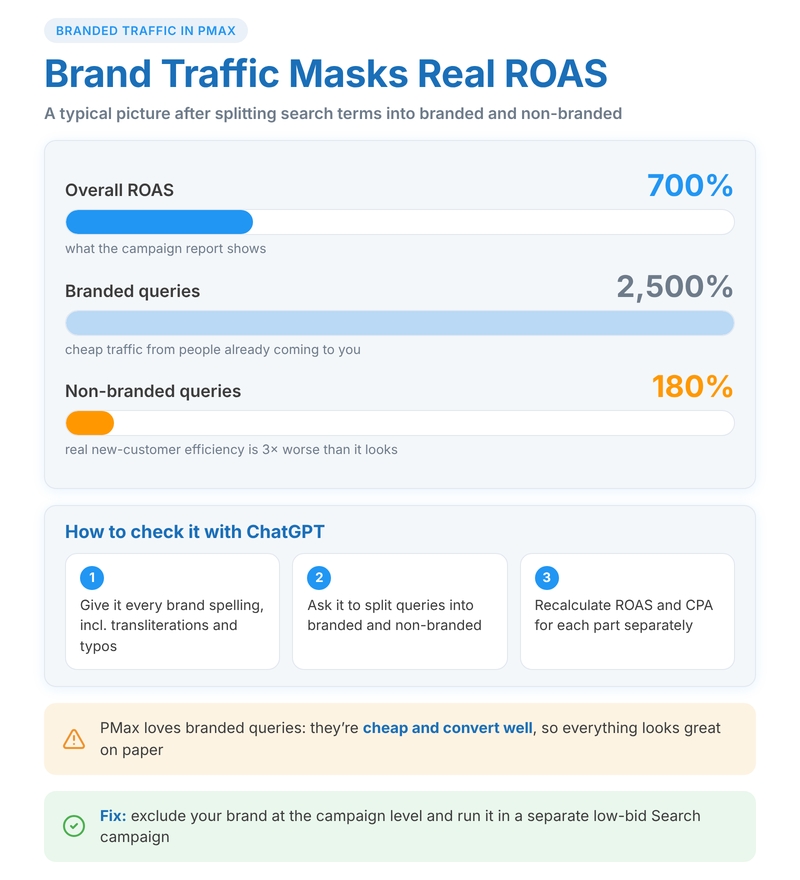
Ask the model to separate branded and non-branded queries (providing a list of spelling variations, including transliteration and typos). Then—recalculate the ROAS and CPA separately for them.
A typical picture: overall ROAS is 700%, branded queries—2500%, non-branded—180%. It turns out the actual efficiency of acquiring new customers is three times worse than it seems. The solution is to exclude the brand at the campaign level and direct this traffic to a separate Search campaign with low bids.
If a Search campaign is running in parallel, add its keywords. Prompt: “Find phrases where PMax gets impressions, and the Search campaign has an exact matching keyword. Compare CPC and CR for each.” This identifies cannibalization—a situation where two campaigns compete, and you pay twice.
Analyzing search terms and gathering negative keywords
This is the most rewarding part of a PMax audit in ChatGPT—the workload is huge, but the rules are clear.
First, ask it to break queries into semantic clusters: targeted commercial, informational (“how to choose”, “what’s the difference”), non-targeted (other products, used, free, vacancies), competitor, and branded. Then—consolidate costs and conversions for each cluster.
Next—n-grams: “Extract unigrams and bigrams, and calculate the total cost and conversions for each. Show the top 30 most expensive n-grams with zero sales.” This provides ready-made negative keyword candidates at the campaign level—this feature is now available in PMax, and you should use it.
Don’t just negative everything right away based on the first export. The query “cheap mattresses” with 15 clicks and zero sales in a month doesn’t mean anything yet if the average CR is 2%. Statistically, 0.3 sales were expected. But “used mattresses” with 200 clicks and zero sales is a solid candidate.
Add a condition: “Suggest as negative keywords only n-grams where the expected number of conversions at an average CR exceeds 2, but the actual number is zero.”
Asset group analysis
Here you’ll need the group statistics and asset ratings. What to ask it to check:
- the CTR spread between groups (a difference of 2–3 times for similar topics is a reason to look into the weaker group’s creatives);
- groups with a “Low” rating for headlines or images—the model will draft a replacement list;
- whether the group structure aligns with the product range structure (having one “All Products” group for a store with 15 categories is almost always a mistake; the creatives end up being too vague);
- groups without videos (Google will draw its own, auto-generated from images, and it often looks bad);
- ad spend on a group relative to its share of the total value.
Use a separate prompt for the assets themselves: paste the headlines and descriptions with ratings as text and ask it to suggest 5 new options in the style of the best ones and explain how the “Low” ones differ from the “Best”. Usually, it turns out that weak headlines are generic (“High-quality products”, “Great prices”), while strong ones are specific (“Delivery in Kyiv within 2 hours”, “24-month warranty”).
Audience signals and search themes
There is no export for this—just a description of the settings. Describe what audience signals are set (customer lists, website visitors, custom segments by keywords, interests), what search themes are added, and show the actual search terms.
Prompt: “Compare the set themes with actual search queries. Which themes are not reflected in the search? Which high-performing clusters aren’t covered by themes? What signals could I add based on what is actually converting?”
The neural network often points out the obvious that gets overlooked: for example, the signal “interest in home renovation” is set, but the query converting is “home electrical supplies”—which means a custom segment signal with these specific phrases will be more accurate.
Product feed
For e-commerce, this is sometimes more important than everything above. Tasks for the product report:
- find products with high ad spend and a ROAS below the target (candidates for exclusion or a separate campaign with a lower target);
- calculate the percentage of items with zero impressions (if 60% of the feed is “sleeping”, the problem lies in the titles, attributes, or a budget skew toward bestsellers);
- identify items with high CTR but low conversion rates (likely a page-level issue: out of stock, priced above market, bad photos);
- analyze titles: do they contain SKUs instead of readable words? Do they include the brand, type, and key features?
Based on the feed itself (or a portion of it), the model will suggest a naming template. Say, instead of “SKU 4521 Blu”—”Brand X City Backpack 25L, blue, with 15” laptop sleeve”.
Placements, demographics, geography
Three quick checks to wrap up:
- Placements—ask it to highlight apps (rows with “mobileapp::”), kids’ and gaming content, and sites with suspicious domains. Upload the ready-made list to account-level exclusions.
- Audience demographics—compare performance by age and gender. If 25% of the budget goes to the 18–24 segment with a CPA three times the average, and the product is expensive home appliances, this is an argument to review your signals (there are no direct demographic exclusions in PMax, but signals influence it).
- Geography—regions with ad spend but no results. A common scenario for Ukraine: targeting is set to the whole country, but 70% of orders come from Kyiv and the surrounding region, whereas the money is distributed more evenly.
ChatGPT prompts for auditing Performance Max

Below are working templates. Substitute your values in the square brackets. It’s better to run each template as a separate message after uploading the corresponding file, rather than all at once—this makes the answers more accurate.
Starting prompt (context for the whole session)
“You are a Google Ads specialist with experience in auditing Performance Max campaigns. I will upload exports from the ad account and ask questions. Business: [online store for garden supplies, Ukraine, average check 1,800 UAH, profit margin around 35%]. Goal: [ROAS no lower than 500%]. Period: [August 1 — October 31]. The brand is written as [Brand X, brandx, brand-x]. Answer specifically, using numbers from the files, without abstract advice. If there isn’t enough data for a conclusion, say so directly.”
Prompt for the channel report
“The file contains channel statistics. Calculate for each: cost share, conversion value share, ROAS, and CPA. Create a table. Highlight those where ROAS is below the target by 30% or more. For each, explain what tools within PMax can be used to reduce its share, and estimate the increase in overall ROI if the money were reallocated to the best-performing channels.”
Prompt for search terms
“The file contains search terms. Execute in order: 1) separate them into branded and non-branded (brand: [variations]); 2) calculate their ROAS, CPA, and CR; 3) break the non-branded part into 5–7 semantic clusters and consolidate costs and conversions for them; 4) build n-grams (1 and 2 words) and show the top 30 most expensive ones with zero conversions; 5) suggest campaign-level negative keywords, but only for n-grams with an expected conversion count greater than 2 where the actual count is zero. Output them as a list ready to be copied.”
Prompt for asset groups
“The table contains group metrics. Below in text are headlines, descriptions, and their performance ratings. Compare the groups against each other; find the weak ones in terms of CTR and ROI. For the group [name], explain how headlines with a “Low” rating differ from “Best”, and write 8 new options up to 30 characters and 4 descriptions up to 90 characters in the style of the best ones, in Ukrainian.”
Prompt for the feed
“The file contains product statistics for 90 days. Find products: with a cost above [500 UAH] and ROAS below [300%]; with zero impressions; with an above-average CTR, but a conversion rate half the average or worse. Suggest an action for each case. Also, evaluate the quality of the titles: point out the 10 worst ones and rewrite them using the template ‘Product type + brand + key feature + variation’.”
Prompt for the final report
“Based on the entire analysis in this chat, draft a final audit conclusion: 1) the three main problems, estimating the losses in hryvnias for the period; 2) a prioritized list of 10 actions—from the most impactful to the least important, specifying where in the Google Ads interface to do this; 3) what needs to be manually double-checked due to data ambiguity; 4) which metrics to track 2 and 4 weeks after the edits are made.”
Common mistakes when auditing Google Performance Max using AI
Here are a few things that even experienced specialists mess up when they first try a PMax audit using a neural network.
- Uploading everything in one file and a single prompt. The model loses context, mixes up columns from different tables, and spits out gibberish. One report—one step—one prompt.
- Trusting numbers without verification. A neural network might add up a column incorrectly or misread a decimal separator (a comma instead of a period is a classic issue for Ukrainian interface exports). Ask the model to show the first 5 rows exactly as it read them before analyzing.
- Not providing business context. Without information on margins, average order value, and goals, ChatGPT evaluates everything based on formal ROI. A 300% ROAS for a product with a 60% margin is excellent; for a 15% margin, it’s a loss.
- Adding negative keywords based on a short timeframe. 7 days of statistics for PMax is almost nothing. The algorithm distributes impressions unevenly, and a query that didn’t convert today might yield three orders in a week.
- Applying all recommendations at once. If you simultaneously exclude the brand, add 200 negative keywords, change the target ROAS, and re-upload half the creatives, the campaign will re-enter the learning phase, and you won’t know what actually worked. Implement changes in waves, spacing them 1–2 weeks apart.
- Asking the neural network to “check the campaign” without specifying exactly what. A vague prompt gets a vague answer. The more specific the question, the more useful the result.
How to turn audit results into metric growth?
An audit just for the sake of an audit is useless to everyone. Once the Performance Max campaign analysis using ChatGPT has identified the problems, plan out the implementation.
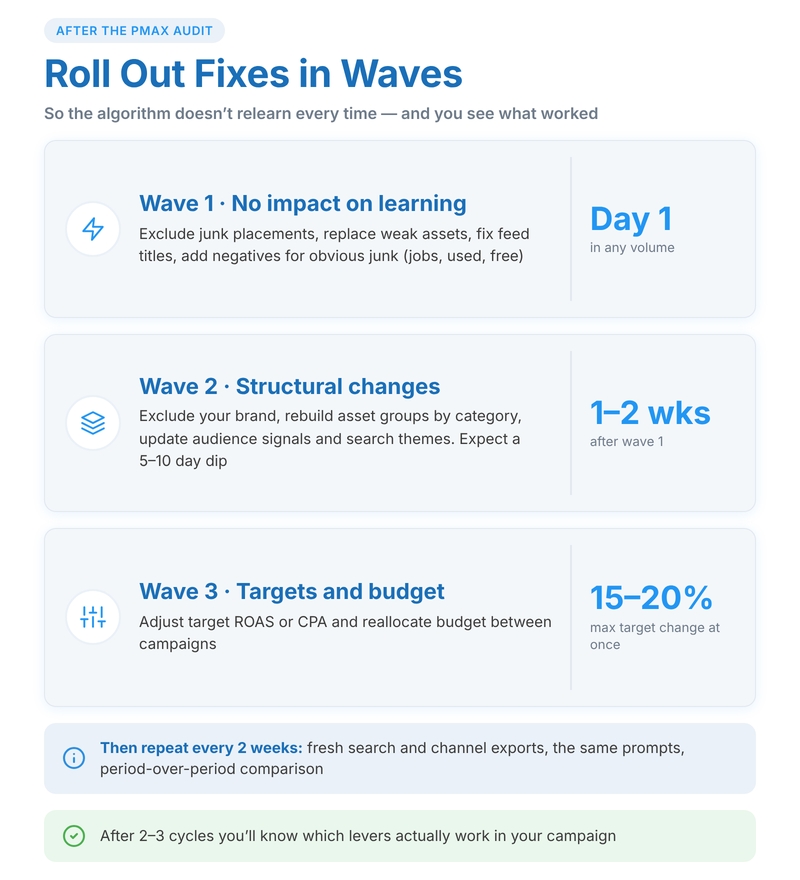
The first wave—things that do not affect the algorithm’s learning phase: excluding junk placements, replacing weak assets, fixing titles in the feed, and adding negative keywords for outright junk (vacancies, used, free). These edits can be done immediately and in any volume.
The second wave, 1–2 weeks later—structural changes: excluding the brand, rebuilding groups by categories, and adding or replacing audience signals and search themes. You should expect a minor performance dip for 5–10 days here.
The third wave—adjusting the target ROAS or CPA, and reallocating money between campaigns. Do not change the target by more than 15–20% at a time.
Optimizing Performance Max using a neural network works well through regular iterations. Once every two weeks—a fresh export of search terms and channels, the same set of prompt templates, and a comparison with the previous period. ChatGPT handles the question “here are the numbers for October and November—what changed, and is it linked to the edits from the change history” perfectly. After 2–3 cycles, you’ll gain an understanding of which levers work in a specific campaign and which do not.