Yesterday the campaign was bringing in 40 orders a day, and today it’s 9. The budget is the same, the products are the same, and there are no red notifications in Google Ads. Sound familiar? The question “why did Performance Max ads drop” consistently ranks at the top of inquiries from online store owners, and almost always there isn’t just one reason, but two or three at once. Let’s figure out where to look for the failure, how to read the reports, and what to do when Performance Max isn’t working like it did a month ago.
Is Performance Max Not Working, or Is This a Normal Fluctuation?
PMax is an automated campaign, and daily spikes are normal for it. The algorithm is constantly testing combinations of assets, audiences, and channels, so a 20% drop on Tuesday and a 30% increase on Thursday is not yet a reason to change anything.
Other signs indicate a real Performance Max drop:
- impressions haven’t increased for 5–7 days, even though the budget hasn’t changed;
- clicks aren’t growing, and the CTR is noticeably lower than last month;
- the number of conversions isn’t increasing with the same ad spend;
- the cost per conversion in PMax has sharply increased—by 40–50% or more;
- sales in the CRM have dropped, even though the campaign report still shows conversions.
Tip! Compare weeks to weeks, not days to days. Take the last 7 days and compare them with the previous 7 and with the same period last year (if there is history). This filters out seasonality and random noise.
Let’s say a tableware store was spending 1,500 UAH a day and getting 12 orders. Two weeks ago, the number dropped to 5, and the cost per order rose from 125 to 300 UAH. This is no longer a fluctuation but a drop. Next, we need to go through the causes.
The Learning Phase: Is the Campaign Stuck at the Start or Did It Re-enter It?
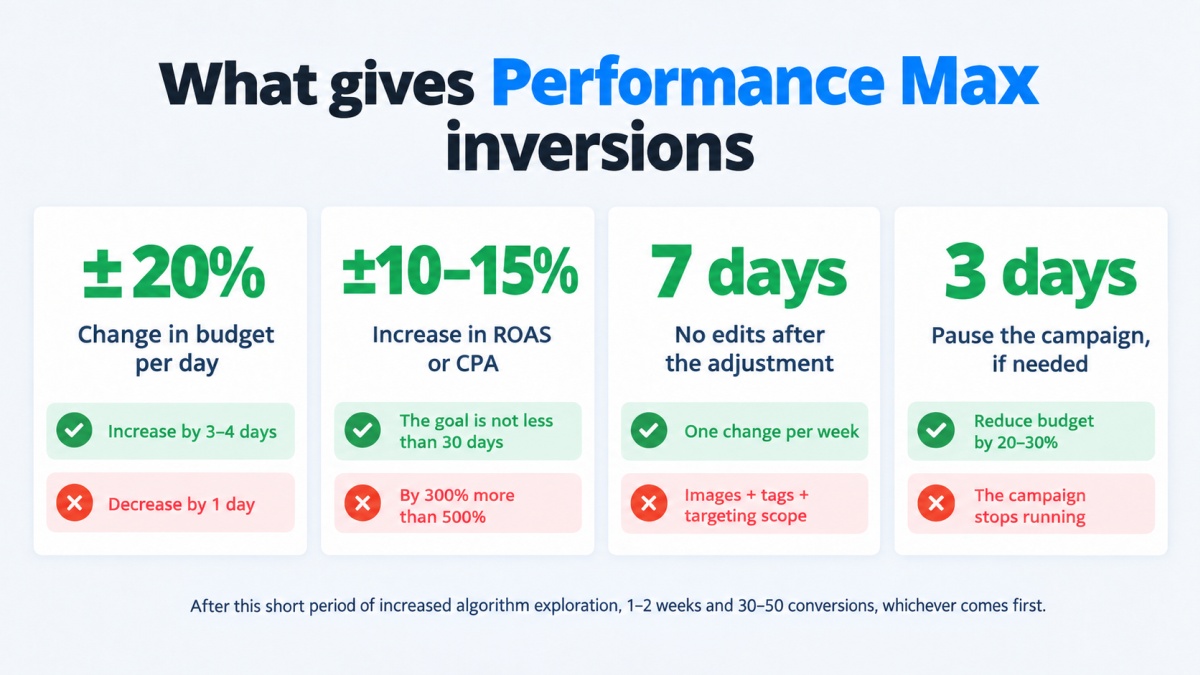
After launching PMax, it takes 1–2 weeks and about 30–50 conversions for the algorithm to gather data. During this time, impressions and the cost per conversion fluctuate, and a drop during the learning phase is a normal phenomenon. Wait it out.
It’s worse when the campaign was running stably, but then ended up in the learning phase again after editing assets. This happens when half the images are replaced, headlines are rewritten, a new asset group is added, and the conversion goal is changed all in one day. Each of these edits resets part of the accumulated statistics. The number of orders doesn’t grow for a week or two—and the campaign simply starts from scratch every time.
What to do:
- make changes in batches—no more than one major edit per week;
- after editing, give the campaign a minimum of 7 days without interference;
- check the status in the “Bid strategy” column—it directly states whether the campaign is learning.
Attention. Pausing the campaign for 3–4 days or more also restarts the learning phase. If you need to temporarily reduce costs, it’s better to lower the budget by 20–30% than to turn off the campaign completely.
Performance Max Drop After Changing the Budget or Target ROAS
The advertiser wants more sales—and starts tweaking the settings: raising the budget, increasing the target, then editing something again. And the campaign drops in response. It’s only a paradox at first glance. The algorithm operates within a certain corridor: it knows how much it’s willing to pay for a conversion and where it finds such auctions. A sharp change in this corridor throws it off balance, and finding a new one takes time. Here are three scenarios where a Performance Max drop occurs most frequently.
- The campaign dropped after a change in Target ROAS. The store was operating at a 300% tROAS, and the owner decided they wanted 500%. The system simply stops participating in auctions where it doesn’t see a chance for such a result. Impressions fall by 60–70%, and low impressions drag down everything else—clicks, orders, revenue.
- A sharp budget increase. It was raised from 500 to 2,000 UAH per day—and instead of growth, it resulted in more expensive conversions. The algorithm started buying traffic it previously avoided, and the new audience converts worse.
- A sharp budget decrease. Cut in half to “wait out” a slow week. The campaign lacks data, returns to testing, and the drop after the budget change drags on for another 7–10 days after the budget is restored.
Practical rules:
- change the budget by no more than 20% at a time and no more often than once every 3–4 days;
- adjust target ROAS or CPA in 10–15% increments;
- before raising the target, check the actual metric for the last 30 days—setting a target higher than that is pointless;
- if the campaign has already dropped after a sharp change, revert to the previous value and wait a week.
What to Do When Conversions Drop in Performance Max?
If conversions drop in Performance Max to zero or almost zero in one day, but impressions and clicks are steady—in 8 out of 10 cases, the tracking broke, not the ads. The algorithm optimizes for the conversions it sees. No data means no optimization, and in a few days, the campaign begins to degrade.
Check:
- if the conversion tag fires on the “Thank You” page—open Tag Assistant and place a test order;
- if developers changed the site structure or the confirmation page URL;
- if the link between Google Ads and GA4 broke, assuming conversions are imported from Analytics;
- if the desired action is set as primary—sometimes, after a site update, only “page view” remains as a goal in the account;
- if a new duplicated conversion action was added: then the system counts every order twice, and the stats look better than they actually are.
A real-world example. An online store moved its checkout process to a separate subdomain for payment. The thank you page remained the same, but the GTM tag didn’t load on it due to cookie blocking. For three days, the campaign received zeros, impressions dropped by half, and the owner decided that PMax had “broken.” They fixed the tag—a week later, the metrics recovered.
Attention. After fixing the tracking, don’t expect an instant recovery. The algorithm needs to gather 30–50 conversions again to return to its previous level.
Products Aren’t Showing in Performance Max Due to Feed Errors
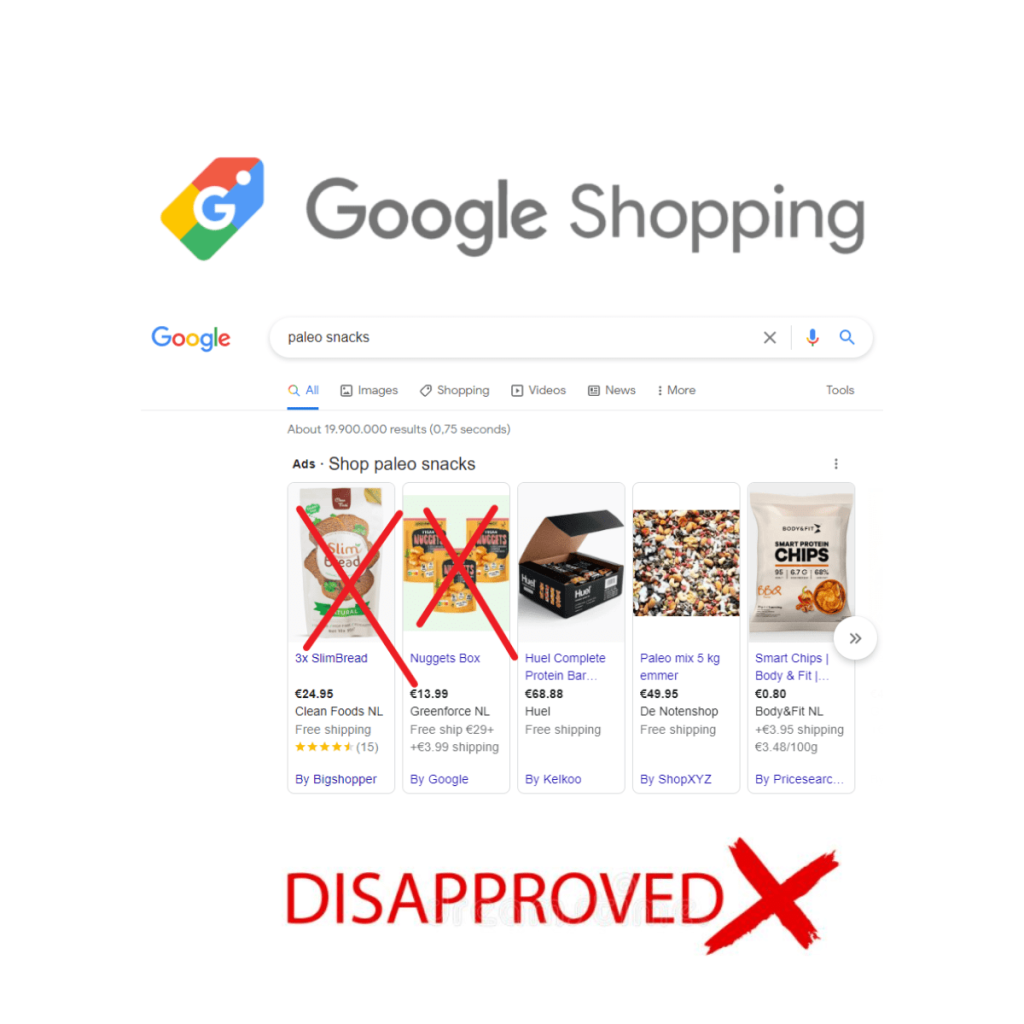
For online stores, the product feed is half of PMax’s success. When a PMax campaign drops, and disapproved products appear in Merchant Center, the connection is direct.
Common causes:
- price mismatch between the website and the feed (the site updated prices, the feed didn’t);
- missing or incorrect GTIN;
- images with watermarks or promo text;
- products are “Out of stock” on the site but “In stock” in the feed;
- the feed hasn’t been updated in over 30 days and has expired;
- Google policy changes for a specific category (medical supplies, alcohol, adult products).
Go to Merchant Center → “Products” → “Needs attention”. If the share of disapproved items exceeds 10–15%, the campaign loses a significant portion of impressions in Google Shopping, which usually provides the cheapest sales. Next, in Google Ads, open the “Products” tab within the campaign: there you can see how many items are getting impressions at all. It often turns out that 80% of the budget goes to 5% of the inventory—the “bestsellers”—while the rest of the catalog simply isn’t shown.
What helps:
- set up automatic feed updates via API or scheduler every 4–6 hours;
- enable automatic price and availability updates through microdata on product pages;
- split the inventory into multiple asset groups or campaigns—bestsellers separately, new arrivals and high-margin products separately.
Weak Assets and Poor Ad Strength
PMax builds ads itself from your headlines, descriptions, images, and videos. If materials are scarce or repetitive, the system runs two or three combinations, and they burn out in a month or two. The result—clicks don’t grow, CTR creeps down, CPC rises, and sales don’t increase.
Open the asset group and look at the Ad strength. A “Low” rating next to half the headlines is a signal to change them specifically, not the whole campaign. Another guideline is “Asset performance”: there Google shows which elements aren’t being used at all.
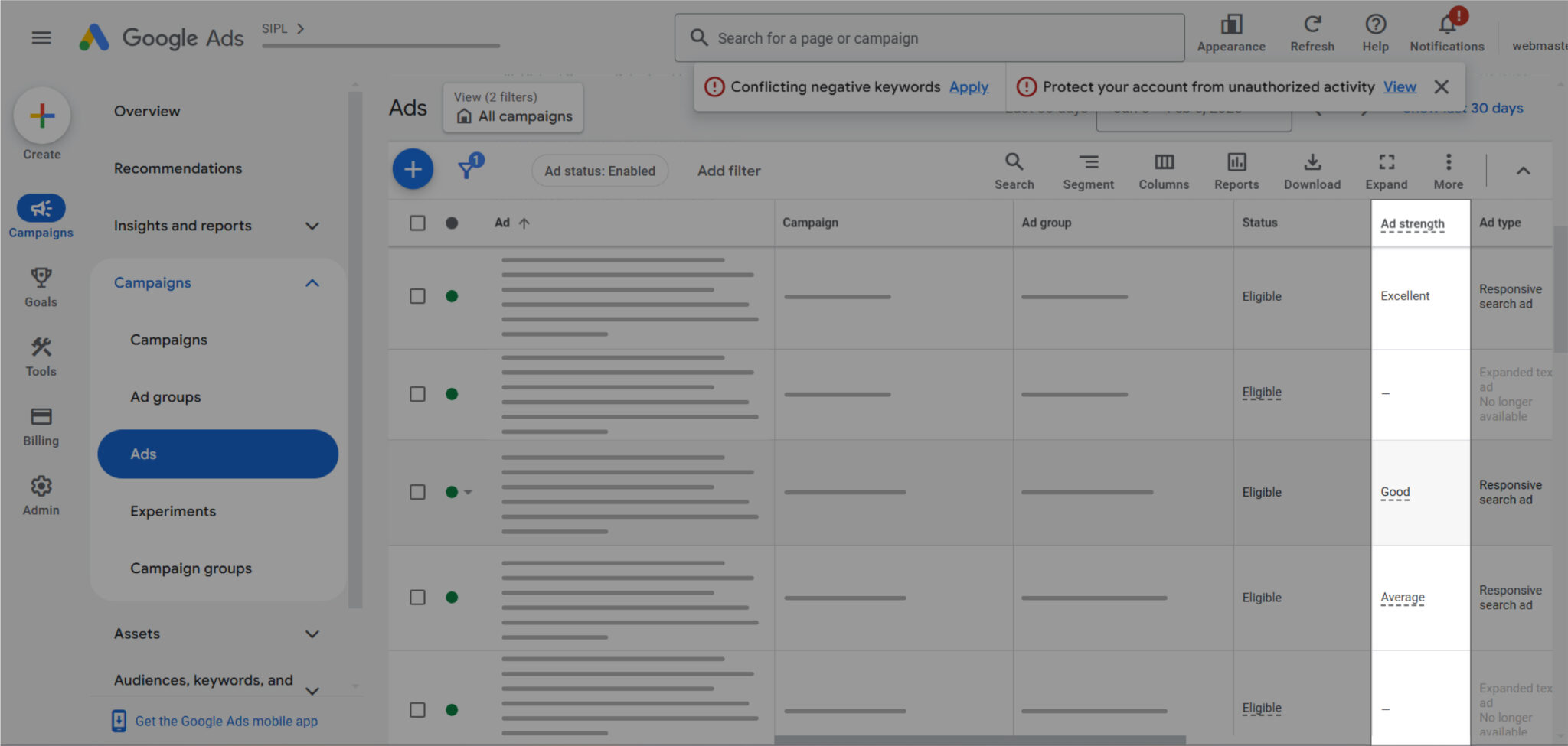
The minimum setup for a healthy asset group:
- 5 headlines (10–15 is better), 5 long headlines, 4–5 descriptions;
- 10–15 images in three formats—square, landscape, portrait;
- a logo;
- at least one video lasting 10–30 seconds.
A separate note on videos. If you don’t add one, Google will generate a slideshow from your images and run it on YouTube. To be honest, it looks sad: it brings in almost no conversions but eats up the budget. It’s better to shoot a video yourself on a phone than to leave it to auto-generation.
Update your creatives every 4–6 weeks, but not all at once. Replace 2–3 images and a couple of headlines—and the campaign won’t return to the learning phase.
Performance Max Drains the Budget on the Display Network and Games
This is where many advertisers find the answer to the question of why Performance Max isn’t working: the campaign spends, shows, and even collects clicks—but there are no sales. You open the report and see that 70% of impressions went to mobile games and the content network.
This happens when:
- there are few auctions in Google Shopping or Search where the campaign wins (high competition, not enough assets for search);
- the budget is large, and the system is looking for somewhere to “place” it;
- the conversion goal is too soft—”page view” or “add to cart,” and cheap clicks from games look effective.
How to spot it. In Google Ads, go to “Insights and reports” → “Placement report” and select the PMax campaign. There you’ll find a list of sites, apps, and YouTube channels where the ads ran.
How to limit this:
- add placement exclusions at the account level—specific apps and entire categories (games, kids’ content);
- shift the goal to a macro-conversion—a purchase or a lead, not micro-actions;
- turn off Final URL expansion if traffic is going to irrelevant pages;
- for new campaigns, try a feed-only setup without assets—then the ads will mostly run on Google Shopping.
You can’t completely disable the Display Network in PMax—Google designed this campaign to be omnichannel. But narrowing the share of “junk” traffic down to 10–15% is entirely realistic.
Why Does PMax Steal Brand Traffic from Search Campaigns?
A classic trap. You launched PMax alongside a search campaign, and the brand campaign started getting half the conversions. Meanwhile, PMax shows a fantastic ROAS of 800%. In reality, PMax simply intercepted users who were already searching for your store by name.
This is traffic cannibalization, and it hurts twice. First, you’re paying for customers who would have come for free from organic search or for pennies via the brand campaign. Second, the PMax report shows fake performance—and you end up scaling something that isn’t actually working.
Check in the “Insights” → “Search themes” → “Search terms” section to see what percentage of queries contain the brand name. Over 30%—the diagnosis is confirmed.
Tools for control:
- brand exclusions at the campaign level—add your brand to the list, and PMax will stop showing for branded queries;
- negative keywords—they can now be added in PMax too, up to 100 per campaign;
- search themes—on the contrary, they suggest priority queries to the algorithm and work like loose keywords.
After excluding the brand, the PMax campaign’s ROAS naturally drops—don’t let that scare you. You will see its true performance for new customers, and that’s exactly what you should focus on.
Audience Signals That Stopped Working
Audience signals aren’t targeting, but a hint to the algorithm on who to start with. At the launch, they speed up learning, but over time their importance weakens. The problem arises when the signal “fades”:
- a remarketing list built from pixel data, which has noticeably decreased after browser updates;
- an uploaded Customer Match list hasn’t been updated for six months;
- an affinity audience is too narrow, and the system has exhausted it.
Update the customer list once a month, adding buyers from the last 90–180 days. Create a separate signal from similar users. And don’t be afraid to test an asset group with no signal at all—for mass-market products, a broad approach sometimes works better.
The PMax Campaign Dropped and Isn’t Spending Budget
The opposite situation: instead of a drain, it’s at a standstill. You set 1,000 UAH a day, but only 150 is spent. The campaign isn’t “broken”; it simply isn’t finding auctions where it can win under your conditions.
Causes:
- Target ROAS is too high or Target CPA is too low;
- too few products are approved in Merchant Center;
- narrow geography or language, and combined with a strict target, there are almost no options;
- a search campaign with the same products has higher bids and is stealing the auctions;
- the campaign was just created and is stuck in the asset review stage (moderation sometimes takes 2–3 days).
Temporarily remove the ROAS/CPA target and set it to “Maximize conversions” for 2 weeks. The campaign will gather data, and then you can restore the target to 80–90% of the actual result.
Causes Outside the Ad Account
Sometimes the answer isn’t in the settings at all. No one touched the campaign, but its performance dropped—because the world around it changed.
- Seasonality. For a gardening supply store, a drop in September is normal. Compare it to last year.
- Competitors. A strong player entered the niche with price dumping—your products in Shopping look more expensive, and CTR drops. Check the “Price Competitiveness” report in Merchant Center.
- The website. You updated the design, and the product page takes 6 seconds to load instead of 2. Or the “Buy” button disappeared on the mobile version. Ads are driving traffic, but the site’s conversion rate dropped from 2% to 0.7%. Run your pages through PageSpeed Insights and walk through the customer journey yourself—from a phone.
- Prices and availability. Top products ran out of stock, and the feed updated late.
- Holididays and long weekends. They break the algorithm’s forecast, and recovery takes 3–5 days.
- Someone else’s hands in the account. A team member shifted part of the budget, changed the attribution model, or paused the campaign for a day. Check the Change history—Google Ads stores it for two years.
How to Find the Cause of the Drop in the Channel Report?
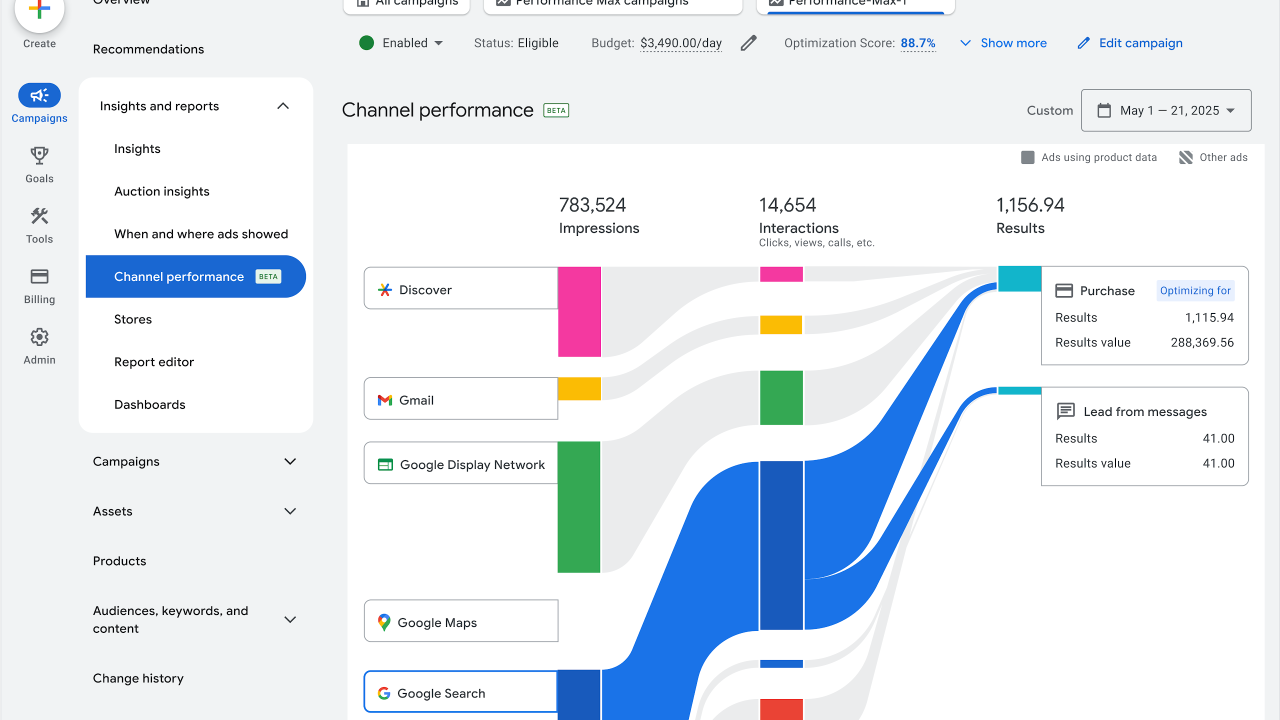
There is no universal “where it broke” report, but in 20–30 minutes, you can narrow it down to one or two hypotheses. Proceed in this order.
- Pinpoint when the drop started. Open the conversion chart for the last 60 days and find the turning point.
- Review the change history for 7 days prior to that date. Any edit to the budget, target, assets, or conversions is the prime suspect.
- Check the campaign and bid strategy status: “Learning”, “Limited by budget”, “Limited by Target ROAS”.
- Go to Merchant Center—check the number of disapproved products and the date of the last feed update.
- Open the “Insights” tab in the campaign and look at the channel performance report. It shows how impressions were distributed across Search, Google Shopping, YouTube, Display, Discover, and Gmail. Compare two periods—before and after the drop. If the share of Shopping ads dropped from 60% to 25%, while Display grew—look for the cause in the feed or the conversion goal.
- Review the placement report—see if new apps and sites have appeared that ate up the budget.
- Evaluate the asset group: asset ratings and what isn’t being used.
- Check search terms—the percentage of branded and irrelevant queries.
- Go to the website from your phone and place a test order.
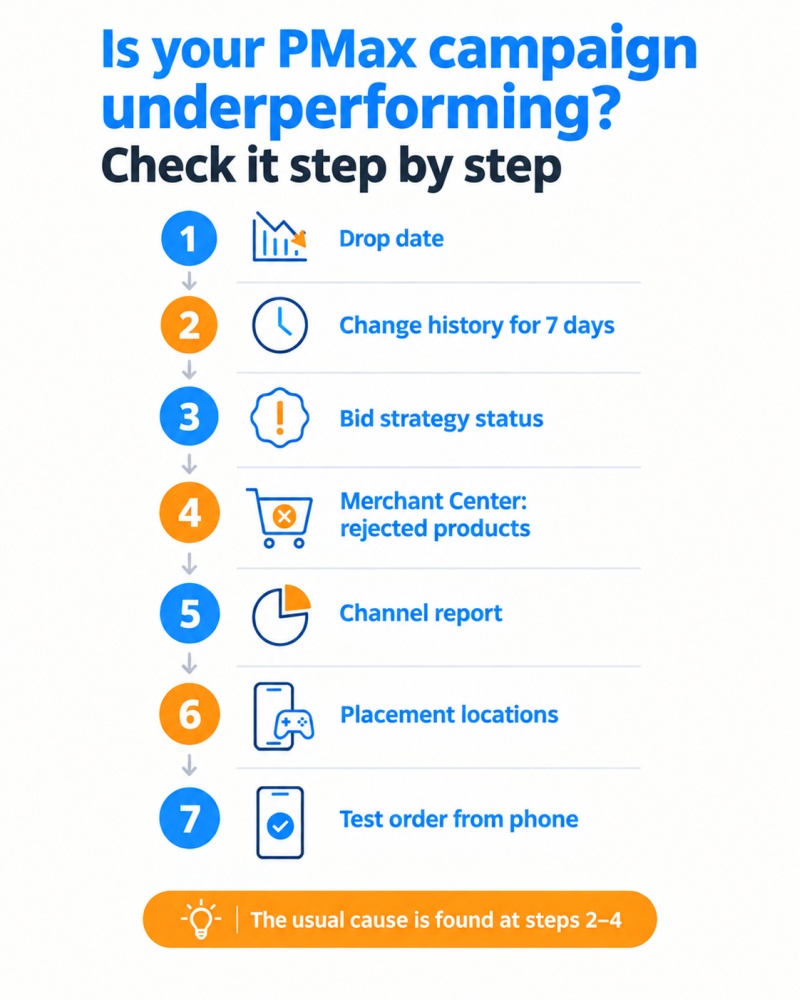
Each step either confirms a hypothesis or rules it out. Usually, by the fourth or fifth point, the picture is clear.
Example. A kids’ clothing store (budget 3,000 UAH per day) saw conversions drop on the 14th. Change history: on the 12th, tROAS was raised from 350% to 450%. Campaign status: “Limited by Target ROAS”. Shopping’s share in the channel report dropped from 70% to 40%. Merchant Center is clean. The diagnosis is obvious, the cure—revert to 350% and don’t touch it for two weeks.
What Helps Prevent Future Drops?
A few habits that eliminate half of potential problems:
- Keep a change log in a Google Sheet—the date, what was changed, and why. In a month, you won’t remember why the campaign returned to the learning phase.
- Set up automated rules or alerts: fewer than X conversions a day—get an email.
- Check Merchant Center every Monday—it takes 5 minutes.
- Maintain a separate brand search campaign and add brand exclusions in PMax.
- Don’t launch PMax with a budget below 300–500 UAH per day—the algorithm won’t have enough data, and instead of results, you’ll get an eternal learning phase.
- Update a portion of your creatives every 1.5 months, not all at once.