How to Scale Google Performance Max Ads?
The campaign is running, ROAS is holding steady at 450%, the budget is being fully spent—and you want to step on the gas: double the daily limit to get twice as many sales. In practice, this almost never works out. More often, the spend increases, the number of sales stays the same, and the cost per order goes up by a third.
The reason is simple. Performance Max runs on machine learning, and the algorithm has already found the most profitable auctions for your current investment. Every subsequent hryvnia buys less “warm” traffic. Therefore, scaling Google Performance Max means giving the system not just more money, but material to work with: fresh products, audience segments, creatives, and adjacent channels.
In this article, we’ll break down the signs of readiness for growth, how to properly increase your Performance Max budget, when to touch tROAS, what to do with the feed, and what to launch alongside it to increase sales rather than just spend.
Important: Everything described below only works with correctly configured conversions that pass value. If the account sees leads without a value or misses some purchases altogether, any Performance Max scaling turns into a lottery.
When is a Performance Max Campaign Ready for Scaling?
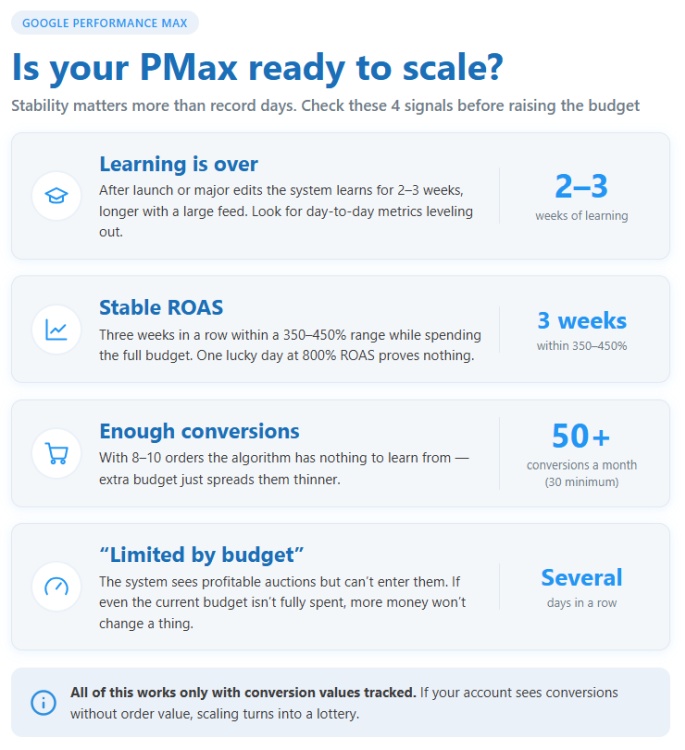
The main criterion is stability, not record-breaking days. One lucky day with an 800% ROAS proves nothing. However, three consecutive weeks in the 350–450% range with a fully maxed-out limit is a reason for growth.
Before increasing your investment, check that:
- The learning phase is over. After launch or major edits, the system usually takes 2–3 weeks to learn, and even longer with a large feed. The “Learning” status disappears in the interface, but you should look for day-to-day metrics to level out.
- Enough conversions have been accumulated: at least 30 per month, preferably 50+. With 8–10 orders, the algorithm has nothing to learn from, and any addition will simply spread them out thinly.
- The “Limited by budget” status has been on for at least several consecutive days. This is the most direct signal: the system sees profitable auctions but cannot participate in them. If even the current limit isn’t being exhausted, extra money won’t change anything.
- The goal is being met or almost met. You don’t have to wait for perfection: if the target is 400% and the actual is 370% with stable dynamics—you can start, but carefully.
Let’s say a home goods online store spends 1,500 UAH a day, gets 40 purchases a month with an average order value of 2,200 hryvnias, and a ROAS of around 390%. The money runs out by 3:00 PM every day—this is a classic candidate for scaling. But if that same store gets 12 orders and spends only 1,100 hryvnias out of 1,500—fix the feed, assets, and landing pages first, rather than raising the bar.
Also, check the “Insights” tab. If one asset group or category brings in 70% of the value, it’s worth developing that specific one, not the whole thing. More on this below.
How to Increase Your Performance Max Budget Without Losing ROAS?
The optimal approach is in increments of 15–20%, pausing to evaluate. This rule is repeated by almost everyone managing large accounts, and it really works. A sudden jump (2-3x in a day) is highly likely to restart the learning phase—the algorithm will have to search for auctions all over again for the increased volume, and the first few days are usually the most expensive.
The working framework:
- Raise the daily budget by 15–20%: from 1,500 to 1,750–1,800 hryvnias.
- Wait 7–14 days. Small amounts (up to 1,000–1,500 hryvnias per day) gather statistics more slowly—they need two weeks, whereas one week is enough for 5,000.
- Compare ROAS and CPA before and after the increase. If it stays within 10% of the previous level—take the next step. If it drops more significantly—stop and wait another 7 days before making a decision.
- Repeat until the additional spend brings a proportional increase in revenue.
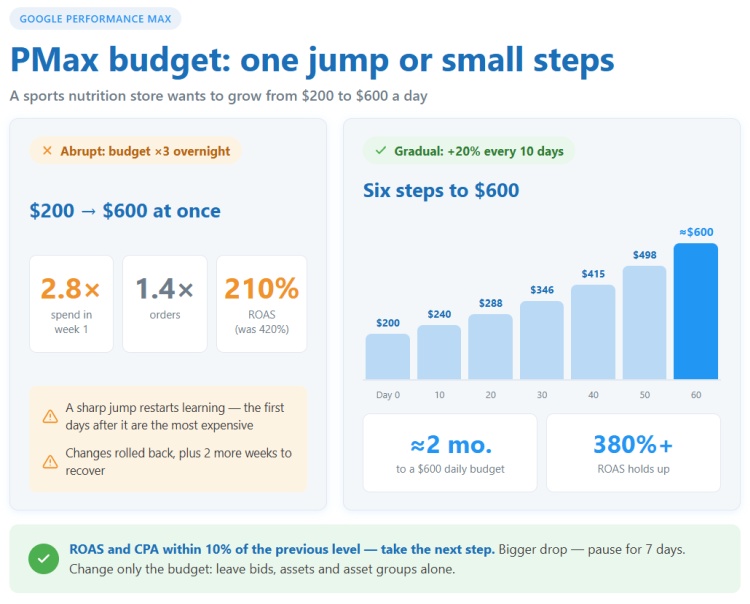
Can you change the budget in Performance Max frequently? Technically—even daily. Practically, the system handles changes within 20% smoothly, while frequent back-and-forth tweaks (Monday +30%, Thursday −25%, Saturday +20% again) disrupt the learning phase and perform worse than taking a single step once every half-month. The rule: if you change the limit, don’t touch bids, assets, or asset groups at the same time. One variable at a time, otherwise you won’t know exactly what made the impact.
Attention: On certain days, Google might spend up to twice your daily average to even out the spend over the month. Don’t panic if you see 3,400 UAH with a limit of 1,800—this is normal. You should only start panicking if it happens daily without any increase in conversions.
Imagine a sports nutrition store that has been running on 2,000 UAH a day for three months. The owner decided to scale sales with Performance Max and immediately raised the limit to 6,000 hryvnias. Over the first week, spend grew 2.8 times, orders by 1.4, and ROAS dropped from 420% to 210%. He rolled back the changes, and it took another two weeks to recover. Using the “20% every 10 days” framework, the same store would have reached 6,000 in about two months—slower, but with a return on ad spend above 380%.
A separate issue is seasonality. Right before Black Friday or the New Year’s peak, there’s no time to wait 14 days between steps. In this case, use seasonality adjustments in the account tools: this warns the algorithm about an expected spike in sales, and the limit can be raised faster. Just make sure to turn it off after the peak.
When to Lower Target ROAS to Scale a PMax Campaign?
Budget isn’t the only lever. Often, volume hits a ceiling due to a target ROAS that’s too high, rather than a lack of funds. The algorithm receives a strict bar, filters out all auctions where it isn’t confident in the desired return, and ends up spending 60% of the amount. Lowering tROAS from 500% to 420% will open access to additional traffic and allow you to scale PMax ad revenue without changing the budget.
Signs it’s time to lower the target:
- the daily amount consistently fails to be spent, and there’s no “Limited by budget” status;
- the actual return is noticeably higher than the target (550% vs. 400%)—there’s headroom;
- impressions and clicks have been falling for several weeks straight with the same settings.
Lower it just as gradually: by 10–15% at a time, with a pause of 1–2 weeks. And keep the break-even point in mind—more on that below.
The opposite also happens: a campaign overperforms its goal and maxes out the budget. In that case, add money while simultaneously raising the tROAS slightly (say, from 400% to 430%). The extra money will go toward volume, and the higher bar will prevent the campaign from sliding into expensive auctions.
Which Strategy to Choose?
Maximize Conversions without a target CPA is suitable at the start, when data is scarce and you need to accumulate 30–50 results. Once there are statistics, add a target cost per action (tCPA)—for lead generation or stores with uniform order values. For e-commerce with prices ranging from 300 to 15,000 UAH, switch to Maximize Conversion Value with a target ROAS (tROAS): the algorithm will start telling the difference between a 12,000-hryvnia order and a 400-hryvnia receipt, and will stop chasing cheap, small items.
Strategies are changed less often than they should be. A store might sit on Maximize Conversions for a year, rejoicing at the number of orders, while the average order value drops in the meantime: the system learned to sell what’s easiest to sell. Switching to Maximize Conversion Value here is the fastest way to increase revenue without additional costs.
Important: Changing your bid strategy restarts the learning phase. Don’t do it during peak season, and don’t combine it with a limit increase.
Why a Larger Budget Doesn’t Always Increase PMax Sales?
Demand is finite, and the algorithm has already skimmed the cream off the top. At 1,500 UAH a day, the system selected the hottest queries and the people most ready to buy. At 3,000 hryvnias, it has to gather volume where the conversion rate is lower: more generic phrases, cold audiences on YouTube and Discover, banners on the Display Network. The average cost per sale rises—this is normal auction economics, not a breakdown.
There is a second, less obvious reason. With modest investments, PMax often survives on branded search and remarketing—on people who were going to buy anyway. A 600% ROI looks great, but there is no room to grow: there won’t be more people searching for your brand. When the limit increases, it has to go into non-branded traffic, and its real return is 250%. The drop looks dramatic, even though you just saw the true cost of acquiring a new customer.
What to do if metrics drop after an increase:
- Wait. The first 3–5 days after a change almost always show worse metrics—evaluate over a full 7–14 day period.
- Check if the campaign has gone back into learning mode. If so, don’t touch anything until it finishes.
- Exclude brand terms and move them into a separate Search campaign. This way, you’ll see the honest return on new customers and stop paying a premium for “your own” people.
- Check the “Channels” tab. If the Display Network share grew from 10% to 40%, but there are no sales from it—strengthen your feed and search themes to pull impressions back to Shopping and Search.
- Verify your landing pages. With Final URL Expansion enabled, the system chooses the page itself, and at high volumes, traffic might drift into weak categories. Limit the expansion or add a page feed.
If after 14 days the metric is still 20% or more below the goal—roll back one step: not to the initial level, but to the previous tier. Make your next attempt later, after working on assets and the feed.
Scaling Google PMax via the Feed, Asset Groups, and Assets
The most underrated way to scale PMax is to give the algorithm more high-quality input data. Money buys impressions, but the feed, assets, and audience signals determine how effective they will be.
Product Feed and Merchant Center
For e-commerce, the feed is 70% of success. Check in Merchant Center:
- Are all products approved? Disapproved items and limited performance warnings cut your reach before the budget even comes into play.
- Titles. “Puma Sneakers” sells worse than “Puma Suede XL Sneakers Red.” Key attributes (brand, model, color, size, material) should be placed at the beginning.
- Attributes like product_type, custom_label, and gtin. Without them, you can’t break your inventory down into groups by margin or seasonality.
- Prices and availability. Discrepancies between the feed and the website lead to suspensions, while “out of stock” products waste impressions.
Add fresh categories to the feed—and you’ll tap into additional demand without raising bids. A plumbing store that added 300 faucet items to its 500 already-advertised bathtubs often sees a 25–30% revenue boost at the same daily limit: new auctions appeared that it hadn’t participated in before.
Splitting Campaigns and Asset Groups
When one campaign runs 3,000 items with margins ranging from 8% to 45%, a single tROAS inevitably averages things out: expensive, high-margin items get too few impressions, while cheap ones get too many. Segment them by custom_label:
- High-margin bestsellers—a separate campaign with a lower tROAS (a higher cost per acquisition is acceptable).
- Main catalog—a medium tROAS.
- Low-margin items or clearance—a high tROAS or no advertising at all.
Each has its own budget, and you can finally see where the money goes. Inside the campaign, divide asset groups by category—with separate headlines, images, and audience signals for each. “Women’s Outerwear” with a photo of a coat will work noticeably better than a generic “Entire Catalog” with the store logo.
Assets and Search Themes
Fill out every group to the maximum: 15 headlines, 5 long headlines, 5 descriptions, at least 10–15 images in different aspect ratios, and at least one video. Without a video, the system will generate an image slideshow—which looks less than convincing, to put it mildly, yet runs on YouTube at your expense.
Search themes (up to 25 per group) prompt the system about desired traffic. Add terms that already convert in regular Search, plus phrases with high purchase intent: “order + category,” “price,” “delivery Kyiv.” This speeds up the exit from the learning phase and helps pull traffic from the Display Network back to Search.
Attention: Do not update assets in batches once every six months. Swap out 2–3 weak assets (rated “Low” in the performance report) every 2–3 weeks—this way, creatives are refreshed without resetting the learning phase.
Which Campaigns Should You Launch Alongside Performance Max to Grow Revenue?
PMax doesn’t cover all demand: it selects auctions where it’s confident in the result and often bypasses phrases with good potential but no history. Therefore, to increase Performance Max campaign sales, it is sometimes more profitable to run a second campaign alongside it rather than pouring more money into the first.
What works best:
- Branded Search Campaign. Launch this first: exclude brand terms from PMax and group those queries into a separate search campaign using manual bidding or tCPA. This way, you’ll stop overpaying for your own customers and get honest numbers on new traffic. It is precisely after this step that many are surprised: PMax ROAS drops from 600% to 300%, revealing that half the revenue came from branded searches.
- Search Campaign for Top Queries. Open the PMax search terms report (available at the campaign level), select 20–40 phrases with the highest value, and build a standard Search campaign from them. Use broad match, set a tCPA 20% higher than the actual target—just for volume—and after 2–3 weeks, gradually lower the target to the desired level. Search and PMax won’t compete in this setup: if a query matches, exact or phrase match Search takes priority.
- Demand Gen. If working audiences have already formed in PMax (the “Insights” tab shows which segments convert), use them in Demand Gen across YouTube, Discover, and Gmail. This is cold top-of-funnel traffic: the direct return will be lower, but PMax will scoop these people up later during the purchase phase. Evaluate this combo based on the account’s total revenue, not just individual campaigns.
- Separate PMax for New Customer Acquisition. Enable the “New Customer Acquisition” goal in your settings, using either “New customers only” mode or bidding higher for new customers (e.g., +500 UAH). This will force the algorithm to look for people outside your usual base—growing the number of total orders, not just the frequency of repeat purchases.
What not to do: Do not launch a second PMax with the exact same products and settings “just for testing.” Clones will compete for the same auctions, split the data in half, and both will stay in the learning phase longer.
The Break-Even Point: How Low Can ROAS Go While Scaling?
Growing profit and increasing ad spend are different things. A campaign with a 300% ROAS can be running at a loss, while one with 180% might yield a solid profit: it all depends on the margin. So before lowering your target for the sake of volume, calculate your break-even point:
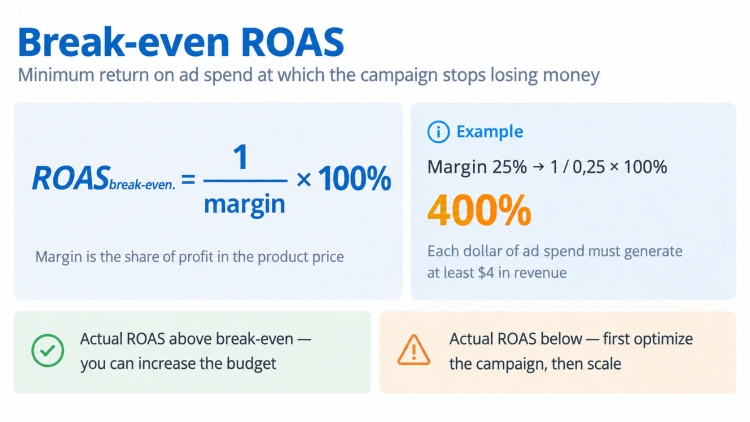
A store with a 25% gross margin breaks even at 400% ROAS, while one with a 50% margin breaks even at 200%. If you lower your tROAS from 450% to 350% with a 25% margin, every additional order brings a loss, even though the revenue in your report is growing.
From there, the math is simple (amounts in hryvnias). With a 25% margin and a 500% target, for every 100 hryvnias spent, you’re left with 25 in net profit. Drop the target to 420%, and you only keep 5 from that same hundred, but order volume might have grown by, say, 40%. Calculate your final profit in hard currency, not percentages: sometimes 5 hryvnias multiplied by 1.4x volume loses out to 25 at the old volume, and sometimes it wins—depending on how many orders the fresh traffic added.
What to monitor weekly when scaling:
Metric | Why | Red Flag |
|---|---|---|
ROAS and conversion value | Main metric for Maximize Conversion Value | Drop of over 15% for two consecutive weeks |
Cost per conversion (CPA) | For tCPA campaigns and lead gen | Growth above the break-even point |
Spend share by channel | Where the extra money went | Display and YouTube grow, Shopping and Search do not |
New customer share | Are sales growing or just repeat purchases | Share drops while investment grows |
Average order value | Has the campaign slipped into selling cheap goods | A decrease of 10% or more |
Status “Limited by budget” | Is there still room to grow | The status disappears, the limit isn’t being reached |
It’s also useful to peek at the products report: if 5% of your items generate 80% of your revenue, break them out into a separate campaign with a large budget. This works faster than a blanket limit increase on everything.
Common Mistakes When Scaling PMax Ad Revenue
The mistakes below are found in every second account that tries to scale Google Performance Max on its own. Check yourself against them.
- Relying on branded traffic. A 700% ROAS at 500 UAH a day is almost always brand traffic, and additional investments will yield nothing but disappointment. Isolate it first, then make your decisions.
- Raising the budget and changing tROAS simultaneously. Two changes mean two overlapping learning phases, and a week later you won’t know which one worked.
- Pausing the campaign at the first dip. Pausing for three days and restarting resets some of the accumulated data. If your return on ad spend drops by 20% on the fourth day after an increase—that’s not a reason to panic just yet.
- Scaling without conversion value. Maximize Conversions with the exact same CPA for both a 400 UAH and a 9,000 UAH order will guaranteed push your campaign toward cheap products as spend grows.
- Forgetting about the website. When spend increases, PMax brings in less qualified leads, meaning page load speed, cart usability, and reviews matter even more. A 1.2% conversion rate will quickly turn into 0.8% if your landing pages can’t handle cold traffic.
- Not monitoring Display Network spend. By default, automatically created assets and final URL expansion on large budgets can drain up to 40% of spend into banners with zero return. Check your channels once a week.
- Expecting results from a single step. Growing a daily budget from 2,000 to 10,000 UAH while maintaining performance is a task for 2–4 months. It’s not quick, but this kind of scaling sticks, rather than collapsing after a couple of weeks.