Hi! My name is Yana Lyashenko, and I’m a Google specialist. To put it simply, I focus on driving the right kind of traffic to businesses—not just “anyone,” but visitors who meet specific criteria agreed upon with the client in advance.
Today we’re breaking down a recent case study. The market is the U.S., and the niche is auto parts (for simplicity’s sake, that’s the easiest way to categorize it). Let’s see what we can actually achieve in the first month of work and why PPC in the U.S. for these types of topics doesn’t launch as smoothly as we’d like.
Launching PPC in the U.S.: How We Approach the Project in the First Month
I’ll say this right off the bat to avoid disappointment later: don’t expect stellar results in the first month. There are niches where optimization alone takes 60 to 90 calendar days—and it’s not because the specialist is working slowly. It’s just that Google stretches out the algorithm training process.
The workflow goes something like this:
- We launch the campaign and collect the initial analytics.
- We check whether the data aligns with the project’s KPIs or not.
- We run an initial traffic test—a small one.
- We evaluate the results and run a second, more substantial traffic surge.
A traffic test is when we intentionally drive a significant increase in volume and observe whether the conversion rate remains at the same level. If it holds—great, we can scale up further. If it drops — it means the algorithm’s analytics aren’t quite there yet.
Important: The first month isn’t about setting ROAS records. It’s about collecting data that will later form the basis for scaling. A campaign that “took off” in the second week has most often just hit a lucky streak rather than achieved a stable result.
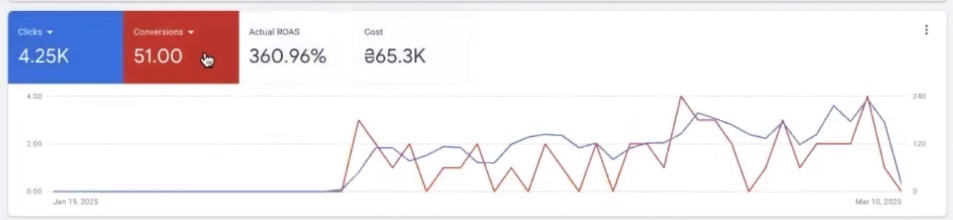
By the way, it’s helpful to divide the month itself into two periods—before the spike and after. On the graph, this boundary is usually visible to the naked eye: clicks spike sharply. I’ll show everything in detail in the screenshots below.
And one more thing, since we’re analyzing a PPC launch in the U.S. using real data. For conversions, I specifically use “purchases”—actual sales—rather than submitted forms or button clicks. Just to avoid any confusion: case studies in this niche sometimes “fudge” the numbers by tweaking the page code. That’s why I reload the page right during the analysis, and only then go to the Overview.
Ad Campaign Analysis
What do we have at the start? It took a long time for the ad account to gain traction. Although the initial metrics looked, to be honest, fantastic: ROAS of 2,463%, then 1,800%, followed by 593%, 715%, and 1,000%.
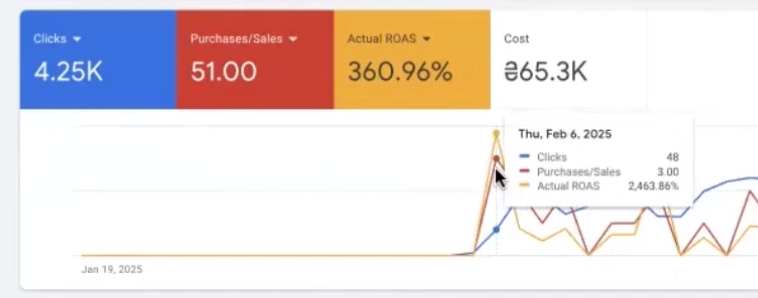
Impressive? Yes. Consistent? Not at all.
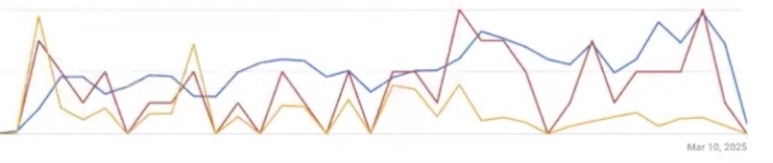
The client’s Shopify site—that’s a whole other story. On Shopify, there’s almost always some instability in the numbers, and it’s not related to advertising but to conversion tracking. Data isn’t pulled in correctly due to different sources and payment methods. Shopify Payments, for example, regularly throws in some surprises.
Why does this affect the ad account rather than just being an “inaccuracy in the reports”? Because the automated system relies on feedback. If it doesn’t receive feedback on buyer behavior, it starts changing the targeting formats to its own. Then you have to manually revert it to the original settings you initially configured.
Tip! Check that conversions are being tracked correctly before evaluating campaign results. Half of the “bad” accounts aren’t actually bad—they just have leaky analytics, and the algorithm is training on incomplete data.
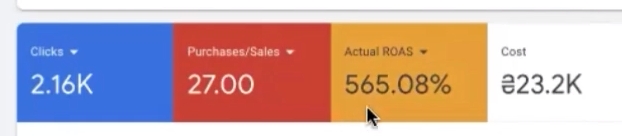
Looking at purchase ROAS, the picture was quite promising. Let’s take the period before our serious attempt to scale up traffic—roughly from January 26 to February 25. Here’s what we see:
- total return on ad spend (ROAS) — 565%;
- number of conversions—27.
The return is good. But the volume is a bit low. For the traffic we’d already been running, 27 conversions over that period is modest.
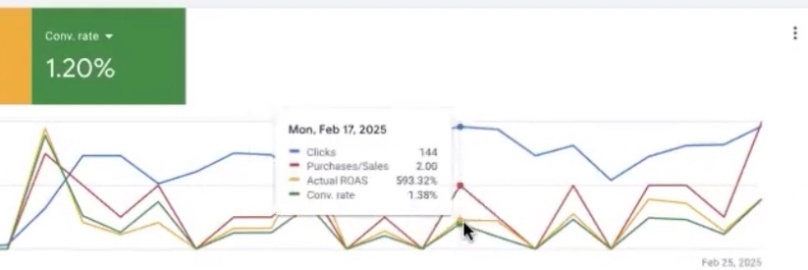
And here, we need to be honest about one thing, because PPC advertising in the U.S. doesn’t forgive everything. We launched our first traffic drive during this period a little too early. At that point, the conversion rate hadn’t yet reached the level where scaling happens smoothly. We wanted to see results faster—and the decision turned out to be premature.
Analysis of the Conversion Rate
Let’s move on to the conversion rate—and here, the picture isn’t quite as rosy. The metric didn’t hold steady at the level it was supposed to.
Here’s a quick benchmark to help you understand: 1.5% is a rough minimum threshold—it’s best not to fall below this in an ad account. You might see rates as low as 0.3% or 0.6%, but those are typical of high-cost niches. Furniture, for example. There, the average order value is high and the decision-making cycle is very long: a person spends a month choosing a sofa, comparing options, consulting with their spouse, and bookmarking the page. For this type of product, a low conversion rate is the norm. Our niche, however, is different, and our conversion rate is literally teetering on the edge.
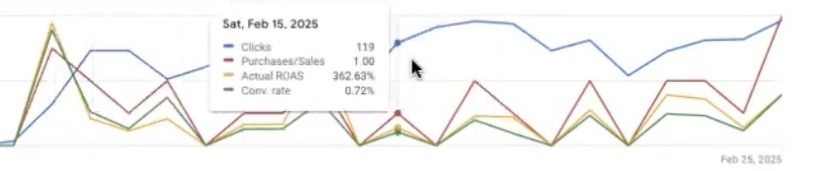
The gap visible on the graph is actually the first small traffic boost. Why do we need it at all? To test a simple hypothesis: can we squeeze out more conversions at the rate we already have?
Here’s the logic. The website and its current traffic have an established conversion rate. We drive in more of the same traffic and see what happens. Essentially, this is a test of the algorithm’s maturity: has the automated system collected enough data to scale, or not yet?
In niches where ROAS already looks decent, you should gather statistics quickly and aggressively. Otherwise, you’ll just be stuck at 20 conversions a month, wondering whether that’s a real result or a random coincidence. Without sufficient volume, the data simply won’t be statistically significant.
In fact, the ROAS didn’t hold up. Traffic increased noticeably—primarily because many more products entered the auction, and a significant portion of the product range was deactivated.
By the way, these “misses” have another useful side effect. They show just how aggressive—or, conversely, how weak—our bidding strategies were for a specific auction. This is something you won’t see in basic reports when setting up PPC for e-commerce in the U.S.—you need a real-world volume stress test.
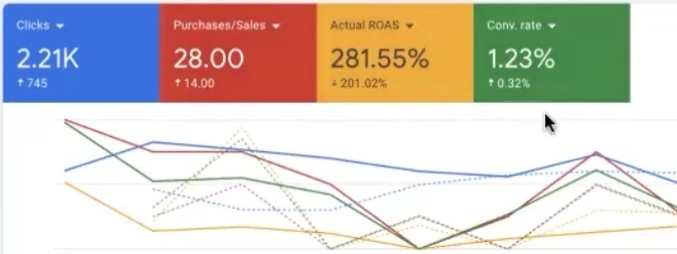
Here are the final numbers:
- we got 28 conversions—an increase of just 14;
- ROAS dropped by about 200 points;
- the conversion rate increased by 0.32% at one point.
ROAS has dropped over the last 7 days. It might recover slightly—late conversions are still being recorded, which happens regularly. However, the increase in the conversion rate—even if small—indicates something important: the traffic quality is fine. It’s highly likely that the ROAS dropped not because of poor-quality clicks, but simply because more products were displayed.
Verifying the Selected Strategy Yourself
How can you verify this yourself? You can easily replicate this analysis in your own account—it’s not complicated at all.
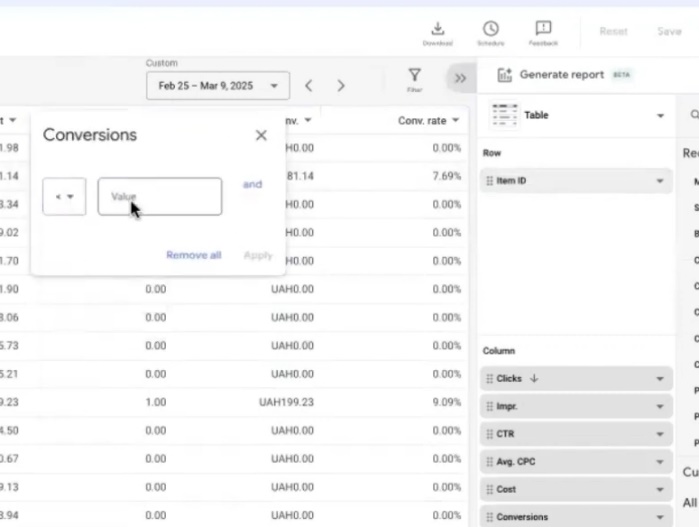
Go to the Shopping Products report and work with the item ID. Next, set the following filters:
- Conversions — less than one. A note here: I use the “last-click” attribution model, so there are no half-conversions. Your model may be different—adjust based on your specific situation.
- Costs — more than 20 UAH. This figure is arbitrary but illustrative: 300 products at 20 UAH each already add up to a significant amount of spending.
Now comes the most interesting part—we’ll average out the cost data by time period. And here’s a nuance that many people stumble over. Simply switching dates in a single window isn’t accurate: in different periods, the conversion filter selects different sets of products. The comparison won’t work.
Helpful tip! Open two windows, each with the same number of days, and compare them side by side. For example, days 12–24 in the first window and days 25–9 in the second. This is the only way to see the true trend, rather than a filtering artifact.
Let’s see what we get. In the “before” period, spending on products totaled about 7,000 UAH. In the “after” period, it was already 36,000 UAH—a fivefold difference.
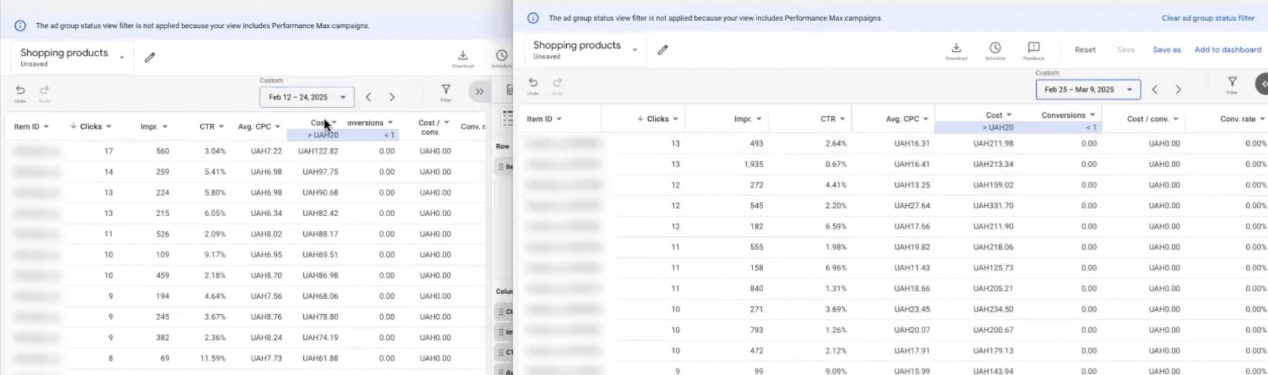
A logical question: Are there any products that simply drained the budget for nothing? Let’s check. No, there aren’t any. There are items costing 331 UAH and 227 UAH—that’s just business as usual. If we filter out items costing between 20 and 120 UAH, we get about 26,000 UAH—this is the main portion of the expenses. Let’s raise the lower limit to 50 UAH—we’ll see 1,648 UAH. In other words, the spending is spread across many segments, each of which generated some traffic.
It’s not a disaster. We were simply consciously trying to drive more conversions.
I’ll be honest: we may have rushed things. We wanted to see results faster—but it turned out the way it did. What’s important is this: the drop in profitability here isn’t because the account “broke” or the optimization strategy went off track. When launching PPC campaigns in the U.S. and other competitive markets, it’s precisely through these test runs that you’ll immediately notice two things: how tight or loose your bids are, and how well your product lineup actually converts.
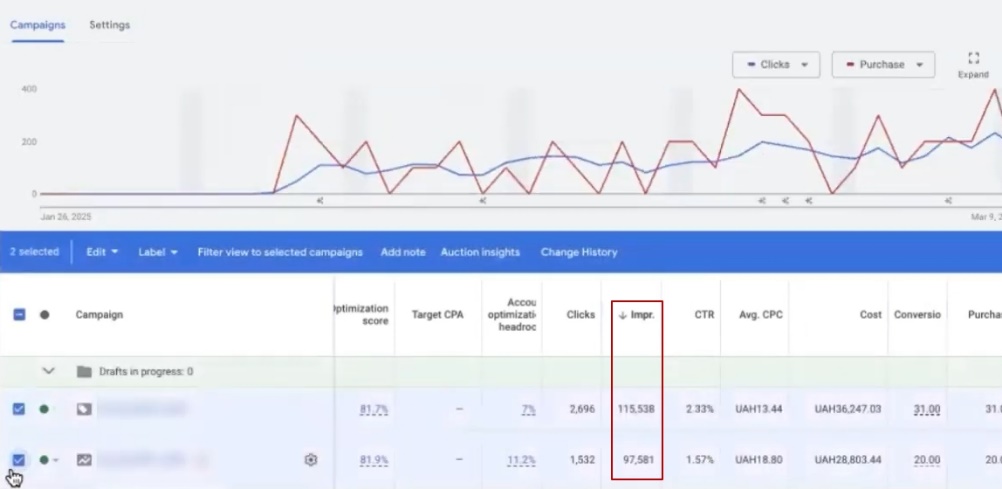
By the way, I’m not hiding the campaigns. Everything that worked during this period is visible in both the cost per click and impressions—you can check for yourself.
Simultaneous launch of two PPC campaigns in the U.S.
There were only two campaigns running in the account: a standard product campaign and Performance Max. We almost always start with this combination—it helps “warm up” the “All Items” feature more effectively.
But let me clear up a common misconception right away. You don’t need a standard product campaign to “kickstart” Performance Max. And vice versa—you don’t run Performance Max just to get the standard product campaign up and running. They don’t prop each other up. It’s simply that each campaign has its own unique strategy, and each serves its own specific purpose.
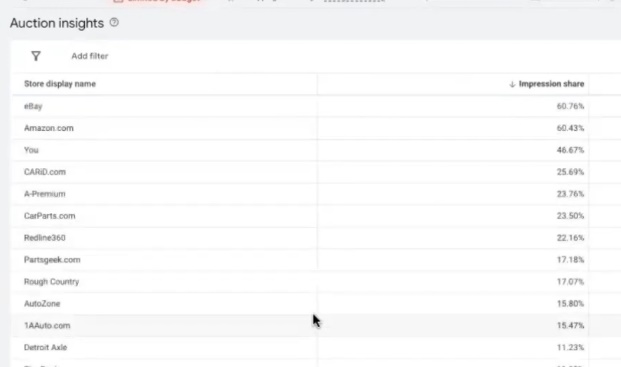
In a standard product campaign, we always deliberately set the target ROI higher—roughly twice as high as in Pmax. Why? To test the limits:
- To see if the account is capable of generating a higher ROI than what we actually need. In our case, the account wasn’t exactly starting from scratch, but there had been virtually no impressions over the previous 30 days—meaning its history was almost blank.
- In Pmax, on the other hand, we set the ROI lower. This is done to ensure competitiveness: the algorithm needs room to compete in the auction.
Next, in both campaigns, we look at the auction statistics—where we stand, who we’re competing against, and where we rank based on the relevant metrics. And here’s what’s interesting: in a standard product campaign during this period, we weren’t in the top spots at all. Does that sound like a failure? Actually, no—it’s an excellent result for a test. That’s exactly what we were testing.
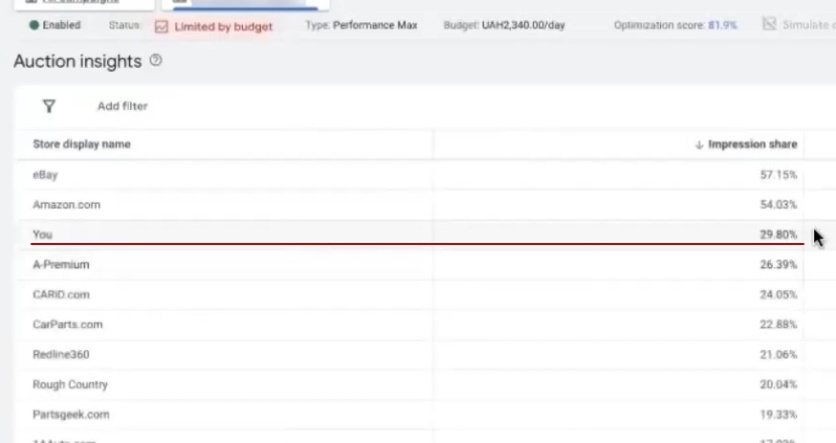
In Pmax, the analytics are a bit more limited. There’s no “Search” category in the auction statistics—it’s a “Feed Only” campaign type. The impression share is also low.
Pay close attention to the auction statistics in the very first month. That’s what shows whether you have any bidding headroom at all, or if you’ve already hit the ceiling and simply have nowhere left to scale.
By the way, this situation clearly confirms that the bid adjustment was made too early. But why not test it if the purchase metrics had been looking great up until then? Especially since conversions actually increased on February 25. Not every period has to be perfect—with proper PPC setup for the U.S. market, such tests are planned in advance. And the results, in my opinion, are quite good.
Actually, that’s what they pay for: a PPC specialist for the U.S. isn’t needed just to click “Run,” but to understand which test will yield useful data and when.
Change in ROI
Did the entire period meet the target ROI? No. I’ve already explained the reason above—a drop in the conversion rate amid increased traffic.
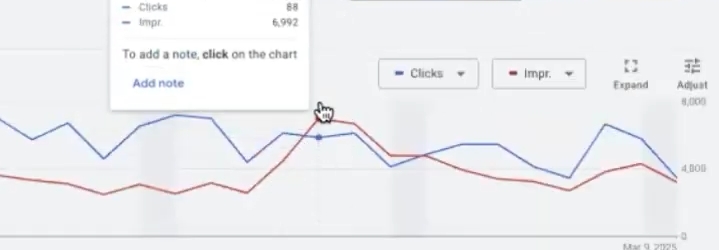
The campaign itself performed well, though. We had a solid margin of safety in terms of profitability, so we could afford to make this move without risking the account’s failure.
The metrics show that the structure has changed, although clicks mostly remained within the same block. However, purchases in the standard product campaign can’t be called stable—they fluctuate. Pmax behaved differently in this regard: it ramped up slowly, gathering analytics at a leisurely pace, but with its own nuances. Any PPC campaign of this type requires patience—the algorithm needs time.
Conclusions Based on the First Month of PPC Campaign Results in the U.S.
In my opinion, the results for the first month are quite respectable. Could we have saved money? Yes. Could we have waited another couple of weeks and left the traffic alone? Also yes. But I’ll admit, I was itching to make changes.
Both campaigns need to be constantly monitored and managed. It was still too early to trim the product lineup based on all metrics. But now, with traffic and clicks taking a nosedive, the situation is ideal for streamlining. What exactly are we looking for:
- products with conversion costs that are too high;
- listings that ran but didn’t generate a single conversion;
- products that didn’t receive any clicks at all;
- consistent “cash cows” that can serve as the foundation.
Essentially, the second month is already ripe for optimization. It’s clear which products are performing well, which are dead weight, and what profit margins to target moving forward.
That said, not everything is smooth sailing. The conversion rate has been fluctuating during these periods: 1.70% in some cases, 1.20% in others, and 1.09% in others. It’s unstable. Not the entire product range is converting as well as we’d like.
A fluctuating conversion rate across different segments isn’t a reason to panic—it’s a signal to segment your offerings. Categorize products by average order value, product structure, and performance: cash cows, stars, dogs, and zero-contributors. Then, assign a specific profitability target to each group.
First conclusion: You can set profitability targets boldly, without hesitating to aim for high values. Auction statistics look logical and justified at both low and higher metrics. Second conclusion: there is potential for further segmentation, and it’s not limited to sales figures.
And one more point about competitors. When giants like eBay or Amazon—low-cost, large-scale players with an endless product range—enter the auction, it’s not a death sentence. On the contrary. This means there are product segments and auction segments where it’s entirely possible to carve out your own slice of the pie. This is precisely what working with pay-per-click in competitive markets is all about: not going head-to-head, but looking for areas where the giants aren’t playing their cards right.
Conclusion
I think this case study turned out pretty well. No, there won’t be a story here about 1,301 sales at $5 each—in the long run, it ended up costing more. But we did manage to drive traffic and test a wider range of products to understand which ones convert profitably and which ones don’t.
So that’s a mini-case study from the U.S. I’m not sure if I covered the points that interested you. If you want, you can analyze a single case study endlessly: why we launched it this way and not another, which products we chose to start with, why we decided to test the waters at that moment and not a week later, why a standard product didn’t convert throughout the entire period, and why we started with a manual strategy. It’s a long conversation.
The main point I wanted to make is this: setting up PPC in the U.S. isn’t about luck. The numbers you see are the result of the team’s deliberate and systematic actions, not a random stroke of luck riding a traffic wave. The U.S. audience responds to specific decisions regarding bids, product selection, and campaign structure—and each of these decisions was made with full awareness.