One of the most common questions a client asks after increasing the budget is: “Have we already hit the ceiling on demand? Maybe we need a second website or new categories?” In 8 out of 10 cases, the answer is no. And you don’t have to guess—you can calculate it based on the data already available in your dashboard.
The short answer
The demand ceiling is a characteristic of an individual product, not the advertising dashboard. In a catalog with 80,000 SKUs, there are 80,000 such ceilings—each one unique—and collectively, they’re so vast that the account never hits them all at once. Instead of saturation, what happens is dilution: the budget spreads out across an endless tail of products that previously didn’t receive any impressions. Therefore, the right question is phrased differently—not “have we reached the ceiling,” but “have we reached the ceiling for the profitable top of the catalog.”
What Is the Demand Ceiling
The demand ceiling is the maximum number of people in a given market who actually want to buy a specific product during a specific period. A product purchased twice a month has a ceiling of two sales. No budget, no bidding strategy, and no creative will increase this number—they can only redistribute those two sales between you and your competitor.
Key point: the ceiling is tied to the product, not to the account. The “campaign ceiling” is a derived value—the sum of thousands of small product ceilings—and it behaves quite differently from what one might intuitively expect.
Why a catalog with 80,000 SKUs doesn’t have a single cap
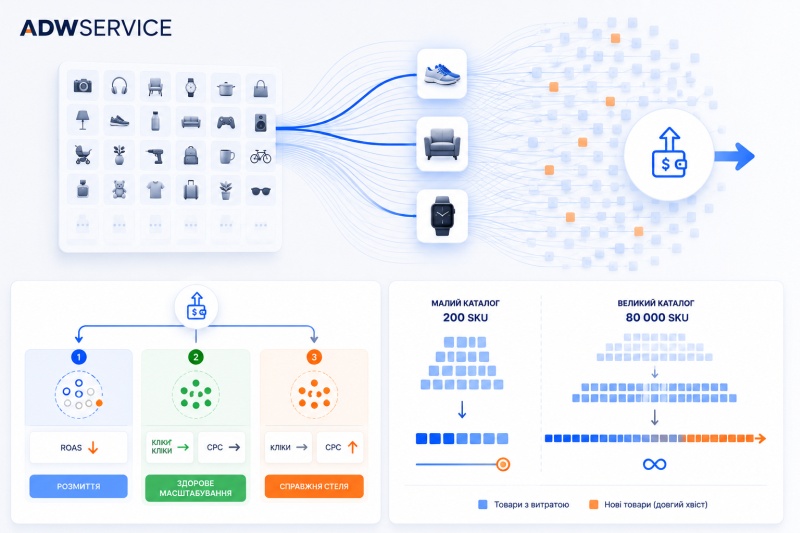
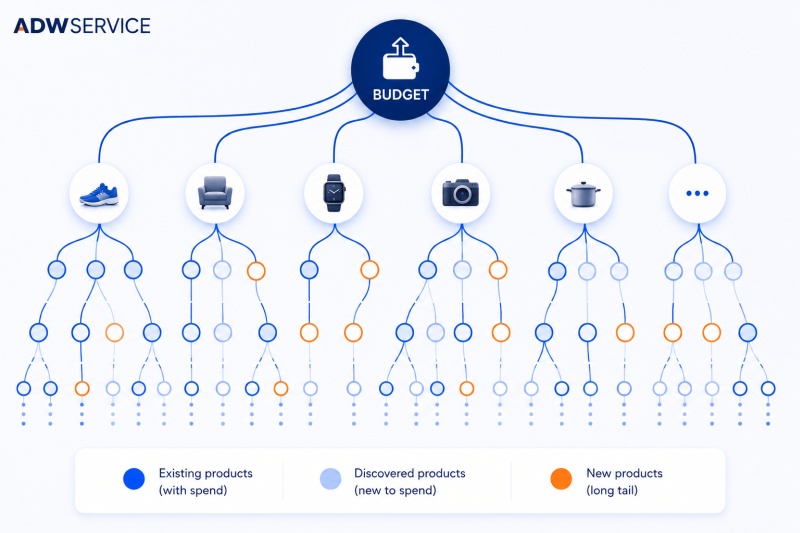
If you have 80,000 products, you have 80,000 separate caps. Most of them are tiny—just a few sales per month or none at all. But there are so many of them that, when added together, they result in a number that the performance budget simply cannot keep up with.
This explains everything else: there’s always somewhere for the money to go. There will always be another thousand products that haven’t received a single impression yet. The algorithm will happily allocate the budget increase there, because technically, this is a new audience and new demand.
That’s why a campaign with a large catalog almost never truly reaches saturation. It gets diluted—endlessly, because the tail is endless.
Why a catalog of 200 products hits its limit quickly
The opposite situation. A catalog with 200 SKUs will hit a real ceiling very quickly because it has nowhere else to spread out. The budget hits the ceiling—and immediately starts paying more for the same users: CPC rises, while the number of clicks stays flat. This is a clear, easily visible ceiling.
That’s exactly why the diagnosis “we’ve hit a demand ceiling” is much more often true for narrow niches and almost always false for large e-commerce catalogs.
The right question: the profit ceiling
A catalog’s total ceiling is a number with no practical meaning. It’s huge, unattainable, and tells you nothing.
The number that matters is the profit ceiling: how much money you can spend on products that consistently convert with acceptable margins before you start simply overpaying for the same traffic. That’s what counts, and that’s what you can base your budget on.
How to distinguish between noise and a true ceiling in your data
Cost increases can be of two fundamentally different types. You can distinguish between them by analyzing item-level data across two periods—before and after the budget increase.
Step 1. Break down the increase in spending into breadth and depth
- Breadth — money was spent on products that weren’t in the budget at all before (or accounted for only a fraction of a penny).
- Depth refers to money spent on the same products that were already being purchased.
Step 2. Calculate the marginal ROAS separately for each component
Not the overall ROAS for the period, but specifically the marginal ROAS: divide the increase in revenue by the increase in spending—separately for breadth and separately for depth.
Step 3. Interpret the results
What the data reveals | Diagnosis | What to do |
|---|---|---|
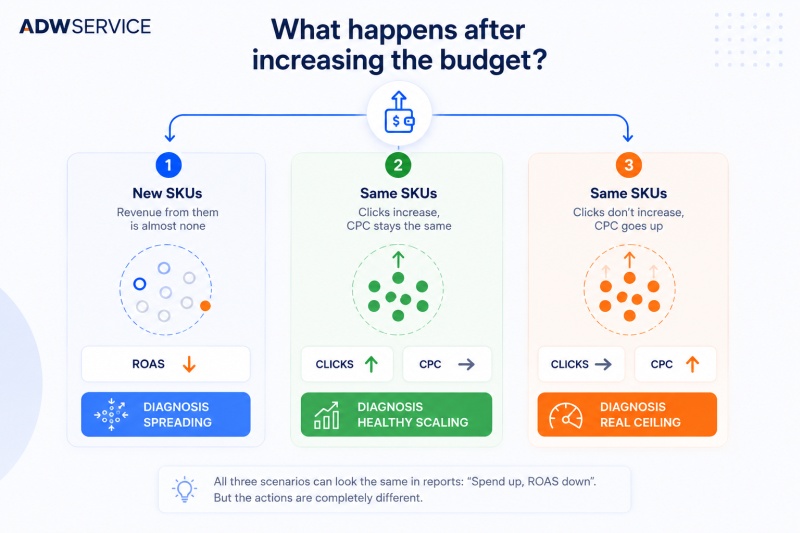
Growth came from reach; there’s almost no revenue from that source | Dilution. The old products haven’t gotten worse—it’s just that their excellent ROAS is now being split with the costs generated by the new products | Restructure the campaign. Don’t let the budget feed the tail |
Growth has gone deeper; clicks have increased, but CPC hasn’t changed | Healthy scaling. Demand is still there; you just weren’t capturing it before | Don’t interfere; keep running the ads |
Growth has gone deeper, but clicks haven’t increased—CPC has gone up | A true ceiling. There are physically no more potential buyers for the product; you’re overpaying for the same people by outbidding competitors in the auction | This can’t be fixed with the budget. It’s fixed by expanding demand itself: branding, new geographic targets, new product range |
The difference is critical, because in the report, all three cases look exactly the same—“costs up, ROAS down.” But three opposite actions are needed.
A quick five-minute indicator
Even before the full breakdown, there’s one metric that’s immediately apparent: how many products had spending before the budget increase and how many after.
Was it 3,000—and did it become 8,000 with the same product lineup? That’s the first scenario: blurring. You weren’t even close to hitting a ceiling—you simply opened up the budget to the long tail.
How to Calculate the Profit Ceiling
- Take the products that have been consistently converting over several consecutive periods.
- See if their impressions are increasing as spending rises.
- If impressions are rising—there’s still room in the auction, and this product hasn’t hit its ceiling.
- If impressions have plateaued while spend is rising—this product has simply become more expensive, and its individual ceiling has been reached.
- Sum up the spend across products that have reached their ceiling—and you’ll get that very “performance ceiling,” not estimated, but calculated.
This number is the honest answer to the question “how much can we spend?”
The only place in the office where the ceiling is fixed
Brand campaigns. Here, the ceiling is real and calculated directly:
volume of brand queries × achievable Impression Share × CPC
This is the only type of campaign where there’s no “long tail” to get lost in. That’s why the brand section of the dashboard provides the clearest signal of whether demand has been exhausted—and why expanding demand (brand, new markets) works where the budget no longer does.
FAQ
-
No. Your budget affects what share of existing demand you capture, not the volume of demand itself. When your share is already high, additional spending drives up CPC rather than generating new clicks.
-
Most often due to dilution: money is being diverted to products that weren’t previously purchased and don’t convert. The average ROAS drops even though the effectiveness of the main products hasn’t changed.
-
When the analysis reveals the third scenario: spending on the same products is increasing, the number of clicks isn’t growing, and CPC has risen. This means that demand for the existing product range has plateaued and needs to be revitalized—through a new brand, a new geographic market, or new product categories.
-
Two item-level data exports—one covering the period before the budget change and one covering the period after, of comparable duration. Be sure to note the time period covered by each export.
-
Yes, the logic is the same. Only the speed changes: the smaller the catalog, the sooner the point is reached where there’s virtually nowhere left to cut prices, and real price competition begins in the auction.