Hello! My name is Yana Lyashenko, a Google logistics specialist. Today we’ll talk about how to reduce the percentage of lost impressions due to ranking in Google Ads. Neither specialists nor business owners ask about this almost at all, although the problem is encountered everywhere. Let’s break it down with a specific example — here’s a screenshot of a query where the percentage of lost impressions is off the charts.

But first — an important point. Ad Rank is calculated for the Search Network and Shopping campaigns. Shopping ads can be displayed in search, the Display Network, and with search partners. In the case of Smart Shopping — YouTube videos and a whole range of other unique placements and formats are connected.
Factors Affecting Ad Rank

Speaking of the classic understanding of ad rank (and by the way, Google regularly rewrites the help documentation), five basic factors are distinguished.
Quality Score
Quality Score consists of three components: expected CTR, ad relevance, and landing page quality. And here’s the catch — at the Shopping campaign level, it’s quite difficult to influence it. The system recalculates it at every auction, for every type of search query.
And Google is now cutting out most low-frequency search queries and simply not showing them in reports. So calculating a weighted average Quality Score in Shopping campaigns is an almost impossible task. You have to work on optimizing the feed in Merchant Center.
Expected CTR is based on historical click-through rate. The logic is simple: the more often people click on an ad, the higher the score. So you need to stand out.
Let’s say you sell spare parts — your photos are identical to a dozen competitors’, taken from the supplier’s website. Change the background, add a diagram or infographic — anything the system allows that helps you visually differentiate from the rest.
Next — the title. This is where many stumble. The product name shouldn’t look like a random set of numbers, letters, and size parameters. It should reflect the essence. Make the name readable for real users.
And don’t forget about attributes in the feed. Fill in both required and optional ones that fit your niche: sizes, colors, size charts, product categories, and similar. The more accurately you describe the product, the better the system will match the audience. And with a relevant audience, you’ll get increased clickability.
Landing Page Quality
If you have a standard product card — consider it rated as average by default. But there are exceptions. If your site takes 5–8–10 seconds to load in different browsers (you can check this in Google Analytics), that’s already a problem. Believe me, with speed optimization according to Google’s requirements, the cost per click can drop by 2–3 times.
Attention: be sure to check mobile responsiveness. Recently, a client came to me with a question — whether to launch ads in their niche. I clicked the link and saw a completely non-responsive version on Prom. And it can be fixed literally in the settings. Without a proper mobile version, launching ads today simply makes no sense.
Ad Relevance
Simply put, this is how well your ad matches the user’s search query. The more accurate the description and name describe the product, the better.
Let’s say you sell jewelry. The description should specifically state: gold, silver, purity, pendant, cross, and similar. Your offer must be clear both in the photo and in the description. Plus, the system will start determining more accurately who and in what situations to show ads to.
Essentially, this is the same work as with Quality Score at the keyword level — it’s just easier in regular campaigns because you set the keywords yourself. But in Shopping campaigns, the system selects queries based on the feed — and controlling this process is more difficult.
What specifically to do? Rework titles, test different description variants. And don’t write fluff like “These are wonderful little boots. We’ve been selling them for 150 years.” Better specify size, material, composition — what really influences the buyer’s decision.
Cost Per Click
Here it’s important to distinguish between two scenarios. If the bid is set by the system (for example, when using Target ROAS or target cost per conversion strategies), you don’t need to interfere much. The automation decides based on machine learning whether there’s a probability of conversion in a particular auction.
But if you set the bid manually — you need to set it so that it’s enough to participate in the maximum possible number of auctions within a specific product group. Specifically the product group — this is important.
How to tell if your bid is sufficient or not? There are two reference points.
First — the break-even cost per click. If your bid is below the average forecasted one used by other advertisers, then raising it is probably not worth it. The percentage of lost impressions due to ranking in this case is a given that you’ll have to accept.
Second — if there’s room and the bid isn’t below market rate, you can go two ways:
- Calculate the bid based on site conversion, so that the target cost per conversion remains within reasonable limits.
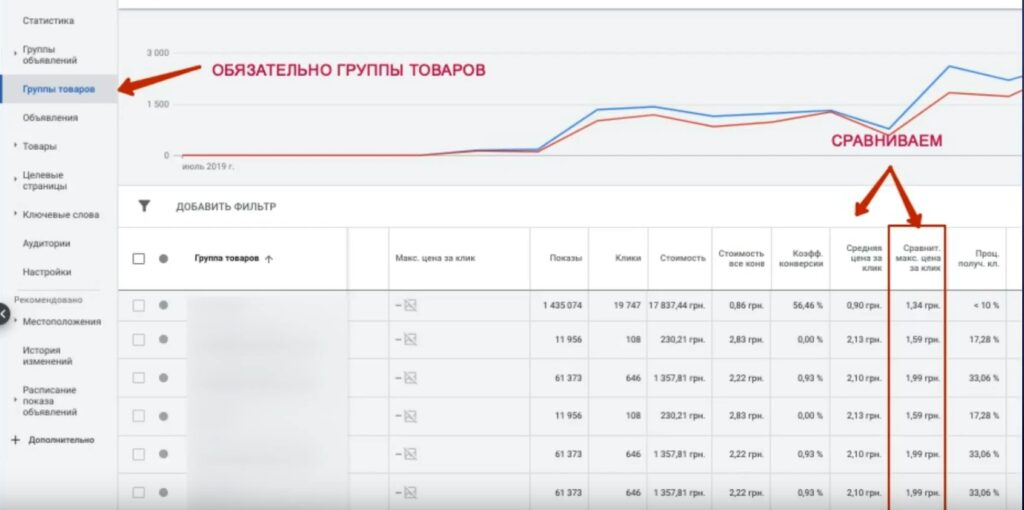
- Go to the product group level, add the “Competitive maximum cost per click” column and orient yourself by it. Note that data may take up to 48 hours to update — if you launched today, the numbers will appear in a day or two. Then the logic is simple: if the actual average cost per click is below the competitive maximum — you can raise the bid. If higher — conversely, lower it. You won’t lose anything.
Budget Size
And now — the point that in the chain of factors will definitely affect reducing the percentage of lost impressions due to ranking. This is about an adequately assigned budget at the campaign level.
And here’s a nuance that many forget. If you’ve set a large daily budget, but there’s only 200 UAH left in the account balance with a budget of 1,000 UAH — the system sees this. And there won’t be results. The account balance must match the assigned budget.
What happens when the budget is set adequately? The system has more room to more frequently bring your ads into auction. Why is this critical? Because now in any search campaign, including Google Shopping, only even ad delivery works.
Even delivery is when the system takes your budget together with the account balance and tries to stretch impressions throughout the day. It doesn’t adjust to demand spikes. Let’s say there’s a peak of queries at 12:00 — you see this in Google Trends, in the planner.
But the system won’t throw all resources at that moment. It will distribute impressions evenly, and by evening it may turn out that there’s no budget left to enter the auction. Moreover, the system often plays it safe — keeping a “reserve” for unforeseen circumstances. As a result, the daily budget may not even be fully spent.
It may sound too simple. But this is really one of the most effective levers. If the cost per click is already at the average maximum level or you’ve reached the break-even point and can’t raise it further — review the budget. Try increasing it 2–3 times without changing bids. In 2–3 days you’ll see how the percentage of lost impressions starts to drop.
By the way, this is exactly what we did in the Smart Shopping marathon — proportionally raised budgets, and the percentage of lost impressions decreased. Bringing it down to 10–20% can be difficult, especially if a large product assortment is gathered in one campaign. The system tries to distribute impressions and clicks between different products — and this is logical.
Attention: the more competently you approach Shopping campaign segmentation, the better the result will be. Distribute products at least by product group types into different campaigns, assign each its own budget and bids — and the overall average percentage of lost impressions will be noticeably lower than when everything is dumped into one campaign.
Why is budget so critical specifically in Shopping campaigns? Google generates a huge number of search queries that you don’t set manually. Traffic comes mixed: non-targeted, targeted but from upper funnel stages (with low conversion), as well as high-conversion — from lower funnel stages. Plus, the products themselves have completely different frequencies.
If you mix everything into a single campaign — you get “borscht” (a mess). The budget simply isn’t enough to bring the entire assortment into impressions. And the average percentage of lost impressions is a weighted average across all product positions. The system showed some items actively, and simply couldn’t pull others.
And finally — don’t forget about the account balance. The larger the budgets, the larger the reserve should be in the account. Don’t worry: if there are no campaigns uncontrollably burning money, you’ll always be able to get the funds back if you decide to stop advertising. Better to have a reserve in the balance — the system will be more generous about bringing ads into auction. More impressions — more traffic. More traffic — more sales. The main thing — don’t forget to control the cost of this traffic.
Any questions about the topic of ranking and lost impressions — write in the comments, we’ll break it down in more detail. See you in the next episode!