Google Ads contextual advertising audit
A PPC audit is a comprehensive review of an advertising account based on a set of criteria: from campaign structure to lead tracking. The goal is singular: to find where money is missing the mark and show what needs to be changed for better results. It’s not about “redoing everything,” but finding and explaining the issues.
In practice, a Google Ads audit is ordered in three situations. The ads are running, money is being spent, but leads are scarce or expensive. A new contractor has taken over, and the newcomer wants to understand what they’ve inherited. Or everything seems to be working, but there’s a suspicion: for the same 30,000 UAH a month, you could be getting 70 leads instead of 40. The third situation is the most common—and the most underestimated.
What an audit provides at the end of the day:
- specific errors and how much money they are eating up;
- priorities—what to fix today, and what can be put off for a month;
- growth opportunities: new formats, underutilized audiences, search terms where ads aren’t showing;
- an understanding of whether the current return is adequate—or if the contractor is just telling fairy tales.
By the way. Some people are still searching for a “Google AdWords audit”—the service was renamed to Google Ads back in 2018, but the essence hasn’t changed with the name. Specialists analyze the exact same things: keywords, ad copy, bids, analytics, and landing pages.
When is the best time to order a PPC audit?
The most common complaint is: “There are clicks, there are expenses, but no sales.” The causes are almost always trivial and visible within the very first hour. Below are the symptoms indicating that you should order a PPC audit not “someday,” but in the coming days.
- The cost per lead has increased by 1.5–2 times over a few months, even though the investment and season haven’t changed.
- Half of the search queries contain words like “free,” “DIY,” “vacancies,” or “used,” while the business sells new equipment.
- The numbers in the ad account don’t match the CRM: 120 leads a month versus the 35 calls and 10 forms the managers actually received.
- Campaigns have been running for months with a “Limited by budget” status, and a portion of the money is going where there isn’t a single sale.
- Traffic is coming from regions where there is no delivery. Ads run around the clock, while the sales department works from 9:00 AM to 6:00 PM.
- The “Recommendations” tab is applied automatically, resulting in uninvited keywords.
- The contractor’s reports only say “CTR grew by 0.3%” and “impressions increased,” while the question “how many sales did this bring?” remains unanswered.
Attention. A drop in results doesn’t always mean incorrect settings. Sometimes a competitor raised their bids, the product itself became more expensive, or the form on the website broke. Therefore, a Google Ads account audit always goes hand in hand with checking analytics and landing pages—otherwise, you might end up treating the wrong disease.
There is also a less obvious signal: everything is stable, but stable for many months in a row. Neither growth nor decline. Usually, this means no one is managing the account, and no one is looking for growth opportunities.
How often should you audit an ad account?
Once a quarter—for most accounts spending from 15,000 UAH monthly. Over this interval, new rules manage to roll out, and automatic recommendations and search garbage accumulate. A full Google PPC audit is usually not needed more frequently: changes just don’t have time to build up.
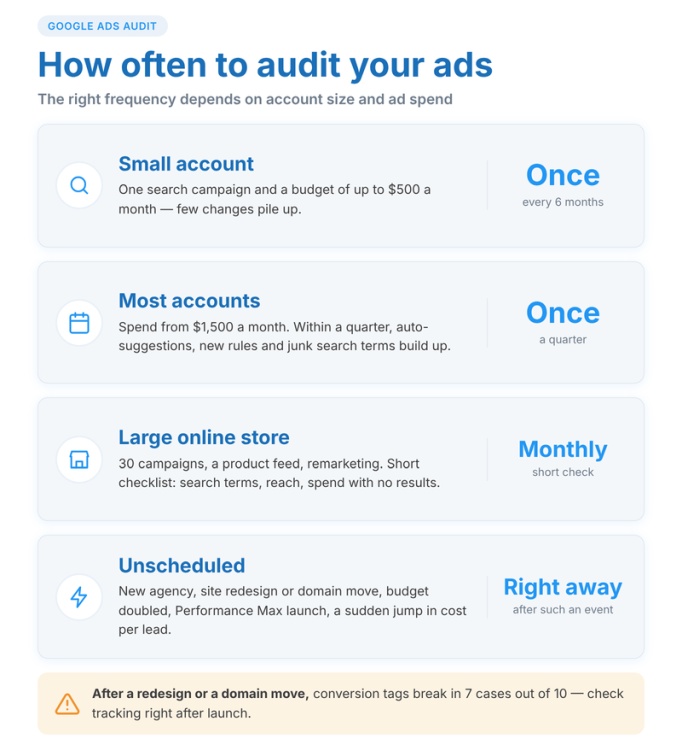
There are events after which it’s best not to delay an audit:
- a change in the contractor or in-house marketer;
- a website launch, redesign, or migration to a different domain (conversion tags drop off in 7 out of 10 cases);
- a doubling or more in investment—errors scale right along with it;
- a change in strategy or the launch of Performance Max;
- a sharp increase in lead costs for no apparent reason.
A small account with one search campaign and a limit of 5,000 UAH per month only needs to be reviewed once every six months. A large online store with 30 campaigns, a product feed, and remarketing needs a monthly review, at least using a shortened checklist: search terms, reach, and wasted spend.
What does a Google PPC audit include?
A Google Ads audit by ADWService is not about running the account through an automated tool, but a manual review using a unified checklist. The order is fixed: first analytics, then money, then settings. The logic is simple—until it’s clear how leads are being tracked, any conclusions about bids and keywords will just be reading tea leaves.
Conversion tracking and linking Google Ads to GA4
First of all, we find out what the account actually considers a lead. Which actions are marked as primary, and whether “viewing contacts” is mixed in alongside actual form submissions. Smart bidding strategies learn from this data: if the goals are full of garbage, the algorithm spends months looking for the wrong people.
Next is the link to GA4: whether the accounts are linked, if auto-tagging is enabled, and if goals are imported twice. We cross-check the monthly numbers across three sources: the ad account, GA4, and the CRM or call log. A 10–20% discrepancy can be explained by attribution, but a twofold difference is an error, and we find it in every third client.
Campaign and ad group structure
We evaluate whether the structure reflects the business’s goals or just the convenience of the person who built it. Are brand and non-brand separated (brand gives a 30–50% CTR and masks the poor performance of everything else)? Are Search and Display mixed? Are categories with different profit margins isolated? How many keywords are in a group? Having 5–20 closely related phrases is normal; having 150 mismatched ones is a reason to rebuild the structure.
Keywords, match types, and negative keywords
Match types are the primary lever for controlling spend, so we calculate the share of spending on broad match and its actual return versus phrase and exact match. We look at negative keywords across three levels: shared lists, campaign, and ad group. Cross-negativing is evaluated separately so that “buy a boiler” doesn’t end up in the “boiler repair” group and compete with itself.
Search terms report
This is usually where the fastest result of a Google Ads audit is found. We export data for 30–90 days, sort by cost, and clear out rows with no results, then sort by impressions—this is where informational phrases with low CTR surface. As a result, the client receives a ready-to-use list of negative keywords, rather than a generic tip to “work on your search queries.” We separately evaluate the share of hidden “other search terms”: if over 25–30% of the budget goes to them, we suggest reviewing the match types.
Ads, assets, and Quality Score
We evaluate performance not by taste, but by CTR and CR relative to their peers in the ad group. We check how thoroughly responsive formats are filled out (10–15 headlines and 4 descriptions, rather than 3 and 1), the presence of keywords and the city in the headlines, and the enabled assets: sitelinks, callouts, phone numbers, prices, and promotions. Without these, the ad block takes up less space in search results and loses 10–15% in CTR.
We export the Quality Score for all keywords along with its components. Words with a score of 1–4 sometimes overpay for a click by 2–3 times—they get their own dedicated plan: a new ad group, fresh creative, and a more relevant landing page.
Bidding strategy, budget, and impression share
We check if the strategy aligns with the volume of data. “Target CPA” on a campaign with 5 conversions a month works worse than manual bidding—the algorithm has nothing to learn from. Our benchmarks: at least 30 leads in 30 days for tCPA, and at least 50 for tROAS.
We look at the distribution of money: are the campaigns with the cheapest leads hitting their daily limits, while the underperformers spend every last penny? Loss of reach due to budget and rank shows where the problem lies: in money, bids, or ad quality. We compare CPC and ROAS not with “the market,” but with the client’s unit economics: with a website conversion rate of 3% and a target lead cost under 400 UAH, a click costing over 12 UAH is already unprofitable, and we calculate this separately for each campaign.
Geotargeting, ad schedule, and devices
It’s not just the list of regions that matters, but the “Presence or interest” setting: by default, an ad for a dental clinic in Odesa is shown to people in Poland interested in Odesa. We exclude non-delivery zones, and look at the breakdown by hours, days of the week, and devices. Sometimes mobile traffic provides 70% of clicks and 20% of conversions—the reason is a clunky form, not the audience.
Landing page and load speed
We open the landing pages and match them against the search query: an ad for a “sofa bed under 10,000 UAH” shouldn’t lead to the homepage. We measure speed via PageSpeed Insights, test the form on a mobile phone, check the clickability of the phone number, and verify links and UTM parameters. We send a test inquiry—this is how we find broken elements the client hasn’t known about for weeks.
Product feed, Google Shopping, and Performance Max
For online stores, we add a Merchant Center block: the percentage of disapproved products, how well attributes are populated, and the accuracy of pricing and availability. A feed with 30% disapproved items restricts reach more than any bid. In Performance Max, we break down asset groups and products: which categories eat up all the money, which ones aren’t showing at all, and whether the brand is excluded.
Auto-applied recommendations, change history, and competitors
The change history shows which automated recommendations were applied and by whom—and what resulted from it. We don’t use a 90–100% optimization score as a benchmark: the system considers expanding keywords to broad match and increasing spend as optimization. Additionally, we look at competitors in the auction: who is showing up higher, for which phrases, and with what creatives. This helps explain why a client’s ad is getting lost.
Attention. A complete Google Ads account audit using this checklist takes us up to 12 hours depending on the size. If you receive an “audit” an hour after granting access, it’s just an export from an automated tool, not an analysis.
Do you need access to the account for a Google Ads audit?
For a comprehensive review—yes. Without it, only the ads in the search results and the website are visible: you can evaluate the creatives, landing page, and load speed, and roughly estimate the keywords. But not the bids, search terms, goal settings, or change history. Such a “cold” audit is only useful as a preliminary glance.
The standard option is “Read-only” access (that’s exactly what it’s called in the platform). The auditor sees everything but cannot change a bid, pause a campaign, or spend money. Access is granted in a minute: Tools and Settings → Access and Security → add a user via email.
If the Google Ads account audit needs to cover analytics as well, grant the same access in GA4 (the “Viewer” role at the property level). Otherwise, some conclusions will be based on guesswork: there’s no way to verify which events are imported as goals and whether they duplicate each other.
What else is usually requested from the client:
- data on actual sales for 2–3 months—at least in the format of “there were 80 inquiries, 31 paid”;
- profit margins or average order value—to calculate the allowable cost per lead;
- priority products or services and regions.
Without these numbers, an auditor will say “the CPC is high,” but they won’t tell you if it’s high for your specific unit economics. For a clinic with an average bill of 15,000 UAH, a 60 UAH click is fine; for a pizza delivery place, it’s a disaster.
What mistakes does a PPC audit help uncover?
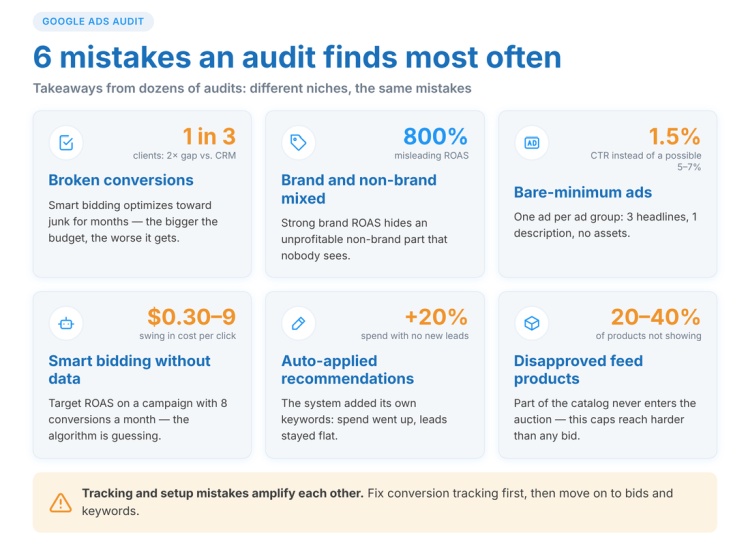
If we compile the results of dozens of audits for our clients, the list repeats with surprising accuracy. Different niches, different investments—but the missteps are identical. Here is what a PPC audit reveals in almost every second account.
- Conversions are either not set up or set up incorrectly. The most expensive mistake: an automated bidding strategy with “crooked” goals spends months optimizing for garbage—and the higher the investment, the worse it gets.
- No negative keywords, or lists haven’t been updated in six months. Search queries include “free,” “manual,” “forum,” and competitors’ brand names: there are clicks, but no leads.
- Everything is in broad match. Sometimes it’s the keyword “repair” without negative keywords. In this case, an ad for apartment renovations might show up for an “iPhone repair” search.
- Brand and non-brand are in the same campaign. The ROAS is 800%, but that’s just the brand. The non-brand portion is operating at a loss, and no one sees it.
- Only one ad per ad group, minimally filled out. Three headlines, one description, no assets. A 1.5% CTR when 5–7% is possible.
- Automated bidding without data. “Target ROAS” on a campaign with 8 conversions a month—the algorithm is guessing, and bids wildly jump from 3 to 90 UAH.
- Geotargeting across all of Ukraine when delivery is only within Kyiv and the Kyiv region. Or leaving the “Presence or interest” setting at its default.
- Auto-apply recommendations are enabled. The system added keywords, spend increased by 20%, but the number of leads stayed the same.
- The landing page doesn’t match the query. All ads lead to the homepage.
- Disapproved products in the feed—20–40% of the inventory isn’t participating in auctions.
Slightly less common, but still regular: Display network campaigns with mobile app placements enabled (games generate tens of thousands of accidental clicks), remarketing without excluding past purchasers, and a lack of ad scheduling for services driven by phone calls.
Attention. Errors in analytics and campaign settings amplify each other. As long as conversions are tracked incorrectly, any optimization leads nowhere. Therefore, fix tracking first, and then move on to bids and keywords.
How to check Google Ads settings yourself?
It’s hard to do a complete Google Ads audit on your own without experience, but an express version taking 2–3 hours is entirely doable. This is enough to grasp the scale of the problems and have a substantive conversation with your contractor. Below is the step-by-step process.
- Start with conversions: Goals → Conversions → Summary. Write down all actions with the “Primary” status. Page views or button clicks without an actual form submission listed among them is your first find. Ensure the goals have fired in the last 7 days.
- Export campaign spend for 90 days with the columns “Cost,” “Conversions,” “Cost per conversion,” and “Conversion value / cost” (which is ROAS). Sort in descending order by cost. Anything that spent over 3,000 UAH with zero results is a candidate to be paused or rebuilt.
- Open the section (Campaigns → Insights and reports → Search terms). Filter: conversions = 0, sort by cost. The first 50 rows will yield negative keywords in half an hour, saving a noticeable chunk of money.
- Check the “Match type” column in the keywords section. Calculate the share of spend on broad match and its return versus phrase and exact match.
- Enable the “Quality Score” column and its components. Filter for keywords with a score below 5 and a cost above 500 UAH—these are candidates for a separate ad group with fresh creatives and a more targeted landing page.
- Look at the columns “Search impression share,” “Search lost IS (budget),” and “Search lost IS (rank).” High losses due to rank combined with a low Quality Score indicate weak ad presentation, not a lack of funds.
- Go to the settings of each campaign: locations, location options, language, ad schedule, networks (Search + Search Partners + Display in a single Search campaign—turn off the Display Network).
- Check the change history for 3 months. Filtering by user will show what the contractor changed and what Google’s automation did.
- Open GA4 → Admin → Product links and make sure the ad account is connected and conversion events are imported only once.
- Walk through the customer journey: click your own ad from a smartphone, get to the form, and submit a test inquiry. This is how broken forms and pages that take 8 seconds to load are found.
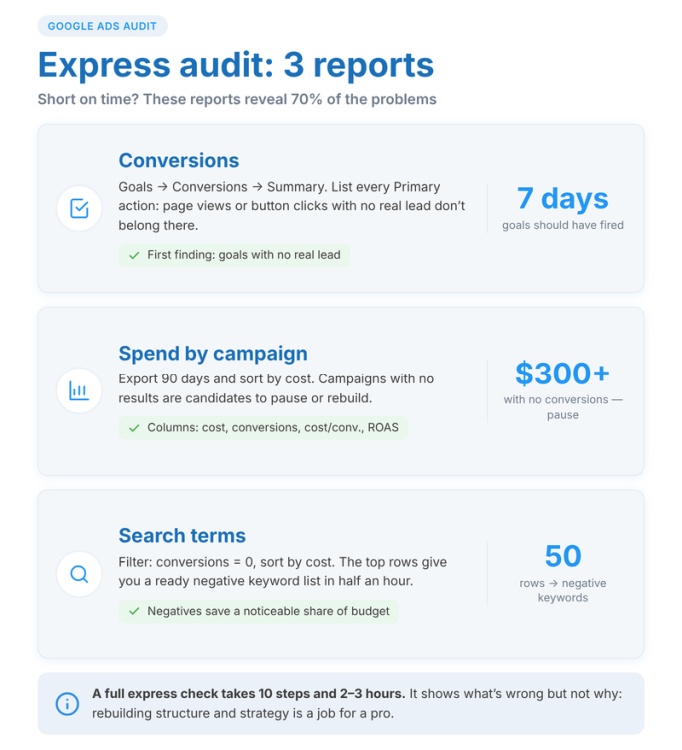
If you’re really short on time, three reports will suffice: campaign costs, search terms, and conversions. They reveal 70% of all problems.
A brief disclaimer. An express check shows what is wrong, but rarely explains why or what to do in a specific niche. Restructuring, rebuilding the keyword core, and choosing a bidding strategy suited to your data volume is the job of a pro.
What will you get as a result of a Google AdWords audit?
A good Google Ads audit ends with a document, not a verbal “everything is bad, let’s redo it.” Usually, it’s 10–25 pages plus a spreadsheet with discovered search terms, keywords, and recommendations. What’s inside:
- campaign performance over 3 months—cost, conversions, CPL, ROAS, and reach;
- errors with an impact assessment: “31% of the budget goes to irrelevant queries—roughly 12,400 UAH monthly”;
- ready-to-upload negative keywords;
- feedback with headline and description variants;
- recommendations on bidding strategy and budget based on your data volume;
- growth opportunities: categories and phrases without ads, regions with low reach, unlaunched formats (Google Shopping, remarketing, video);
- priorities: what to fix this week, what to fix in a month, what to postpone.
Prioritization is the most useful part. No one is going to fix 40 issues all at once. But “three tweaks that yield 60% of the impact”—absolutely.
Standard practice involves a 30–60 minute review call. The client asks tough questions, and the auditor explains why they recommend specific actions. If a meeting isn’t offered, ask for one yourself—a written report without a discussion often goes unread.
What shouldn’t be in the document: generic phrases like “improve ads,” “optimize keywords,” or “work on conversion rates.” A recommendation without specifics is not a recommendation. The right way: “in the ‘Custom Kitchens’ ad group, replace headlines 4, 7, and 9 with options including a starting price, and add a ‘Price’ asset with three items.”
What determines the price of a PPC audit?
A basic audit at ADWService costs $350—a flat fee that doesn’t depend on the niche. For this money, a specialist reviews the account across all points from the section above, calculates the unit economics for each campaign, and creates a prioritized plan. For most projects with a monthly spend up to 100,000 UAH, the basic format is enough: it highlights all major issues and shows where to start.
At the same time, the price of a PPC audit can increase if a deeper dive is required. That’s why we have three tiers:
- Basic — $350. A complete checklist review, a written report with reasoning for every issue found, and a list of untapped opportunities.
- Advanced — everything in Basic, plus a video breakdown: we record a screencast pointing out every finding, explaining why it’s a mistake, and providing examples from other projects.
- Expert — everything in Advanced, plus a one-hour consultation where you ask questions and work with the specialist to prioritize implementation.
We calculate the cost of a Google Ads audit for the “Advanced” and “Expert” tiers individually, after a brief look at the account. The final total is influenced by:
- data volume—3 search campaigns versus 30 with an 8,000-item feed and three Performance Max campaigns take a different amount of time to review;
- number of languages—Ukrainian and Russian keywords yield twice as many phrases and ads to analyze;
- geographic targeting—targeting Ukraine versus 12 European countries requires different depths of regional and competitor analysis;
- the need for advanced competitor analysis: who is showing up higher, for which phrases, and what bids they are holding.
Turnaround time is 1–2 business days for a basic audit of a small account. A large online store or a multilingual site takes 3–10 days: there are more campaigns, product reports, and sales reconciliations.
Attention. The cost does not include fixing the discovered problems. You can hand the report over to your contractor or in-house marketer—the recommendations are written so they can be implemented without us. If necessary, our PPC specialist can handle the implementation for an additional fee.