Hello! My name is Yana Lyashenko, and I am a Google logist. Today, we will analyze specific figures to determine how to improve the results of a commercial advertising campaign. After implementing the changes, I will be sure to request feedback from the client to determine whether it was effective.
What shall we talk about? What exactly needs to be done to make a standard marketing campaign start generating more sales? When does it make sense to switch to smart campaigns? What budget should be set for them and what ROAS target should be set? All this will be discussed using the example of a real project with seasonal goods. Let’s go!
Analysis of an advertising campaign for the sale of artificial Christmas trees
I open the advertising account. There is only one campaign here — “Artificial Christmas Trees.” I immediately see a notification: the balance is zero. I checked the results — the ads are not being displayed. The reason is simple: the account has not been topped up. Therefore, it will not be possible to analyze the live advertising results, so we will work with the available statistics.
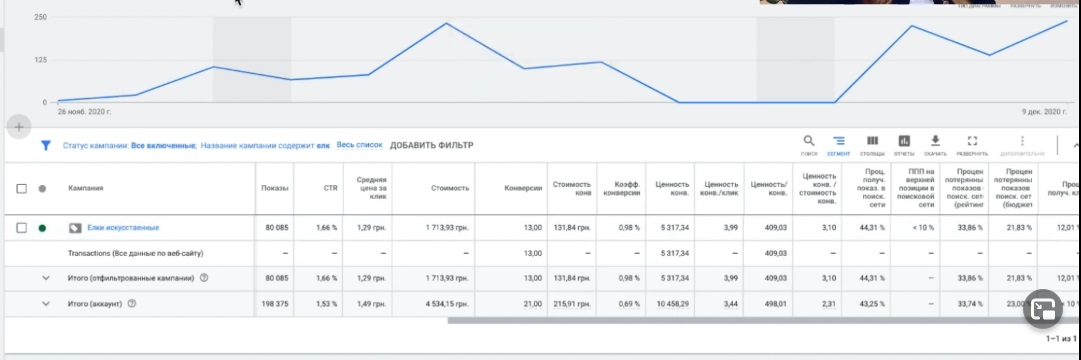
By December 9, the balance had already been exhausted. I look at the data for the “Artificial Christmas Trees” campaign:
- Over the past 14 days, 1,700 hryvnia has been spent.
- 13 transactions received;
- The average price per conversion is 131 UAH.
- ROAS was 3.10.
Important point: the break-even point on margin announced by the client is approximately 3.12. In other words, the campaign is balancing on the edge — it is not actually making any money during this period.
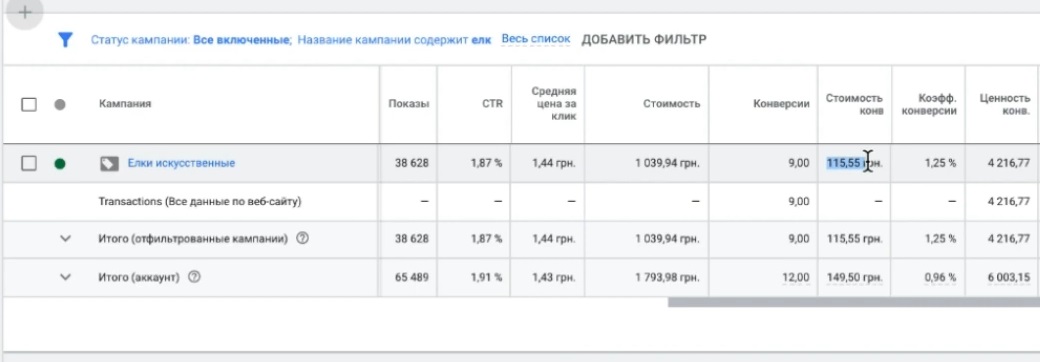
But over the last 7 days, the picture has improved — ROAS has grown to 4.05. The campaign is now in the black! The cost per conversion has dropped to 115 UAH, and the conversion rate has risen to 1.25%. For comparison, the conversion rate was only 0.98% over 14 days. It is clear that the commercial advertising campaign has started to work much more effectively.
Overall, the results for the last week are quite good. Now let’s move on to the questions asked by the client. I will briefly summarize the three main ones:
- Why are there mainly only two products in the sales output?
- Is it possible to “spam” the search results with your ads?
Let’s start with the answers to these questions.

Why aren’t my ads getting enough impressions?
Let’s figure out why the commercial advertising campaign is not getting enough impressions and why only two products from the entire range are mainly appearing in the search results.
The first thing I notice is the percentage of impressions received in the search network. It is only 40%. That is very low. Why is this happening? The system indicates two reasons: insufficient budget (about 35%) and low rating (about 30%).
Let me clarify right away: these percentages are approximate. In reality, with competent account management, the figures can be significantly better.
Now let’s look at the daily budget for the campaign — it’s set at 78,000 hryvnia. Yesterday, December 9, it was 63,000. Looking at the history of changes, I see that the person only increased the budget. But the system still says there’s not enough. Why?
The answer is simple: the advertising account is not being topped up enough. I checked the transaction history — the average top-ups are 500 hryvnia. This is catastrophically low, especially when several campaigns are running in parallel. And for seasonal goods such as Christmas trees, which gained 38,000 impressions in just one week, such amounts are a drop in the ocean.
What happens if there is insufficient replenishment?
When there is not enough money in the balance to run all campaigns at full capacity, the system begins to “stretch” the balance between them. It literally squeezes the budget drop by drop — not because it wants to cause harm, but because accelerated display is no longer available, only standard display.
The result is a paradox: you topped up your account with 500 hryvnia, but they are not really being spent. The system spreads them out in a thin layer, and this directly affects the rating of all your advertising campaigns.
My recommendations
Calculate optimal daily budgets — I talk about this in almost every video. Top up your account in advance, at least 2-3 days ahead.
If you’re short on cash right now (some projects have delayed payments), keep only the campaigns that actually convert and allocate your entire budget to them.
In our case, the trees could have performed much better. The break-even point is 3.12, and the campaign is coping with it. It just needs to increase the budget.
Why don’t we occupy all the top search results?
Because the rating has dropped. And it’s actually even lower than the system shows. How can you check this? In the “Recommendations” section for a specific commercial advertising campaign, you can see the overall optimization indicator. Yesterday it was around 26-27%. This is critically low for occupying top positions in search results.
Why is the optimization indicator important?
To be honest, Google’s official documentation does not explicitly state that the optimization score directly affects ad rankings. However, there is a nuance. This metric is taken into account in the main MCC (managed account) when evaluating the effectiveness of advertising campaigns. When the system alerts me, as a manager, that an account is “suffering” due to under-optimization, it’s a serious wake-up call.
In practice, the connection is direct: as soon as you start improving your optimization score, all your statistics immediately improve. We clearly demonstrated this during the marathon: as soon as participants began working on optimization, the percentage of lost impressions due to ranking immediately decreased. We analyzed many different blocks there, and perhaps I didn’t focus on all the details, but every little thing really helps improve results.
In my experience, loss of impressions due to ranking is often directly related to low optimization. This needs to be corrected.
How can I improve my optimization score?
Not all system recommendations should be followed blindly. Let’s see what Google suggests:
- “Your account budget has been exhausted, please top it up” — this is clear, as we have already discussed above.
- “Attract customers on partner sites” — this recommendation is not suitable for everyone. Sometimes affiliate sites generate cheap, high-converting traffic, and sometimes they generate outright junk. You can test it and see how it works. If it doesn’t suit you, click “Close all,” select “Not suitable,” and close the recommendation.
- “Switch to smart shopping campaigns” — let’s take a closer look at this. The client had a question: when should a standard shopping campaign be converted to a smart campaign, and is it worth doing at all? We’ll discuss this below. The system, of course, promises to increase performance when switching to a smart campaign.

The main principle is this: follow the current recommendations, close the outdated ones, and watch your optimization score grow. I guarantee 100% that it works; we tested it repeatedly during the marathon.
Let’s take stock of the interim results
Why is the Christmas tree campaign getting less attention than it could?
- Low rating due to poor optimization;
- Insufficient funds in the account balance.
At the same time, the daily budget is set at 78,000 UAH, but only 1,039 UAH was spent. The money simply cannot be spent because the balance is empty. Let’s move on.
Why are only a few products displayed in the search results?
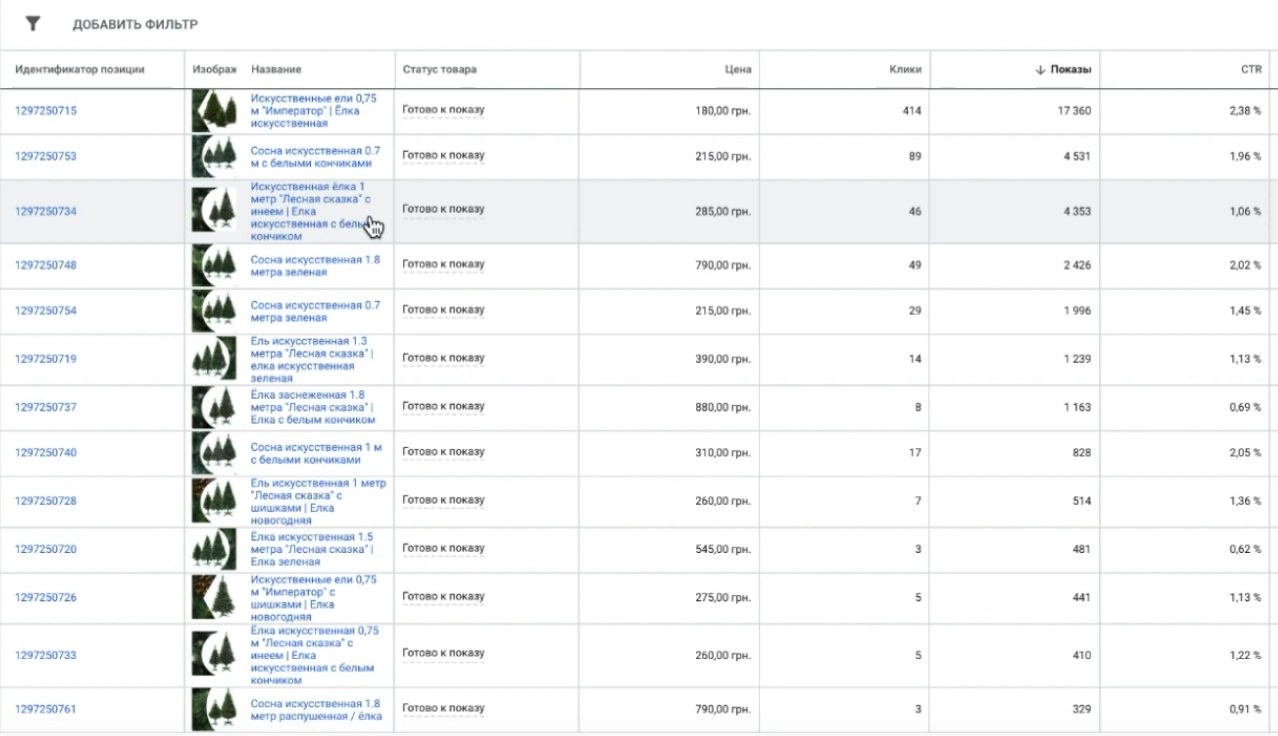
Let’s move on to the next question: why are there mainly only 1-meter and 0.75-meter Christmas trees in stores, while the rest of the stock is sitting idle?
The client wrote that he set the same price per click for all products. I look at the campaign structure — indeed, the guy got confused: he broke everything down into separate identifiers, each pine tree is a separate position. The same bid is manually assigned to each product. The approach is understandable, but there is a nuance.
Why does this happen?
First, the campaign uses a conversion price optimizer. It automatically raises or lowers the bid depending on the likelihood of conversion. Therefore, the actual price per click varies depending on the position—the system itself decides where to raise and where to lower the bid.
To be honest, I’m not a fan of this optimizer. It has too little impact on the overall picture and doesn’t take into account all the factors that lead to a purchase. Although in this case, it worked to its full potential.
Secondly, and most importantly, the search queries people use to find products are practically identical for all items. I look at the search queries in this advertising campaign — there are no sizes listed. All queries are along the lines of “buy an artificial Christmas tree” or “buy a Christmas tree” — without specifying a specific height.
We encountered a similar situation during the marathon when we were working with diapers and mattress covers. There, too, we had a single product with identical requests. Individual users were looking for mattress covers of a specific size, but the majority of requests were general.
What is going on in the system’s mind? The product is the same, the requests are the same — so we show what converts better. And the rest is left idle.
How can this be fixed?
If you really want to work with standard shopping campaigns, you need to structure your campaign differently. For example, divide products into groups by price (inexpensive and expensive), assign different priorities and bid levels. This way, you can even out the number of impressions between positions. We discussed this mechanism in detail during the marathon — there are separate videos on structures and priorities.
The second option is to switch everything to smart shopping campaigns. Then the system will automatically balance the impressions between products. In the first few weeks after launching a smart campaign, you can see how it displays almost all items with approximately the same number of impressions. It is much more difficult to achieve this distribution with regular shopping campaigns.
How can you maximize the number of impressions in search results?
Specific steps:
- How to raise your rating was discussed above (working with the optimization indicator).
- Increase your budget — more money in your balance means more reach and impressions.
Is it worth bothering with feed optimization right now?
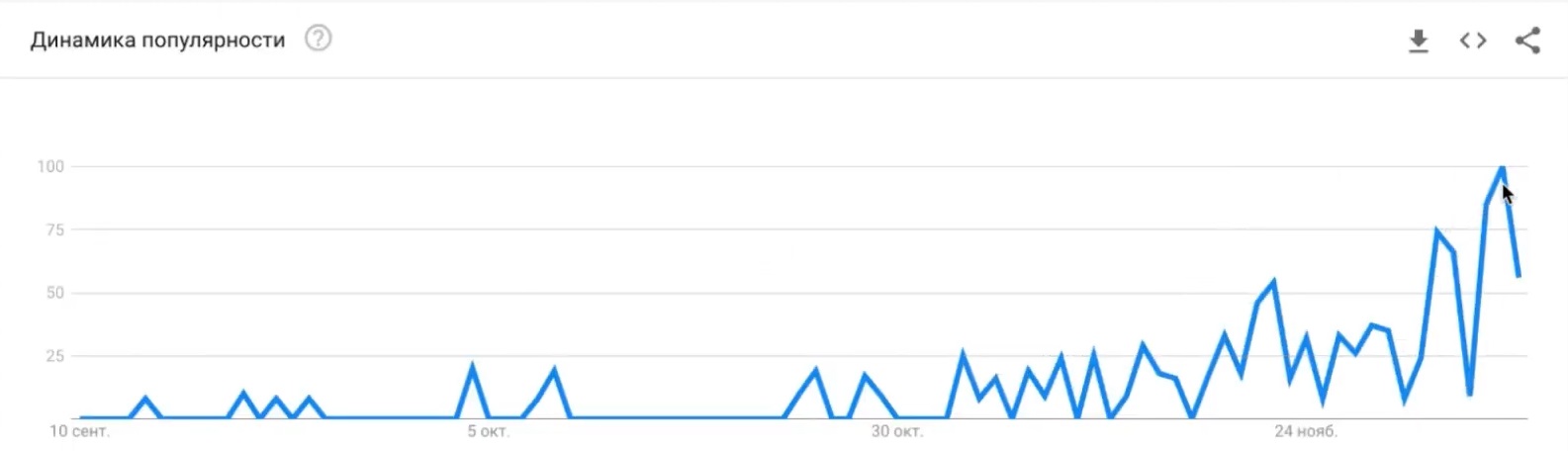
In this niche, demand peaks in the period leading up to December 20-21, with a maximum until the end of the month. Then there is a sharp decline. I checked the search query “buy a Christmas tree” in Ukraine — the decline starts as early as December 21. By January 4, the topic will become completely irrelevant.
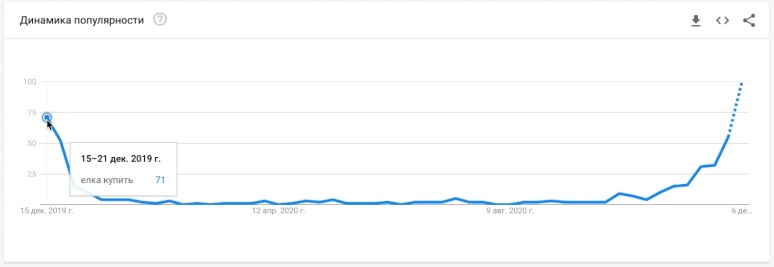
So my advice is: don’t waste time on deep feed optimization. It will only give you a fraction of a percent improvement. It’s better to focus on getting the most out of it before December 20: raise your rating, replenish your balance, and grab your share of the market.
According to the feed itself, everything is more or less in order. “Artificial fir trees” and “Christmas tree” are used as keywords. You can add “yalinka,” although Google understands the connection between Russian and Ukrainian quite well. There is a price. GTIN and MPN are not required for this type of product.
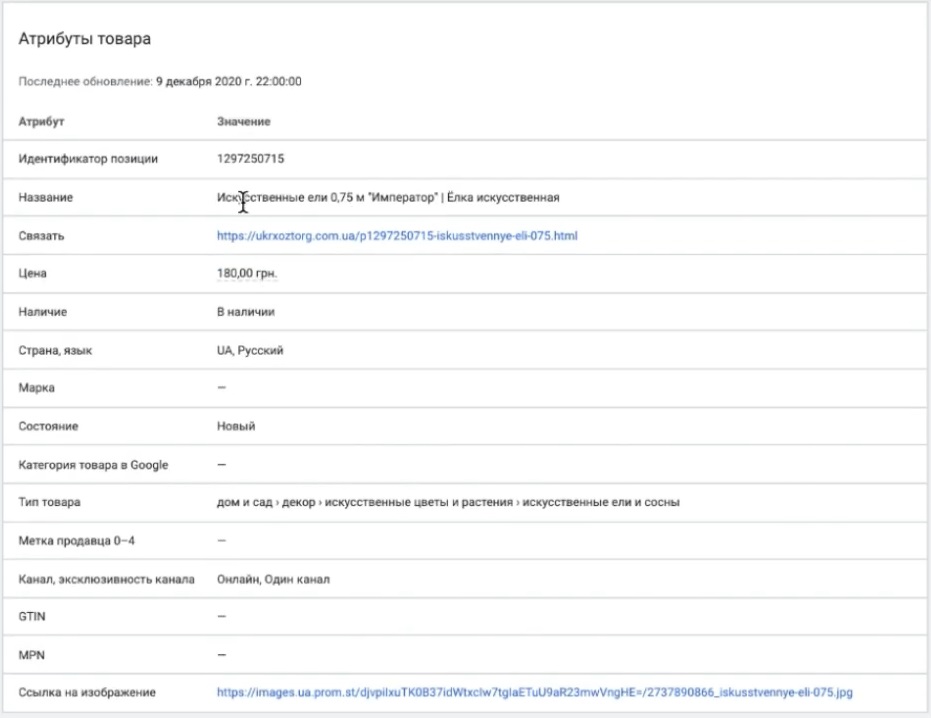
The only thing you can tweak is the product category. Go to Google Help, find the Google Product Category file, download it, and select the most detailed category for your products. Or check which category Merchant Center has automatically assigned — you can see this right at the top of the product card.
Is it worth using a conversion price optimizer?
I have already touched on this topic above, but I will answer again specifically. The conversion price optimizer works, but does not reveal its full potential. If you have the opportunity to switch to full automation — target conversion price or target return on ad spend (target ROAS) — it is better to choose them.
And if the system itself suggests switching to smart shopping campaigns, it’s definitely worth doing.
When should you switch to smart shopping?
The benchmark is as follows: a minimum of 15 transactions over the last 20-45 days. Ideally, over 14-20 days. In our case, the system began to suggest the transition after only 13 transactions, which is a positive sign.
For seasonal niches such as Christmas trees, smart shopping is the best choice. It will allow you to make the most of the time remaining before the peak sales period.
What target profitability should be set?
There are some important nuances here. Over the past 7 days, the campaign’s return on investment was 4.05. At the same time, the system itself suggests a value of 111% (i.e., 1.11) — this is what Google has calculated as optimal for this account.
But! The customer’s break-even point is 3.12. And the system offers only 1.11. The difference is significant.
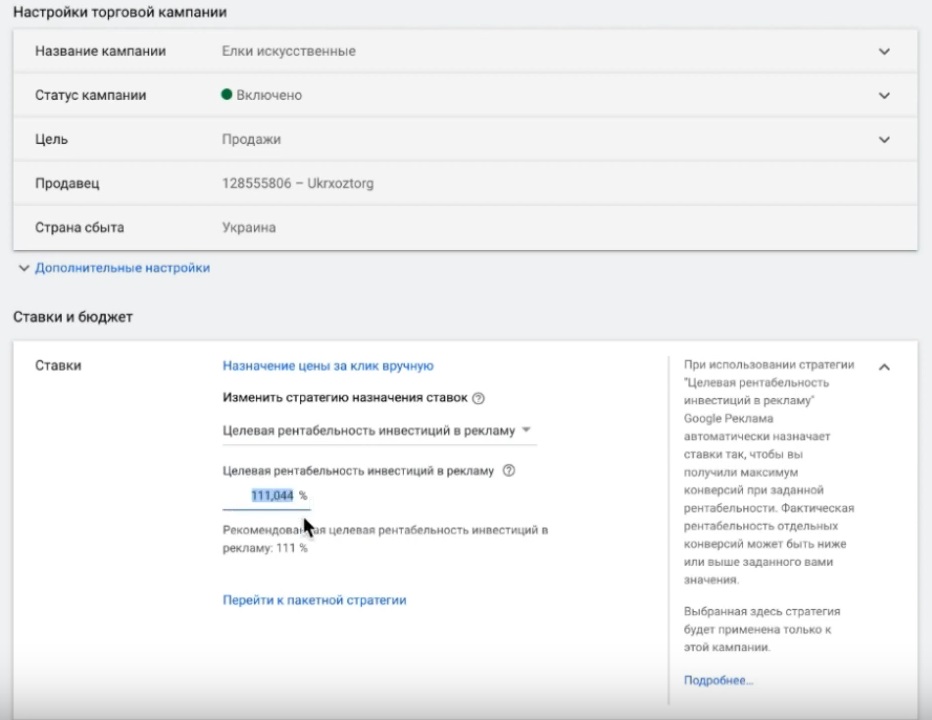
What should you do? There are several options:
- Conservative approach: set the target ROAS at the break-even point (3.12) and subtract 20-30% from it. This is if you are not ready to spend money on collecting statistics in the early days.
- Aggressive approach: set a lower profitability target, closer to what the system suggests. Remember the main rule: the lower the target profitability, the more sales you can get. The higher you set it, the lower the volume.
It is important to understand that smart shopping is almost always more expensive in the early days. Then it evens out. But there are only 10 days left until December 20, so there is not much time to spare. Therefore, you need to start here and now, as this is the main point for scaling sales. You can be more cunning: run smart shopping and a standard advertising campaign in parallel. Set a high priority and a target profitability at the break-even point for the standard campaign — it will be partially displayed in the ads. And in smart shopping, set a lower profitability for maximum coverage.
What budget should be allocated?
The minimum is to top up your account with 2,000 hryvnia. This is a forecast calculation that will allow you to see how the campaign will perform in the first two days.
Next, look at the results: if the conversion cost has increased, raise the target profitability, and the indicators will even out. The system needs 3-4 days to retrain.
Of course, the final decision is yours. I provide options and explain the logic, but the choice of strategy is up to you.
How to calculate your budget for smart shopping?
Now about the budget — this is a key point. Smart shopping has one peculiarity: the smaller the budget you set at the start, the slower you will be able to ramp it up.
A safe budget increase is approximately 30% every 3-4 days. This applies to both increases and decreases in target profitability. Why this particular step? Google always allocates a certain percentage of its budget to testing new hypotheses. No one knows the exact figure — it could be 10%, 20%, or even 40%. Based on my observations, with stable budgets and a smooth 30% increase, this “test” portion is about 10%.
What happens if you set the budget too high right away?
During the marathon, we saw cases where the system immediately allocates a large percentage to retraining, making the first few days expensive. This is not a problem in itself—in the US market, for example, it is normal practice. On projects that I personally consult on or that my team leads, we sometimes deliberately collect statistics in the first few weeks, balancing at zero or even slightly in the red.
It is important to understand the goal: not just to get conversions into the account, but to train the system to bring in the right, high-quality conversions.
Specific figures for our case
So, what do we have:
- There are 10 days left until peak demand;
- CPA for the last 7 days — approximately 115 UAH;
- CPA for 14 days — approximately 131 UAH;
- You need to top up your account with at least 2000 UAH for this advertising campaign only.
Ideal budget calculation: 115 UAH × 10 = 1150 UAH. We round this up to a daily budget of 1200 UAH for the smart campaign.
In this case, the target ROAS can be set either at the 111% suggested by the system, or at the break-even point (312%) minus 20-30%.
Why set profitability below the break-even point? So that the system can start collecting statistics faster. The higher you set your target profitability—especially higher than Google’s forecast—the longer you will have to wait for results. And we only have 10 days, so there’s no time to waste.
If you cannot allocate 1,200 UAH per day, set the minimum: CPA × 3.5-4.5. In our case, this is 115 × 4 = 460 UAH or 115 × 4.5 = 520 UAH. This is the minimum budget required to ensure a quick start without a three- to four-day ramp-up period.
December 20 is the peak, after that it’s all downhill. There’s no time for experiments.
Important warning! In the early days, you need to monitor your advertising campaign particularly closely. It can “go crazy” — it will start learning and, based on minimal statistics, generate conversions at unpredictable prices. This is normal, but keep your finger on the pulse.
Setting up a smart marketing campaign
When the system suggests switching to a smart shopping campaign, it wants to cover the entire account by default. But we don’t need that — we only do smart shopping for Christmas trees.
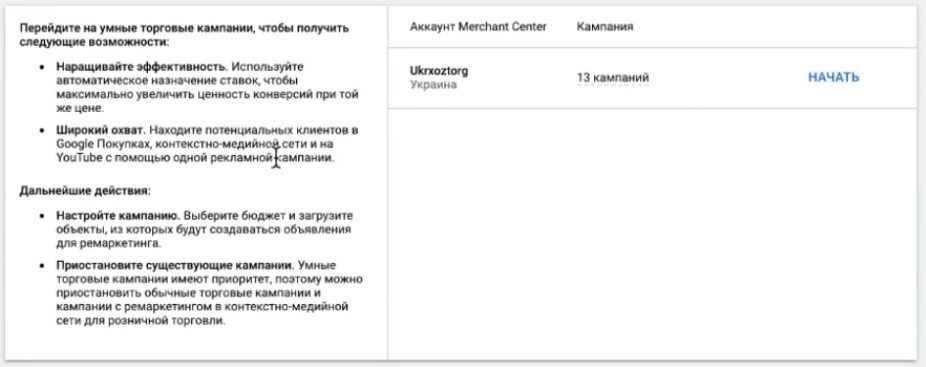
Step-by-step setup:
- Click “plus” to create a new campaign.
- Select the goal — “Sales.”
- Campaign type — “Shopping.”
- Subtype — “Smart Marketing Campaign.”
- Enter the main domain and check the connection with the required feed.
- Add objects and create an adaptive ad — write it correctly, using keywords.
- Set the target profitability and budget mentioned above.
After launch, we monitor the performance of the advertising campaign.
Why shouldn’t you panic in the early days?
There is one critically important nuance: conversions arrive in Google Analytics with a significant delay. It’s not three or four hours — the delay can be up to a day, especially for large projects with extensive statistics.
How does this work in practice? Today you spent a thousand hryvnia, but when you look at the reports, you see zero conversions. It seems like a waste of money. You want to turn everything off and forget about it like a bad dream. But after two or three days, conversions pick up, and the campaign turns out to be quite profitable.
I have seen this in various niches and on different smart shopping projects. The reason lies in the attribution model.
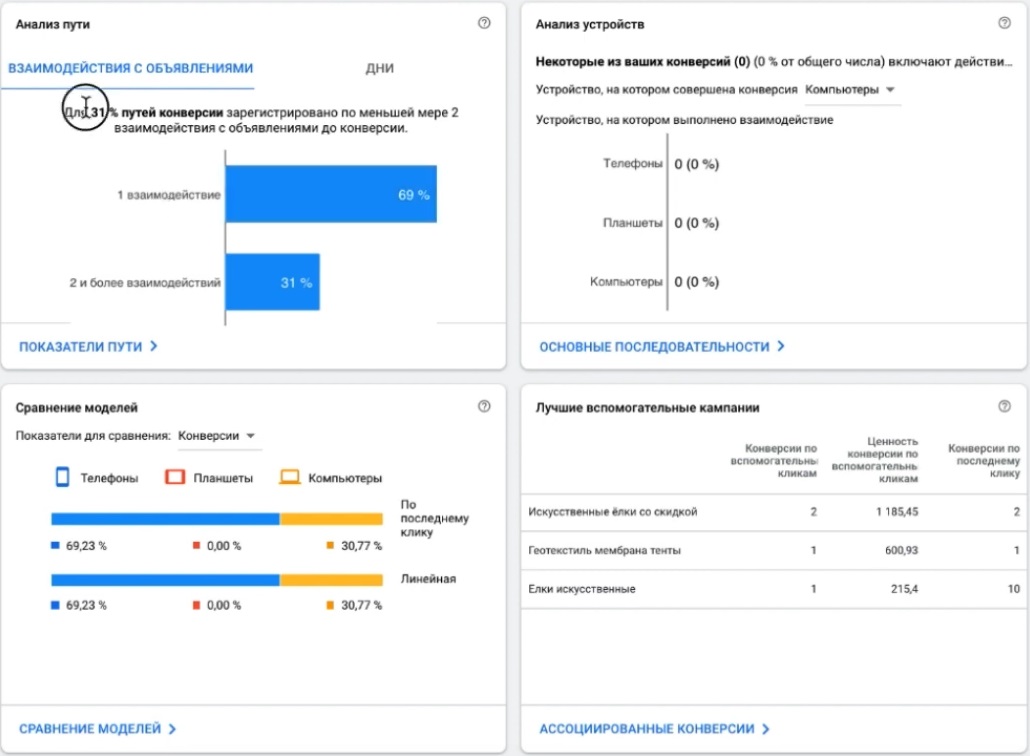
What is an attribution model and why is it important?
By default, the conversion tracking period for clicks is 30 days. This means that if a person clicks on an ad today and makes a purchase a week later, the conversion will still be counted.
In our case, most conversions occur on the first day of interaction. However, there are about 30 conversion paths where the purchase is made on the second touch and later. Therefore, the data in the reports “catches up” with reality with a delay.
The faster users make a purchase decision, the shorter the attribution window can be. But in our situation, it’s better to leave everything as it is — let’s not complicate things.
Tip! The main thing is to stay calm. Be prepared for the fact that for the first few days, your smart marketing campaign will look like a complete failure. This is normal. Then it will even out and start to take off at such a pace that you’ll barely have time to restock your warehouse.
Is it worth using scripts?
Let’s figure out what scripts are and whether you need them. Essentially, scripts automate routine tasks: they adjust bids for you, move budgets around, upload ads for editing, or download them back. It’s a tool that relieves specialists of some of their operational work.
But if I had to choose between scripts and properly training the system to get high-quality conversions, I would definitely choose the latter. It will pay off handsomely and ultimately take less time.
Scripts have disadvantages:
- They’re dumb. Whatever algorithm you write, that’s what will be executed. They won’t think for you.
- After updating the API in Google Ads, some scripts simply stop working, and you have to redo everything.
Where can I see competitors’ rates?
Short answer: nowhere. You will never see your competitor’s actual bid openly. Even if you go to the statistics for artificial Christmas tree auctions, you won’t find this data there. The auction is closed, as Google explicitly states.
Is it possible to calculate it approximately? The result will be a very rough estimate, far from reality.
What can you see?
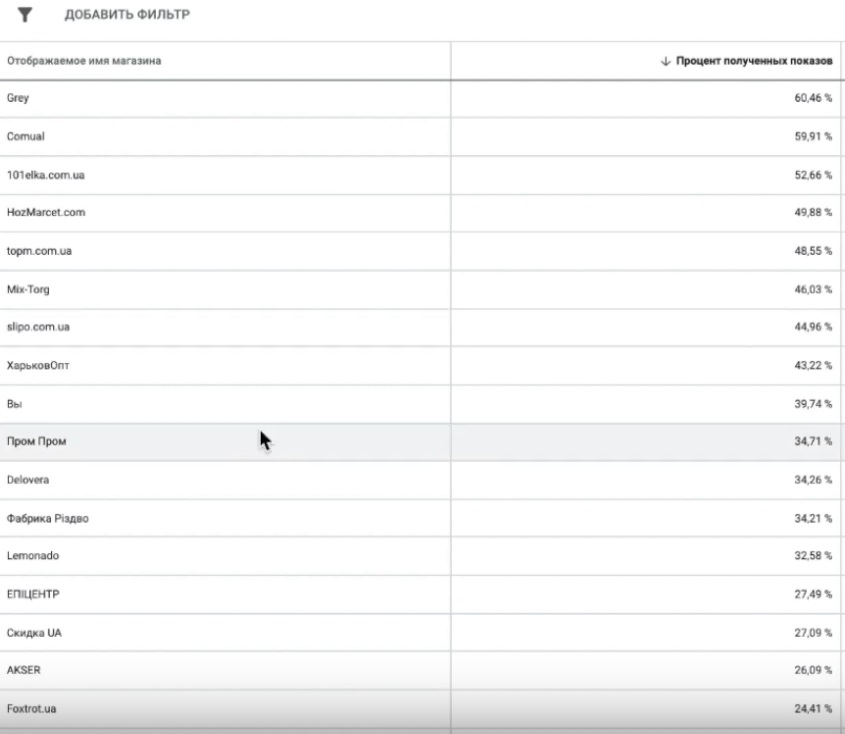
There is an indicator called “comparative maximum cost per click” — this is the average amount that other advertisers in your product category pay.
How to interpret it:
- If your competitors’ rates are higher than yours, it may be worth raising yours.
- If the bid is lower, it means that the problem is not money, but ranking, feed optimization, and other factors.
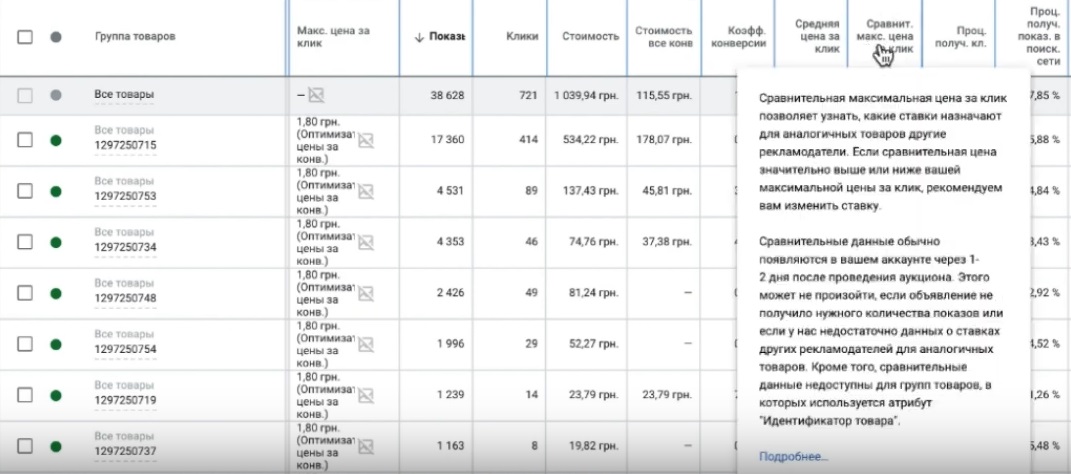
In our case, the bid is about the same as everyone else’s. At the same time, we are significantly lagging behind in auction statistics. Conclusion? It’s not about the size of the bid. Even if you raise it, the other two problems (rating and balance) will remain — you will still be at the bottom of the search results.
Another useful indicator is comparative CTR. It shows how clickable your ads are compared to your competitors. In our case study, the comparative CTR is 2.40%, while the client’s CTR is 1.87%. There is a difference, but it is not critical.
If everything was fine with account replenishment, the rating remained at least 30%, and the budget was spent normally, then it would make sense to optimize the feed. But now, at the peak of the season, there is no time for that. There is only one task: to spend as much as possible on advertising, regularly replenish the balance, and monitor the campaign.
Results and action plan
What do we have? The balance is exhausted. Perhaps there are simply no resources available for advertising right now — this happens in different businesses for different reasons.
But I see a real opportunity to make a good profit before December 20. How good — I can’t say, it depends entirely on you. Demand is already at its peak and will soon begin to fall. There is little time left.
You have all the information and a plan of action. Now you just need to decide what to do with it.
If you found this material useful, please give it a like—I’d appreciate it. Write in the comments: what you agree with, what you disagree with, and what other options you see for promoting this project. See you in the next issue!