Hello, everyone! I’m Yana Lyashenko, a Google logistician. Today, we’ll take a look at how to set up remarketing in the Display Network — the usual way, without dynamic campaigns.
Here are the questions sent by the specialist: “I only use responsive display ads. I see that it is possible to upload HTML banners, but I tried it and it didn’t work. I don’t understand this format, although I see some sellers have beautiful animated ads that catch the eye. I set up the audience recommended by Google. But it turns out that the ads are being shown to people who have never visited the site—I don’t understand how that’s possible. Initially, the audience was set up for site visitors. But can someone who looked at kimonos see ads for sneakers? Or are the ads strictly categorized? The budget is small. How can I track effectiveness and what can be improved in general?”
The questions are clear, let’s figure this out.
Analysis of an advertising campaign
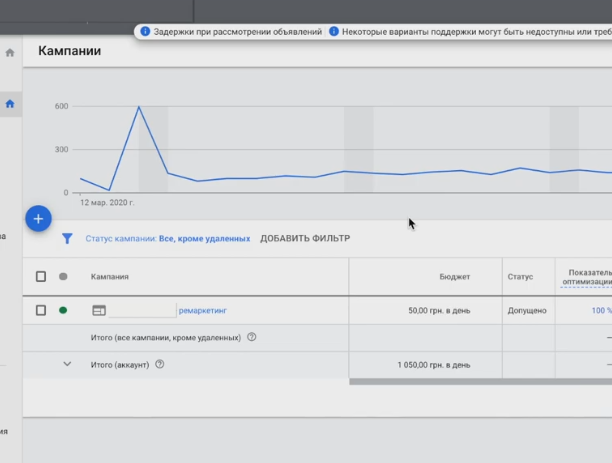
I’ll be honest: setting up remarketing is something I really love. It’s an interesting type of advertising. Search campaigns are more or less simple and predictable. But remarketing requires a completely different approach: you need to be creative, build hypotheses, and analyze user behavior. For us, technical specialists who are constantly buried in spreadsheets and reports, this is a great opportunity to get a little creative.
I look at the statistics: 1,500 hryvnia spent, 3 conversions received. In my opinion, conversions are a bit expensive, but it all depends on your margin. What is really confusing is the low conversion rate. So let’s think about what can be improved.
How is the campaign structured?
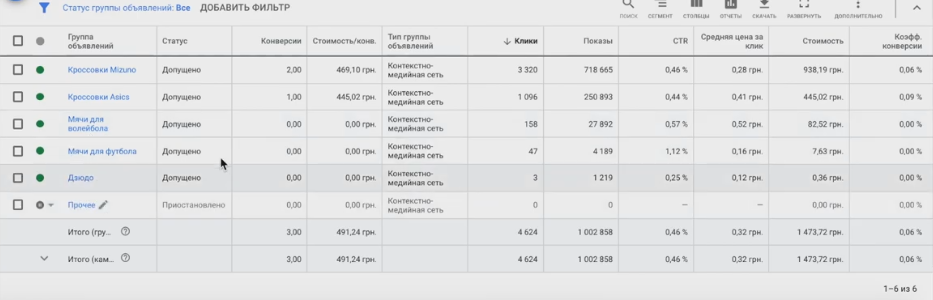
I see that the ad groups are divided into product categories. Each group has its own remarketing list with people who visited specific pages. There is a group called “All Users,” “Asics Sneakers,” “Sports Style,” and so on.
Now I understand what the specialist was talking about regarding Google audiences. There are several types mixed together here:
- Remarketing lists — website visitors who visited specific pages.
- Audiences by intent — for example, “Buy volleyball sneakers”
- Audiences by interest — broader segments.
- Look-alike audiences — users similar to your customers (currently suspended).
It is precisely because of audiences based on intentions and interests that ads are shown to people who have not visited the website. This is not a mistake—it is an expansion of reach. But it is important to understand the difference: true remarketing only works with lists of website visitors, while everything else is targeting a cold audience.
Where shall we begin working on this campaign?
The first rule is to segment as finely as possible. Put audiences based on intent into a separate campaign (this is no longer remarketing, but intent-based CMS). Classic remarketing goes into its own campaign. Lookalike audiences also go separately.
Why complicate the structure like that? Actually, it makes life easier:
- Easier to manage bids and budgets;
- It is easier to analyze what exactly works;
- The system better understands where to go with optimization;
- It is more convenient to build reports in Data Studio or Google Analytics — simply filter by campaign name.
KMS performance metrics
I use five key indicators to evaluate the effectiveness of remarketing and any media advertising. Four of them are competition metrics, and the fifth is the bounce rate. This set is sufficient for basic analysis.
What I see in this campaign:
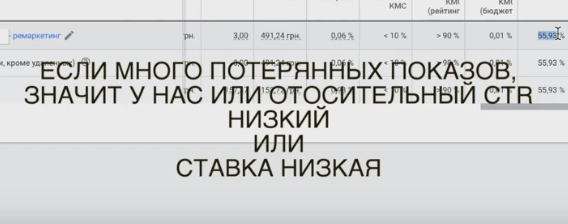
- Percentage of impressions received — many impressions lost. This means that the campaign is not achieving its full reach.
- Relative CTR — 55%. It should be at least 100%, ideally 200-300%. This indicator reflects how clickable your ads are compared to your competitors. If you have 55%, it means that your competitors get almost twice as many clicks on the same platforms. For remarketing campaigns, I recommend aiming for 200%+. A low indicator means that your banners are not attractive enough compared to other advertisers. And this directly affects the rating of your ads.
- The bounce rate is around 70%. That’s a lot. It turns out that most of the paid traffic simply leaves the site without taking any action.
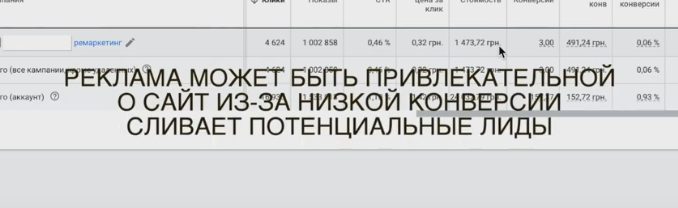
Why is the failure rate so high?
There may be several reasons:
- Non-targeted placements — ads are shown where the audience is not interested.
- Click fraud — random or intentional clicks without genuine interest.
- Discrepancy between the ad and the landing page — you promise one thing, but the website offers something else.
The third option is unlikely here — it is unlikely that sneakers lead to a page with volleyballs. So, let’s dig into the first two directions.
Go to the “Placements” report and see where exactly the ads are displayed. And this is where the problem often lies — mobile apps. They can drain your budget on irrelevant clicks.
Views on mobile applications
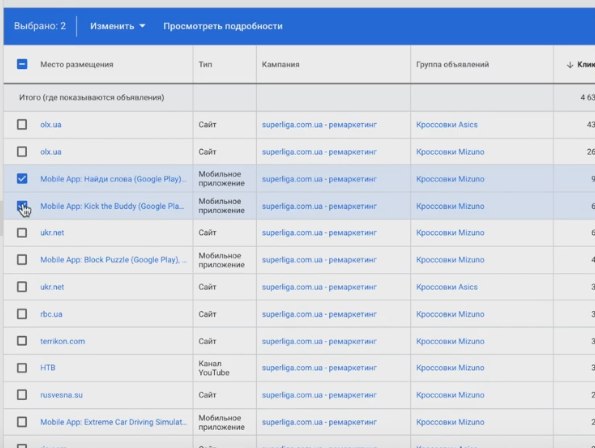
Mobile apps themselves are a good place to display remarketing banners. The question is, what kind of apps?
Many developers make the mistake of placing ad units in the most inconvenient places possible—so that users accidentally click on them. Your finger slips, you click the wrong place—the click is counted, the money is deducted. And the user doesn’t even wait for the site to load and immediately closes the tab. That’s how you end up with a high bounce rate.
How to find “empty” clicks?
Open your Google Analytics report on advertising campaigns and compare two metrics: the number of clicks and the number of sessions. Ideally, there should be no fewer sessions than clicks. If the difference is significant, some of the clicks are going nowhere.
Where do these “pacifiers” come from?
- Click fraud by site owners — some webmasters earn money from impressions and ask their friends to click on ads.
- Accidental clicks in apps — those inconveniently placed banners.
I look at the statistics for this campaign and see: 94 clicks from one app, 61 from another. One of them is Kick the Buddy (a game where you have to beat a rag doll). What does this have to do with sports shoes? Nothing. Such placement platforms should be immediately added to the exceptions.
Which apps should I keep?
Think about where your target audience might actually be. If you sell sports equipment, look for sports-related apps: workout trackers, running apps, fitness programs, sports news. Yes, you will have to spend time manually selecting suitable platforms, but it will pay off in fewer empty clicks and higher conversions.
But even sports apps are not ideal. Especially now, when people are spending a lot of time on news sites, specialized forums, and watching YouTube. And this is where an interesting opportunity arises.
The contextual media network can display banners on YouTube, but few people use this feature. You can manually compile a list of channels or even specific videos with a large number of views where you want to place your ads. This is an excellent idea for remarketing an online store.
Imagine: a person is watching a video about running technique or a review of running shoes. There are channels for athletes preparing for marathons and Ironman competitions, blogs by soccer players analyzing tricks, and videos about volleyball serves. Your audience is already there—all you have to do is reach them.
Personalization instead of generic banners
This is where the real magic begins. Don’t make banners like “Buy Asics sneakers for 2,500 UAH.” This approach will generate clicks, but it won’t generate sales.
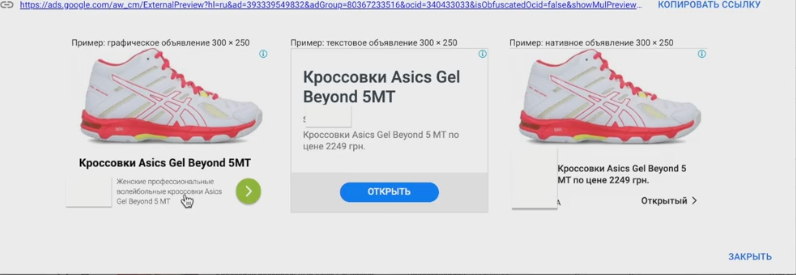
Instead, personalize ads based on context:
- A person is watching a video about preparing for a marathon — show a banner: “Preparing for a marathon? These sneakers can handle any distance.”
- Watch a video about foot placement when running — “The right shoes are half the battle. Find your perfect pair.”
- Learning soccer tricks — “Want to play like a pro? Start with the right boots.”
What specific pain points does your audience have? People watch videos to solve their problems. If you fit into this context correctly, they will buy.
Let me give you a counterexample. I was on the Watsons website, buying something completely unrelated to hygiene. And do you know what they “followed up” with? Lacalut toothpaste for bleeding gums. I didn’t even look at it! That’s what remarketing looks like when it annoys instead of selling.
What to do with OLX and similar platforms?
Let’s return to the placement locations. I see in the OLX report — one conversion for 112 hryvnia. Could your audience be looking for sports shoes there? Quite possibly. Should you keep this platform? Perhaps, but with reservations.
The problem is that OLX gets a lot of random clicks, especially from the mobile app. 433 clicks, 152 hryvnia spent — and nothing. If you use such platforms, keep an eye on the statistics and be ready to quickly disable them if they prove ineffective.
But mobile applications such as games should be excluded immediately and without regret.
Next comes manual work. The placement sites need to be sorted through and filtered. I look at the report: Rusvesna is clearly not our story. Globacart, Pravda, OLX, RIA, Lady Diana are controversial options; we need to look at the statistics. I see a YouTube channel on the list, but it’s a women’s beauty channel and has nothing to do with sports shoes.
You can try a different tactic: take remarketing lists and show ads on the most visited websites — Ukr.net, Sinoptik, Gismeteo, Obozrevatel. Simply reach your audience where they are. But there is a caveat to this strategy: you need to get a lot of clicks to get conversions. On specialized resources, the likelihood of a purchase is higher — if, of course, the message is chosen correctly.
What should be excluded first?
The first is mobile applications. They lead in terms of non-targeted clicks.
Second, channels and websites that do not match your audience. “Whiskers, Paws, Tail” is a channel about animals, which is not your topic. “Let Them Talk” — people who watch this are unlikely to buy professional sports sneakers. “Soviet Cinema” and “Russia 1” are also off the mark.
Pay special attention to sites with high CTR. Oddly enough, these are often the ones that turn out to be problematic. I filter by impressions (more than 100) and see that almost all high-CTR positions are Mobile Apps. Random clicks, money down the drain.
I understand that manually reviewing 769,000 sites is unrealistic. Therefore, set filters: first, more than 100 impressions, then you can lower it to 50. The goal is to find those sites that consume the budget without return.
Checklist: What to do with your campaign right now
- Review all placements, exclude mobile apps and irrelevant channels.
- Compile a list of YouTube channels and forums where your audience actually hangs out.
- Develop personalized messages for each segment.
- Test the top sites in terms of traffic — Google Trends shows that weather is consistently a hot topic around the world, so forecasting sites can provide good coverage.
- Restructure the campaign: divide remarketing, audiences by intent, and look-alike.
This principle of working with platforms is universal for any contextual media network. The result depends on creativity and targeting accuracy. If your budget is limited, test platforms selectively rather than spreading yourself too thin.
Advertisement analysis
Now let’s look at the ads themselves. The specialist wrote that he only uses responsive ads, but it is possible to upload regular graphic banners. Let’s talk about how to make them effective.
There are several critical aspects to adaptive media ads. The most important one is the right image. What does that mean?
- Visually simple and easy to understand;
- With a clearly legible message;
- Attractive and high quality;
- Allows you to understand what the product is in 2 seconds.
Why exactly 2 seconds? Because the average user’s brain does not consciously focus on banners. People only notice things that solve their current problems. If you’re hungry, your eye will be drawn to food delivery ads. If you don’t need an apartment, real estate ads will fly right past your consciousness.
You literally have a couple of seconds to grab someone’s attention. People glance at a banner and instantly decide whether it’s for them or not. If it is, they might click on it and buy something.
Examples of ad refinements
I look at specific ads in the campaign.
Kimono belts
The image is visually heavy, with only the word “Belts” written on it. How can it be improved? Show a person from the chest to the waist tying a belt on a kimono. Add large, legible text that says “Kimono belts.” The image should attract attention first, and the text should explain.
Mizuno judo kimono
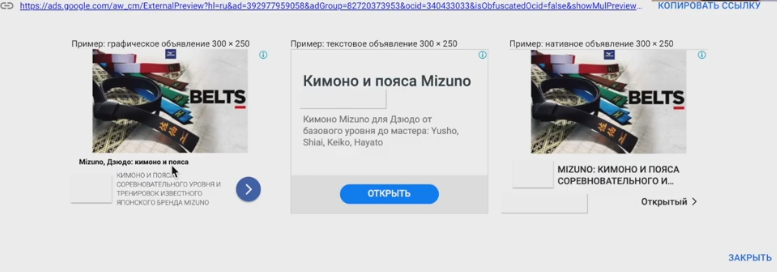
This ad is better—it has a brand name, specifies the purpose, and mentions the competitive level. We’ll keep it, but we’ll redo the image. And don’t repeat the same thing: instead of “Mizuno kimono for judo,” write “For judo, from beginner to master”—the product’s advantage should be obvious.
Sneakers
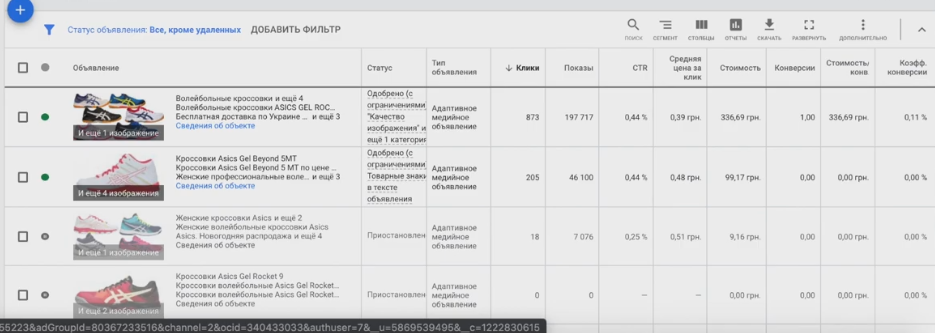
The rule here is simple: shoes and clothing sell better when shown on a person in motion.
- Running shoes for marathons — photos of feet in these shoes while running.
- Table tennis shoes — feet in sneakers, racket nearby, tennis table in the background.
- Volleyball sneakers — show them on a volleyball player jumping.
People don’t just buy shoes—they buy confidence and comfort. Write about what the product can offer: non-slip soles, improved bounce, shock absorption, reduced friction. What problems does your audience face? Marathon runners suffer from rubbing shoes. Tell them how Asics solves this problem.
Where can I get photos?
There is no need to invest a lot of money in photo shoots. The lifespan of a single banner is about two weeks of intensive display. After that, it becomes “stale,” banner blindness sets in, and the image needs to be changed.
A practical solution: find a teenager you know who has an Instagram account and knows how to take photos. Pay them $50 and ask them to take photos of your feet in sneakers on a treadmill or volleyball court. Young people today take photos just as well as professionals and know how to edit them. Or take the photos yourself and send them to a freelancer for editing — they’ll make them look great.
The structure of an effective banner
What should be on the graphic banner:
- Picture — an athlete in motion, usually feet for sneakers;
- Your store’s logo — without it, the banner will not pass moderation;
- Minimum text—no more than 5 words: “Professional Asics sneakers,” “Shoes for volleyball players”;
- Call-to-action button — “Buy,” “Learn more.”
What sizes should you use? Six or seven basic sizes are sufficient: 320×50 for mobile devices, 336×280, 300×250, 728×90, 468×60, plus vertical skyscrapers. The exact sizes can be found in Google’s help section. This is sufficient for display on YouTube and most websites.
Don’t invest too much money in a single banner. Setting up remarketing involves constantly rotating creatives. The scheme is as follows: you launch a banner, it works, then its effectiveness drops — you pause it and launch a new one. You can bring back the old ones after a while. This is a constant process, and in this respect, remarketing is more complicated than search advertising.
Where can you make banners? You can use Photoshop, order them from a freelancer, or use services such as BannerBull. The main thing is not to overcomplicate things and be prepared to change your creatives every couple of weeks.
Audience settings
One of the most common questions is: “If a visitor looked at kimonos, will they then see ads for sneakers or balls? Or are the ads strictly categorized?”
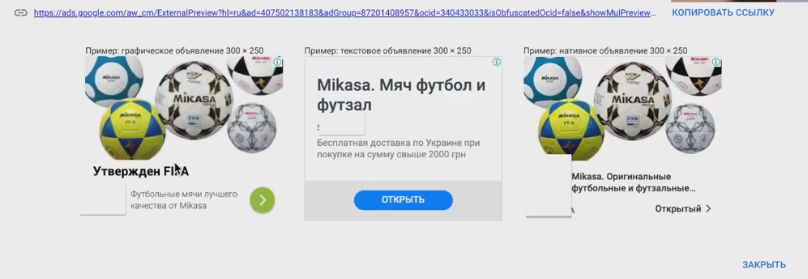
The answer depends on how your remarketing lists are set up. If your campaign uses the “All Users” audience, then yes, they will see everything. If someone visits a page with Asics sneakers, then looks at volleyballs, then something else, they will be added to the general list and will see all of your ads.
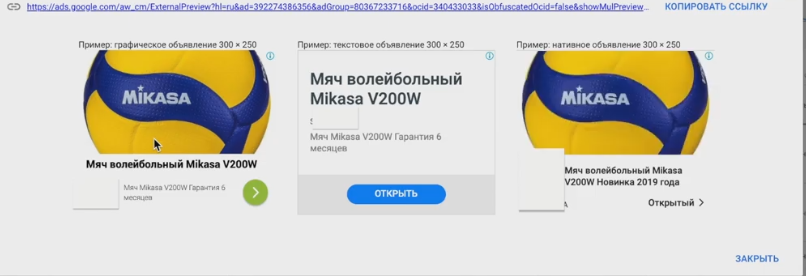
Is it worth strictly separating audiences—gathering separately those who only looked at sneakers and those who only looked at balls? In most cases, no. Remarketing in Google Ads works a little differently.
How to find an audience that will buy?
The main task is to identify the characteristics of people who actually convert. Here’s a simple way to do that.
We take all traffic in analytics—not just Google, but all of it. This is important because we need to consider behavior in associated conversions. We select the “Reached goal” segment and see what these people have in common.
In our case, I see that the bounce rate among buyers is 0.3%, they viewed about 9 pages per session and spent almost 9 minutes on the site. The conversion rate is 4.57%.
This provides an understanding of what the target visitor looks like. Now you can build audiences based on this data.
Practical ideas for segmentation
Don’t limit your audience too much right away—it will grow very slowly. It’s better to create several separate lists and then combine them.
- Exclusion list: people who spent less than 15-30 seconds on the site. They came by accident and left — why waste your budget on them? Exclude them from all advertising campaigns.
- Engagement lists: visitors who viewed 5+ pages, or 10+ pages, or returned to the site repeatedly.
- Demographic lists: I look at the “Reached their goal” segment—these are mainly men aged 25-44. This means you can create separate audiences for “men aged 25-45” and “women aged 25-45.”
Life hack for creating flexible audiences
Here’s a tip that gives you more options for setting up remarketing. Instead of immediately creating a narrow audience with a bunch of conditions, make a few simple lists:
- Visitors to the Asics sneakers page (no restrictions);
- Visitors who stayed on the site for less than 15 seconds;
- Men aged 25-45;
- Women aged 25-45.
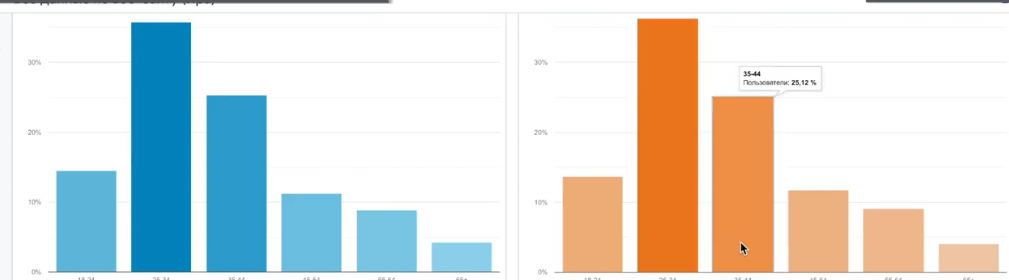
Then combine them within ad groups: cross-reference the necessary ones and exclude the unnecessary ones. For example: show ads to those who visited the sneakers page + men aged 25-45, exclude those who spent less than 15 seconds on the site.
This approach provides flexibility. Audiences are assembled more quickly, and you can test different combinations without creating dozens of separate lists.
Final audience structure
For effective remarketing of an online store, I recommend the following approach:
- The main audience is visitors interested in specific product categories.
- Demographic narrowing — gender and age based on conversion data.
- Exclusion of dropouts — those who were on the site for less than 15-30 seconds.
- Additional segments — by viewing depth, time spent on the site, repeat visits.
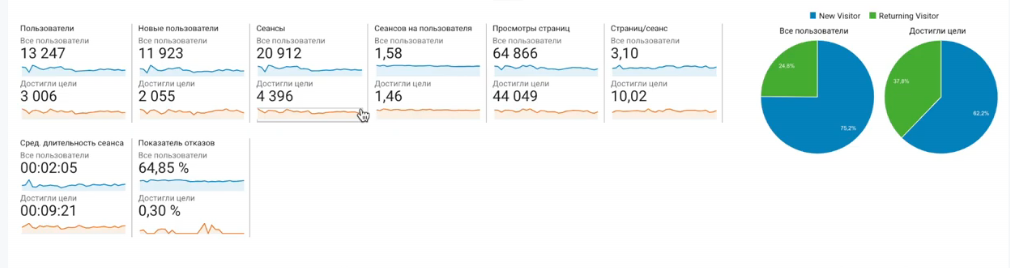
Focus on the “Reached goal” segment in analytics—it will show you which audience characteristics correlate with purchases.
Setting up an advertising campaign by device type
Be sure to check out the device statistics. Where is the conversion rate higher—on desktops or mobile devices?
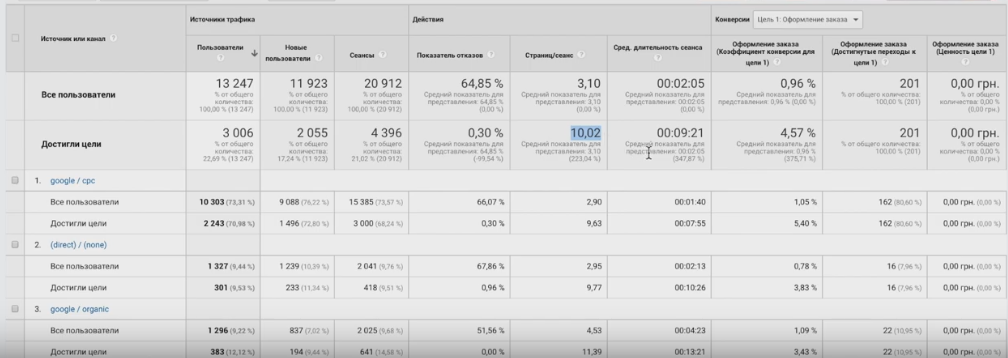
I see an interesting picture in this campaign: conversion from mobile devices is 5.18%, which is significantly higher than from computers. At the same time, audience behavior differs: on desktops, people view about 10 pages and spend 12 minutes on the site, while on mobile devices, they browse less but buy more often.
This is a tip for creatives. If the mobile audience converts better, emphasize the convenience of purchasing in your banners: “Order in one click,” “Quick purchase from your phone.” Such data provides ready-made ideas for targeting and personalizing ads.
Helpful tips for configuration
Build remarketing audiences based on actions on your website
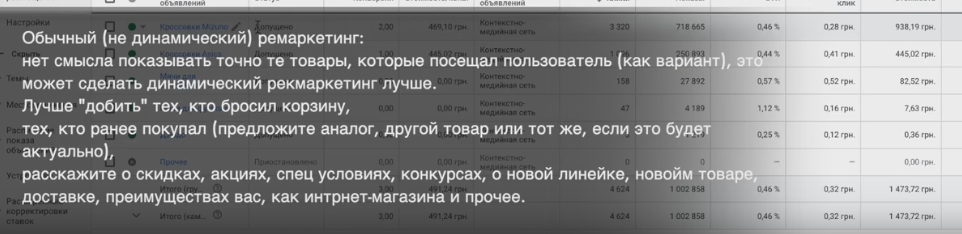
For example: visited the product page → added to cart → did not complete the order. Each stage is a separate list with its own message. Ideally, enable dynamic remarketing. It automatically shows the user the exact products they viewed. If you don’t know how to work with Google Tag Manager or code, don’t worry, everything is explained step by step when creating audiences.
Use cross-selling through remarketing
Don’t get stuck on one category. Audiences for retargeting can be combined for upselling:
- For those who watched volleyballs, show them volleyball sneakers.
- For those interested in soccer gear, offer soccer balls.
- Got a bestseller? Push it across all relevant categories.

Work with abandoned carts
Be sure to create a list of people who added items to their cart but did not complete their order. This is a hot audience—they were already one step away from making a purchase. Create separate ads for them: “Your items are waiting in your cart,” “Complete your order and get free shipping.”
Build your audience
At the same time, gather an audience of those who have already placed an order. Why? For upselling in a few months. Sneakers wear out, and runners replace them regularly. In six months, you can remind them: “Time to update your sneakers?” or “Your pair has already run its marathon — choose a new one.”
If you use intent-based CMS, be sure to exclude those who have already visited the site. The purpose of these campaigns is to seek out a new audience, not to catch up with the existing one.
Priorities for testing:
- First, look-alike audiences based on buyers or engaged visitors;
- Then — audiences by intent;
- Last but not least — broad interests.
For look-alikes, use a high-quality database: people who have placed an order, or those who have viewed 9+ pages, spent more than a minute on the site, but have not yet made a purchase.
Consider the interests of the target audience
Don’t use overly general categories such as “fitness” or “sports” — the audience is too diverse. Think about who specifically buys your sneakers.
If they are marathon runners, add keywords such as “marathon training,” “Ironman training,” “Run under the Chestnut Trees,” and “marathon running.” Personalize the ad: “Getting ready for a marathon? Run it in the right sneakers.”
When should you turn off a campaign?
Keep a close eye on your CPA. If you:
- Cleaned the accommodation areas;
- Excluded non-targeted clicks;
- We made some good banners;
- And still no conversions.
So, the combination of audience and positioning isn’t working. Turn it off and rework it. Don’t waste your budget on something that isn’t delivering results.
I hope this analysis was helpful and that you found some ideas for your remarketing campaigns. If you have any questions, please leave a comment!