Hello! My name is Yana Lyashenko, and I am a Google logistician. Today, we will explore a topic that raises many questions: why individuals are unable to pass Google Ads advertiser verification.
I already have separate materials for legal entities and sole proprietors on my channel. This post is specifically for those who work with the advertising account as individuals.
Who is a natural person without registration as an individual entrepreneur?
Let’s get the terminology straight right away. An individual is not a sole proprietor. It is a person who does not conduct business activities. In the Google Ads payment profile, such a user is simply displayed as “Individual” — and that’s it.
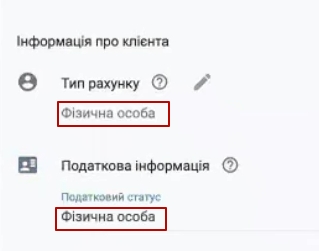
Specifying the account type
What should you pay attention to first?
- The country of your billing address must match the information in your documents. For example, if you are a citizen of Ukraine, it is logical that Ukraine should also be specified in your profile.
- The account type must be set to “Individual.”
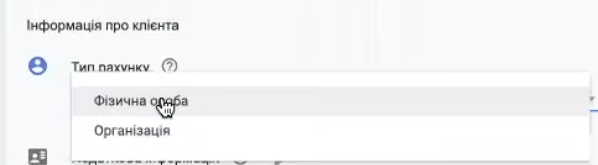
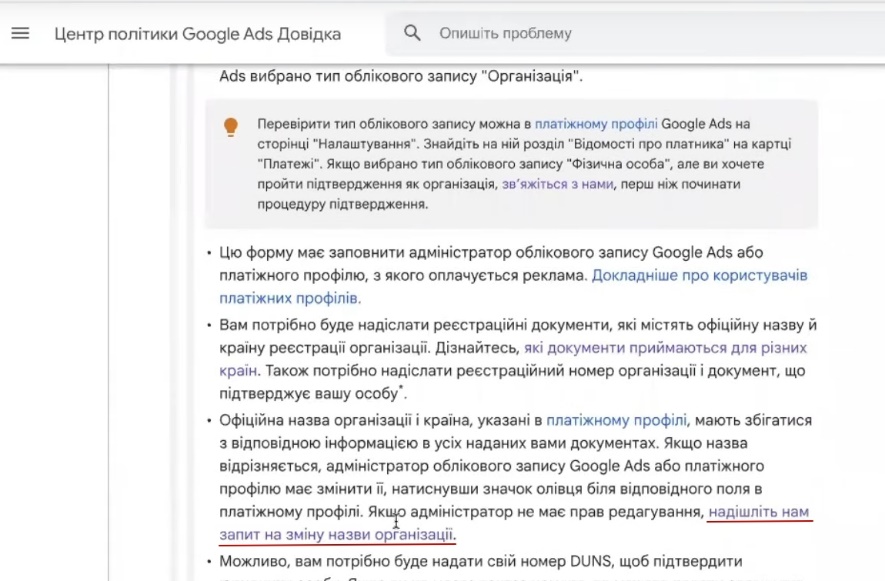
How do I request a change to the name of my organization?
Sometimes, when creating an account, people accidentally select “Organization” and check the “VAT payer” box. If this is your case, you need to change your payment profile to an individual.
How can this be done in practice? There are several ways:
- In your account, find the “Request a change to the organization name” button and click on it;
- Or go to the “Help” section, find “Contact us” and leave a request;
- Another option is to follow the special link “Request to change the name of the organization.”
The rest is simple: click, write what you want to change. Google will send you a form. Fill in all the items that need correction—even if it’s just one letter or a check mark. Enter exactly what needs to be corrected.
Indication of individual identification number
Now about the TIN. If you plan to submit documents for verification — and most likely you will — it is better to enter your identification number in your profile right away. This will speed up the advertiser verification process.

How to fill in your first and last name correctly?
Let’s move on to the “First Name” and “Last Name” fields. There are clear requirements here, and you cannot deviate from them.
What definitely won’t pass inspection:
- only the first name without the last name, or vice versa;
- data in English or Russian (if the passport is in Ukrainian);
- a name with grammatical errors or typos;
- empty field;
- the name of the organization instead of personal data.

If you are an individual and are applying for verification, write your first and last name exactly as they appear in your passport. Letter for letter. This is essential for successful identity verification in Google Ads.
Specifying address details
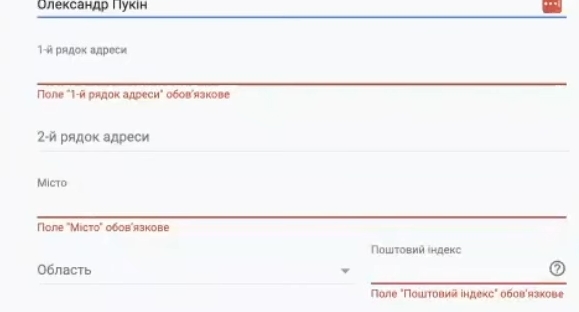
Address, city, state — everything must match the documents you will upload during verification.
I would like to say something separately to those who have moved, changed their place of residence, or have refugee status. For you, there is a special item on the list of acceptable documents—a residence permit. This also includes documents confirming a change of registration, certificates of a new place of permanent residence, and the like. These must also be specified.
The main rule is simple: the information in your payment profile must match the documents you provide exactly. This is very important — don’t forget it.
Important information for Kiev residents when providing their address
A separate note for residents of Kiev. When filling in your address and specifying the city of Kiev, do not select Kiev Oblast in the “Region” field. Select Kiev as well. The fact is that Kiev and Kiev Oblast are two different administrative regions. If you mix them up, the data will not match the documents, and Google Ads advertiser verification will not pass.
And don’t forget to check the postal code — it must also match your address in the documents.
Providing a phone number
Another important detail is your phone number. Only provide your personal number. Not your mother-in-law’s, grandmother’s, godmother’s, son-in-law’s, or child’s. It must be yours so that you can actually be contacted.

Why is this so important? When verifying the advertiser’s identity, Google may call the number provided to make sure it is really you. They may also check the number through public sources. The rules clearly state: “If we don’t find a match after five attempts, we may ask you to provide documents to verify your identity.” In other words, a phone call is one of the verification methods, and the number must be working and belong to you.
Submitting a request to verify payment details
If all the information in your payment profile matches your documents, great, you can move on. If something doesn’t match, first submit a request to change your information (the link to the form will be below).
When everything is in order, your task is:
- Open an account using the email address you used to create your payment profile. Important: this is not the email address you use to grant access in “Administrator” or “Security” mode. This is the email address of the payment profile owner, and it may be different.
- Submit a request to verify an advertiser.
- Attach the necessary documents.
- Wait for a response from Google.
That’s it — now you just wait for the verification result.
Possibility of receiving a request for confirmation of commercial activity
There is one more thing you should know in advance. Google may ask you to provide documents confirming your commercial activity. Such requests are most common for individuals.
Why does this happen? There may be several reasons:
- Domain name history. Sometimes websites are recreated, and one domain is used in different advertising accounts. Your website may have a history, and Google may identify it as a familiar resource. This raises additional questions.
- Nuances with the brand you are advertising. Google wants to make sure that you are actually conducting legal activities and not purchasing goods on the black market.
What documents may be requested in practice:
- documents from the reseller or supplier who sold you the goods;
- confirmation of ownership of the website;
- correspondence with suppliers;
- invoices, delivery notes, and similar documents.
If such a request is received, these documents will have to be provided.
A logical question arises: will Google criticize you for being registered as an individual but submitting business documents? To be honest, I have hardly ever encountered such situations. There was one case when a person found themselves in a similar situation and still had to submit a full set of documents, even though the account was registered to an individual. The verification was successful.
So my advice is: enter your data in such a way that it is easy for you to confirm it. The more accurate and logical everything is, the easier it will be to pass Google Ads advertiser verification and the less likely you are to get stuck in additional checks due to accidental errors.
Set of documents for confirming an individual
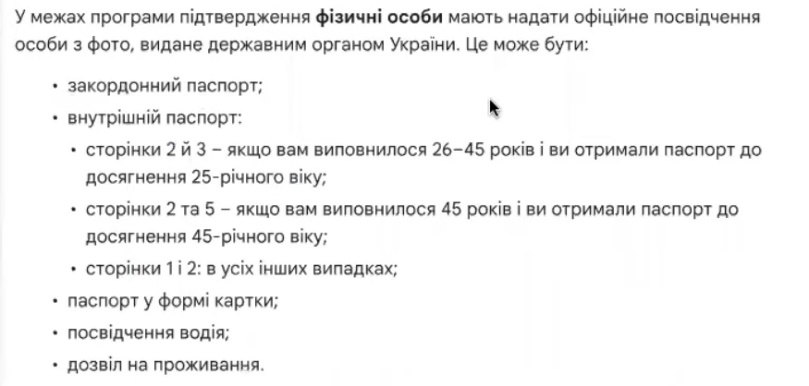
So, let’s summarize the documents. To verify your identity in Google Ads, submit as much as you have. Do you have an internal passport with all pages filled out? Great, upload it. Do you have a foreign passport? Add it too. Do you have an ID card? Attach it as well. The more documents, the better.
Be sure to name your files clearly—for example, “pasport_stranica_1.jpg,” “zagranpasport.pdf.” This will help you avoid a situation where you are denied because of alleged document discrepancies, even though you are sure that you submitted everything correctly. Sometimes files simply get lost in the system, and then it is unclear what exactly went wrong.
I didn’t work in Google’s moderation department, but based on my experience working in the tax department, I can honestly say that documents, letters, and files get lost all the time. Simply because someone got distracted, missed something, or failed to compare one thing with another. Considering how Google sometimes treats those who pay it money, I wouldn’t be surprised if something similar happens there.
My advice: approach advertiser verification like an experienced accountant—everything should be clear, everything should be in place, and everything should match. The more thoroughly you prepare your documents, the fewer problems you will encounter in the future when confirming your identity in Google Ads.
Conclusion
That’s all for the main points and nuances of checking advertisers for individuals. If you found this material useful, I would appreciate your like. Still have questions? Feel free to leave a comment! I always leave a link to my Telegram in the video description — write to me, and I will be happy to answer.